Software for the IT team's people changes and security housekeeping. HR says someone starts, moves or leaves; the desk plans the account changes from your role matrix, makes them one approval at a time, and keeps the evidence an auditor asks for. Laptops out of compliance get a note to the person and their manager. Security findings become tickets with an owner. Unused seats and renewals get a note every Monday. Quarterly access reviews are packaged per system. No agent ever reads or resets a password, grants an admin role, or deletes an account.
For IT teams of 1 to 10 people looking after 50 to 1,000 staff, and for managed service providers running IT for several clients
The pack is built for the people who create and remove accounts, keep laptops compliant and answer the auditor. It fits three kinds of team.
One to ten people looking after identity, passwords, devices and the service desk for 50 to 1,000 staff. You get the desk, Kit, the staff portal and every agent. Your identity provider, device tool and service desk stay the record.
A regional IT team in an MNC with a rule that every account change is approved and evidenced. The desk gives them the plan, the approval trail and the access review packages; nothing is created or removed without a person.
One workspace per client, each with its own role matrix, tools and reviewer. The planner and the chaser are the same for every client; the matrix differs.
| IT Operations / Service Desk | Joiners, movers and leavers planned and executed behind approval; tickets drafted; devices chased. |
| Security / Compliance | Findings ticketed with an owner; quarterly access reviews packaged and decisions recorded; evidence on every change. |
| People / HR | Raises the event once in the HR system; sees the plan status without asking. |
| Finance | Unused seats reclaimed before renewals; the licence list with costs. |
Everything the software produces is a plan, a draft or a package for a person. Every account creation, change or removal waits for approval, one call at a time, and the system's response is recorded. No agent reads, resets or asks for a password, secret or MFA. No agent grants an admin role. Nothing deletes an account, mailbox or device record; leavers are deactivated and kept for 90 days.
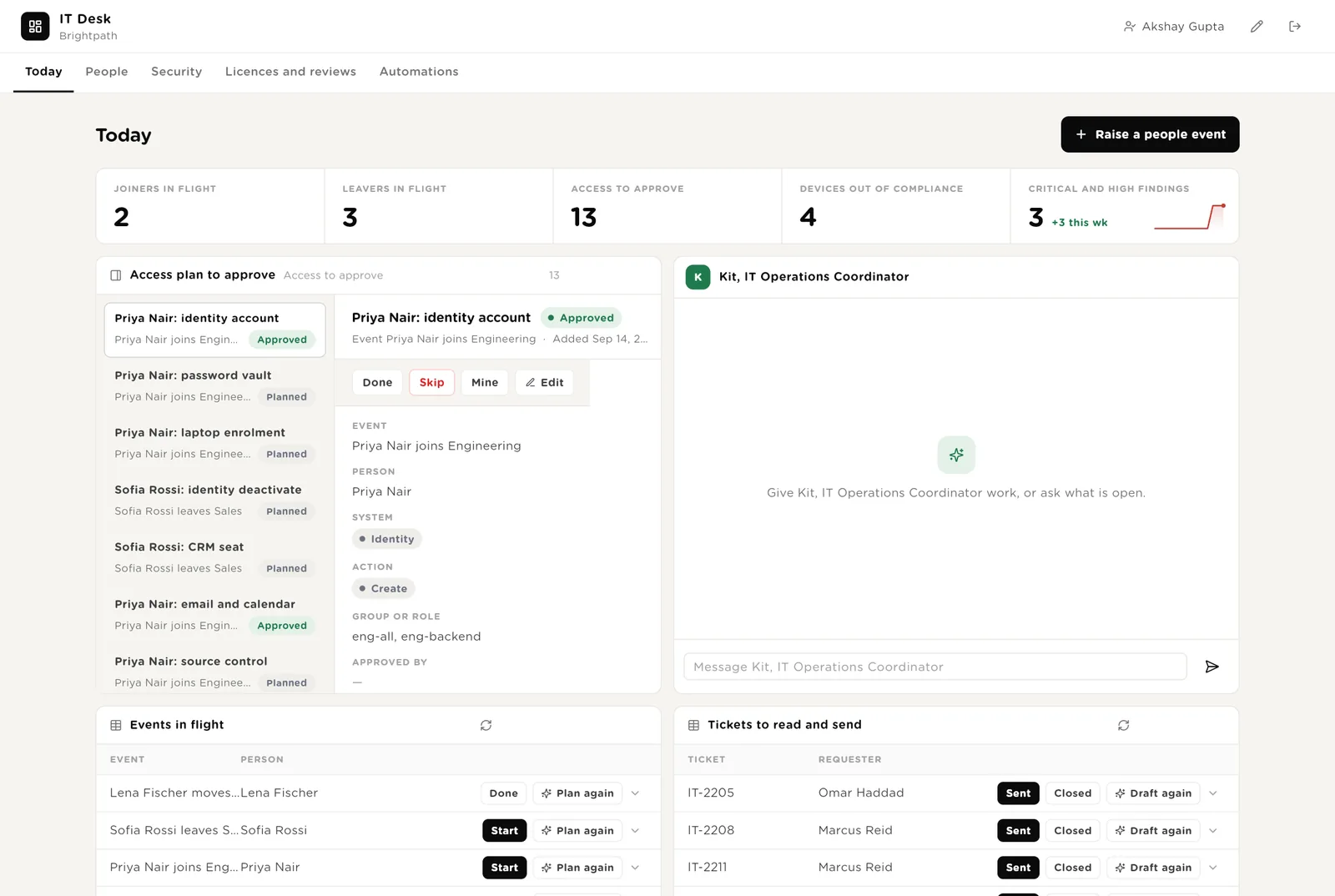
The first screen IT opens. Five live numbers. Every access plan row waiting for approval, with the event, the system, the action and the group. Kit beside them. Events in flight. Tickets to read and send.
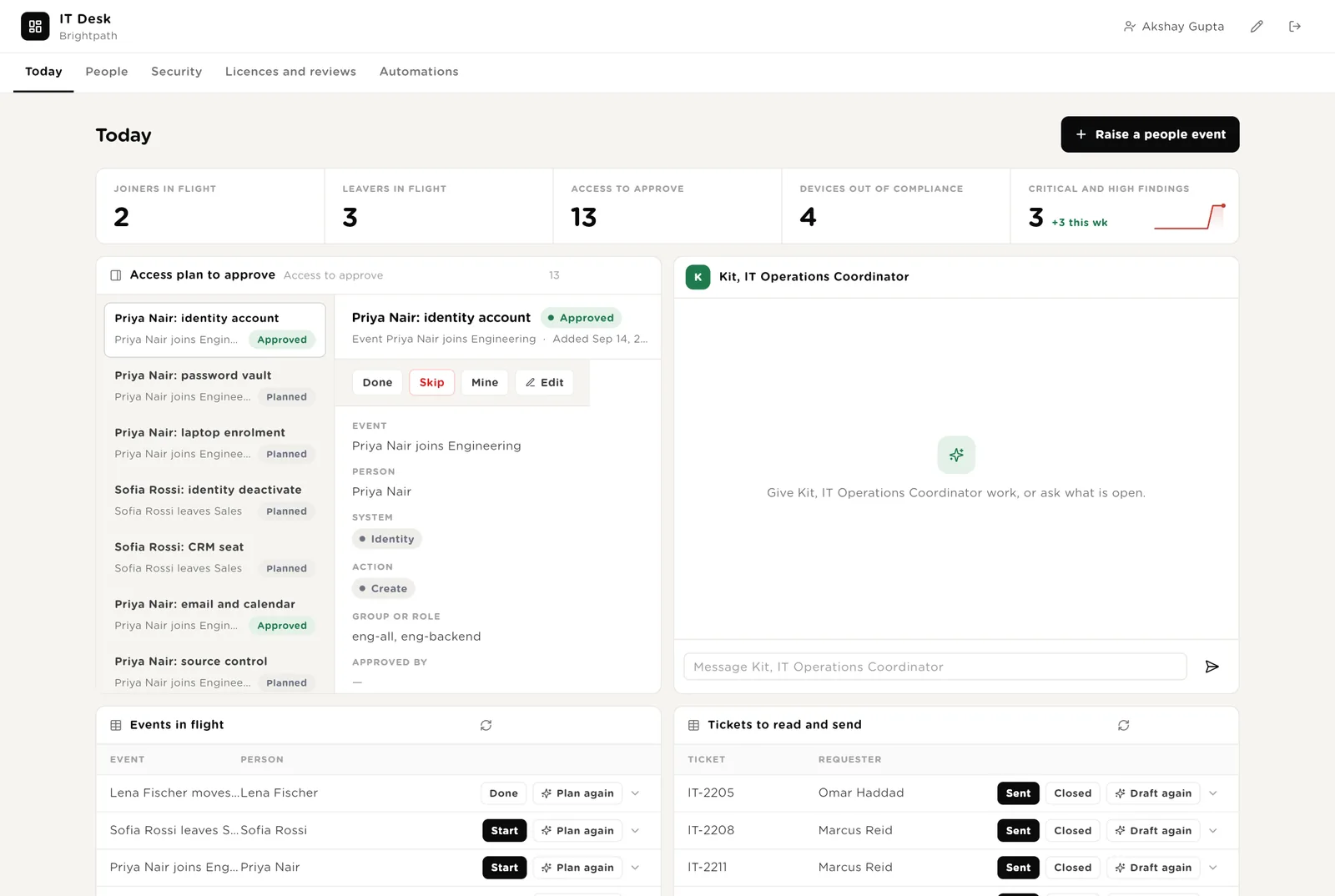
You read the row (Priya Nair: identity account, groups eng-all and eng-backend) and approve it. The executor may now run it; the call is held once more by policy so you see the exact arguments.
On the leaver's last day you click Start; the executor performs every Approved row in order and writes the evidence.
Runs the ticket drafter once more after the requester wrote back.
Scroll down for the exact calls the software wants to make, and Kit's recent work.
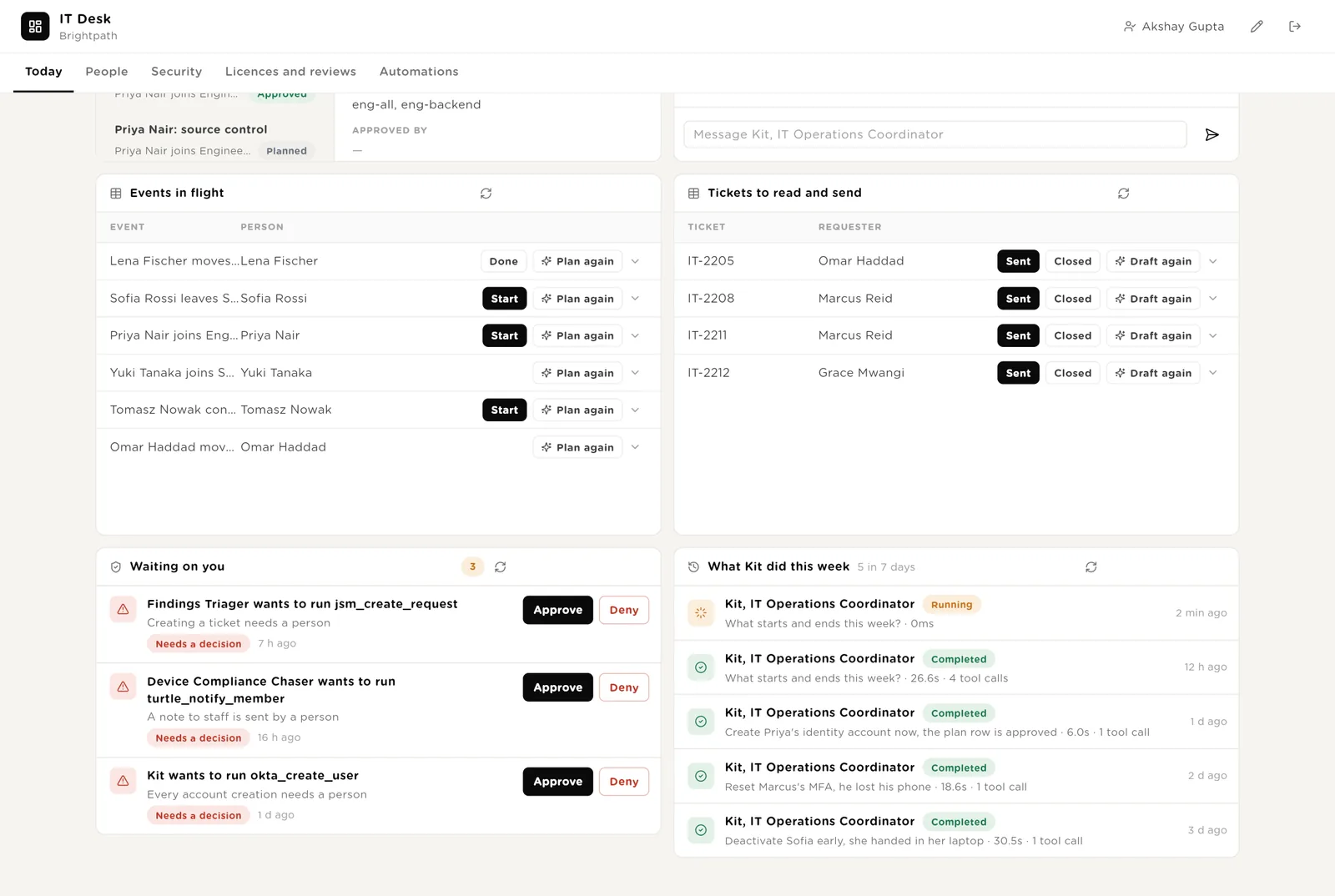
The account to create with its groups, the ticket text, the note text. Approve or Deny in place.
Every run with its duration and tools, including the refusals.
Every event as a card by status, drag to move. Every access plan row with who approved it and when it was done. The directory.
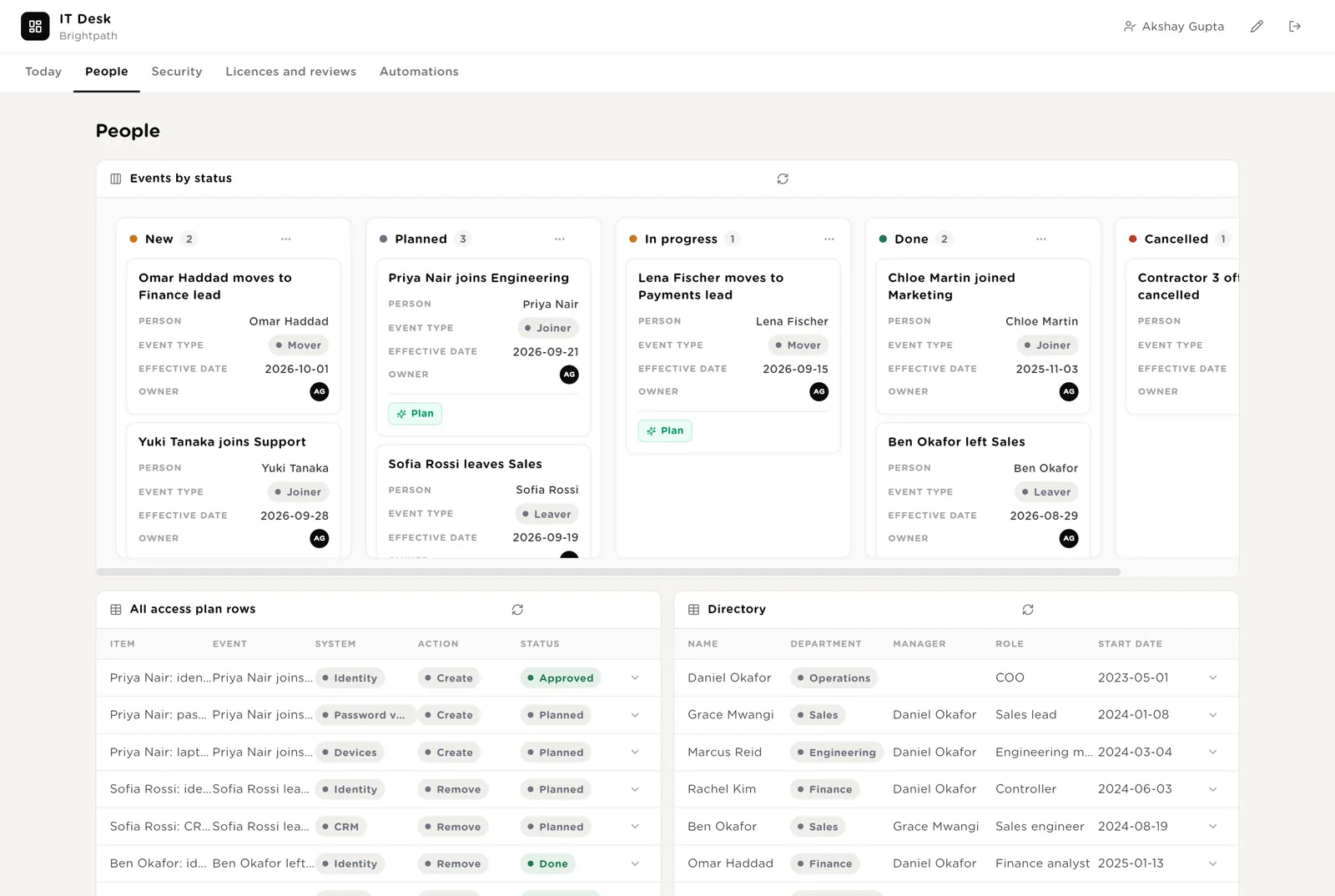
Moving an event to Done records it; moving it to In progress starts the executor for a leaver.
The evidence column is what the auditor reads: system, action, approved by, done at, the system's response.
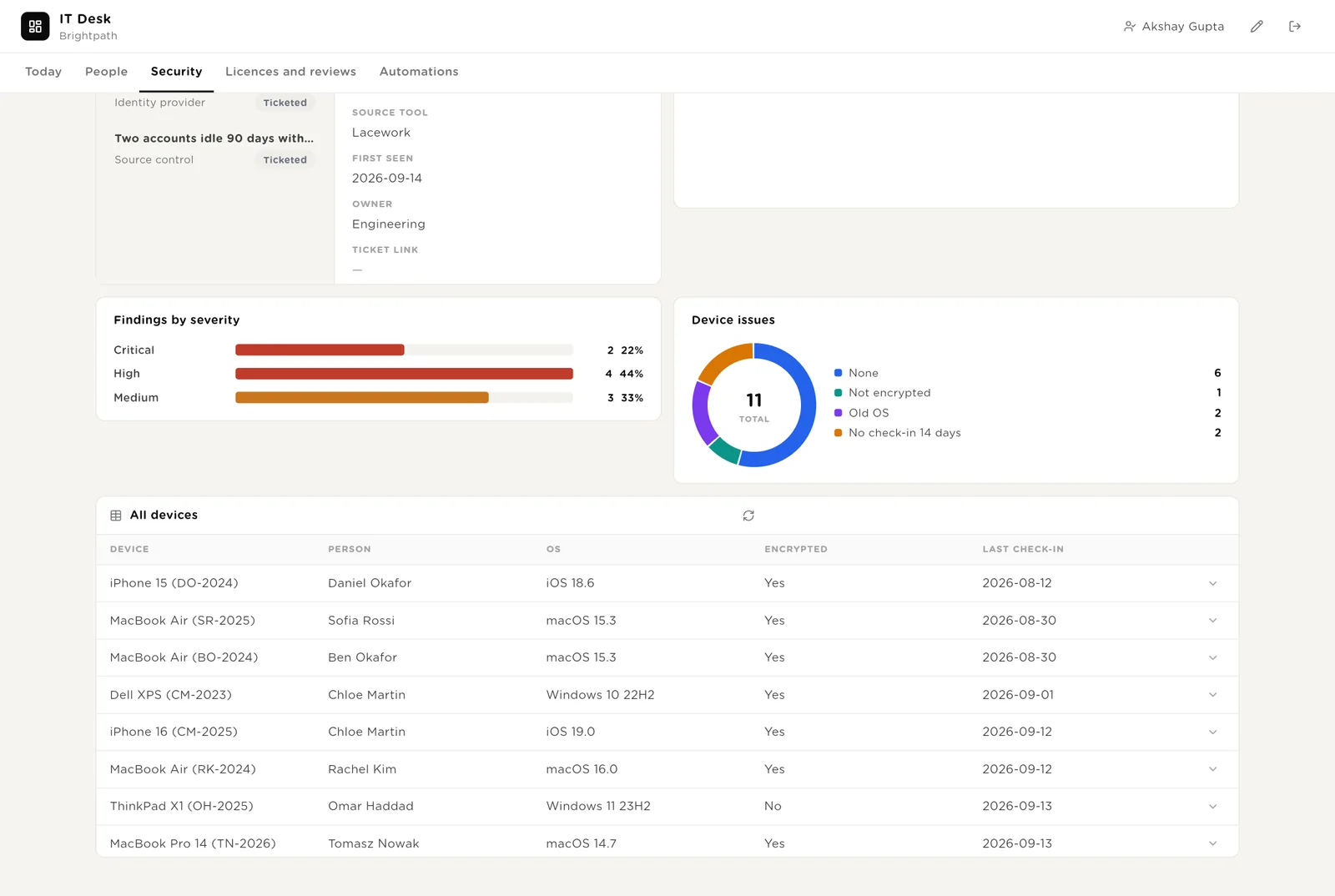
Findings from the scanner, medium and above, with the ticket draft. Devices out of compliance with the note drafted. Findings by severity and device issues at a glance.
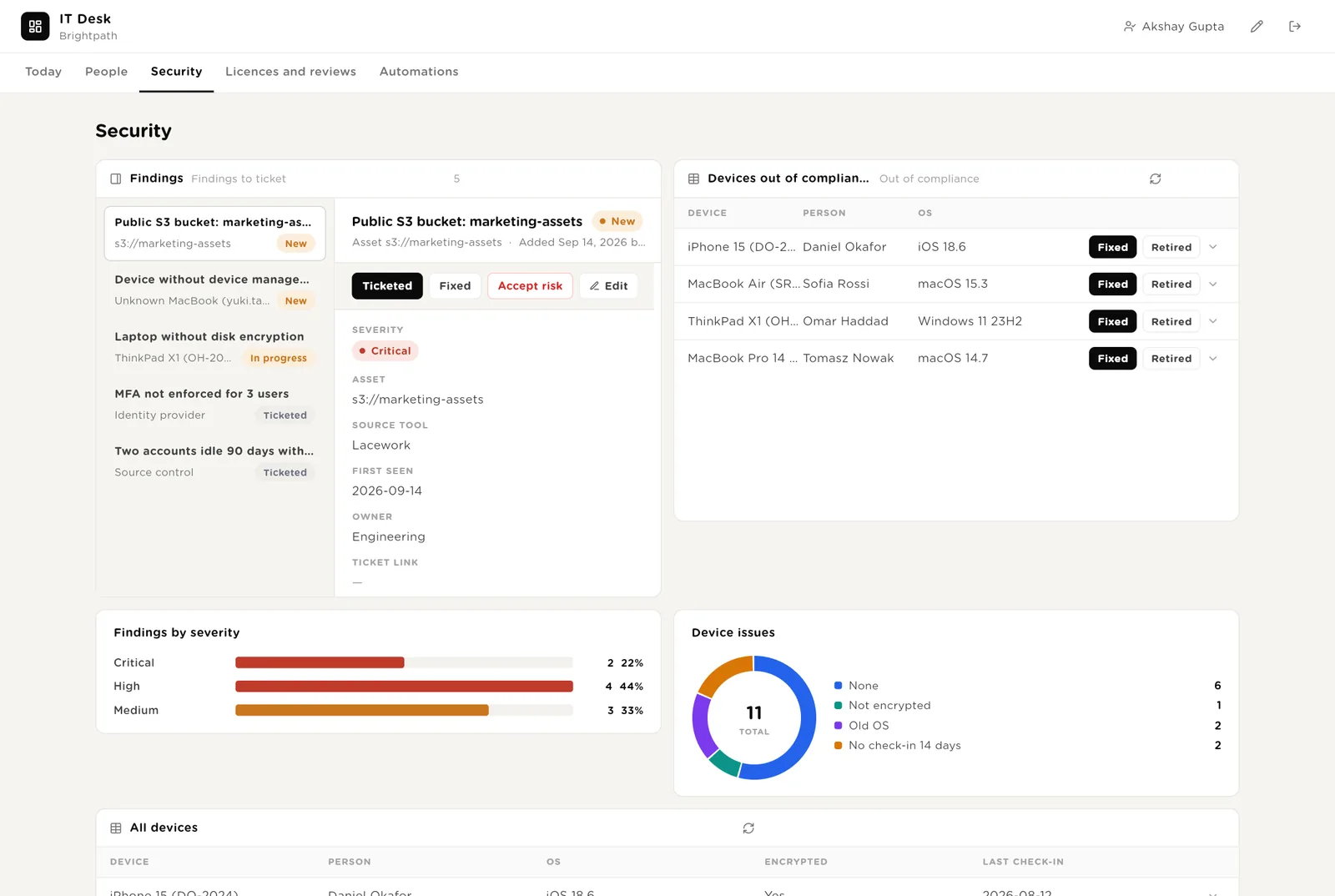
A finding you decide to live with. The playbook asks for the IT lead's name and a review date in the row.
The person did the steps and the device tool confirms. The row leaves the list.
Every managed laptop and phone with its OS, encryption, last check-in and issue.
Products with unused seats or a renewal coming, with the note and the money. Access reviews in progress with the reviewer. Every licence and every review.
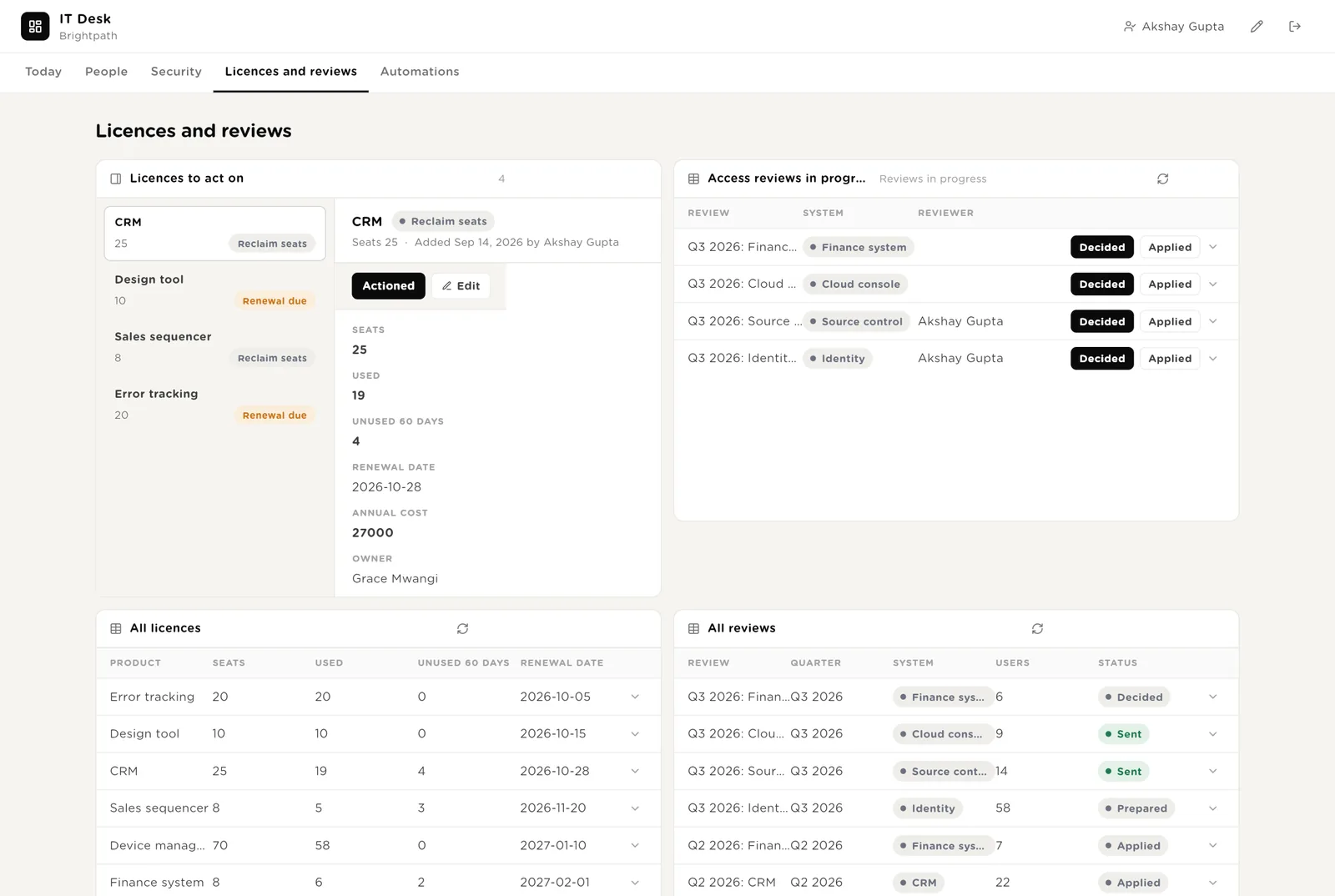
You reduced the seats at renewal or renewed as advised. The row leaves the list.
The reviewer wrote their decisions on the row. Removals become plan rows and go through the executor behind approval.
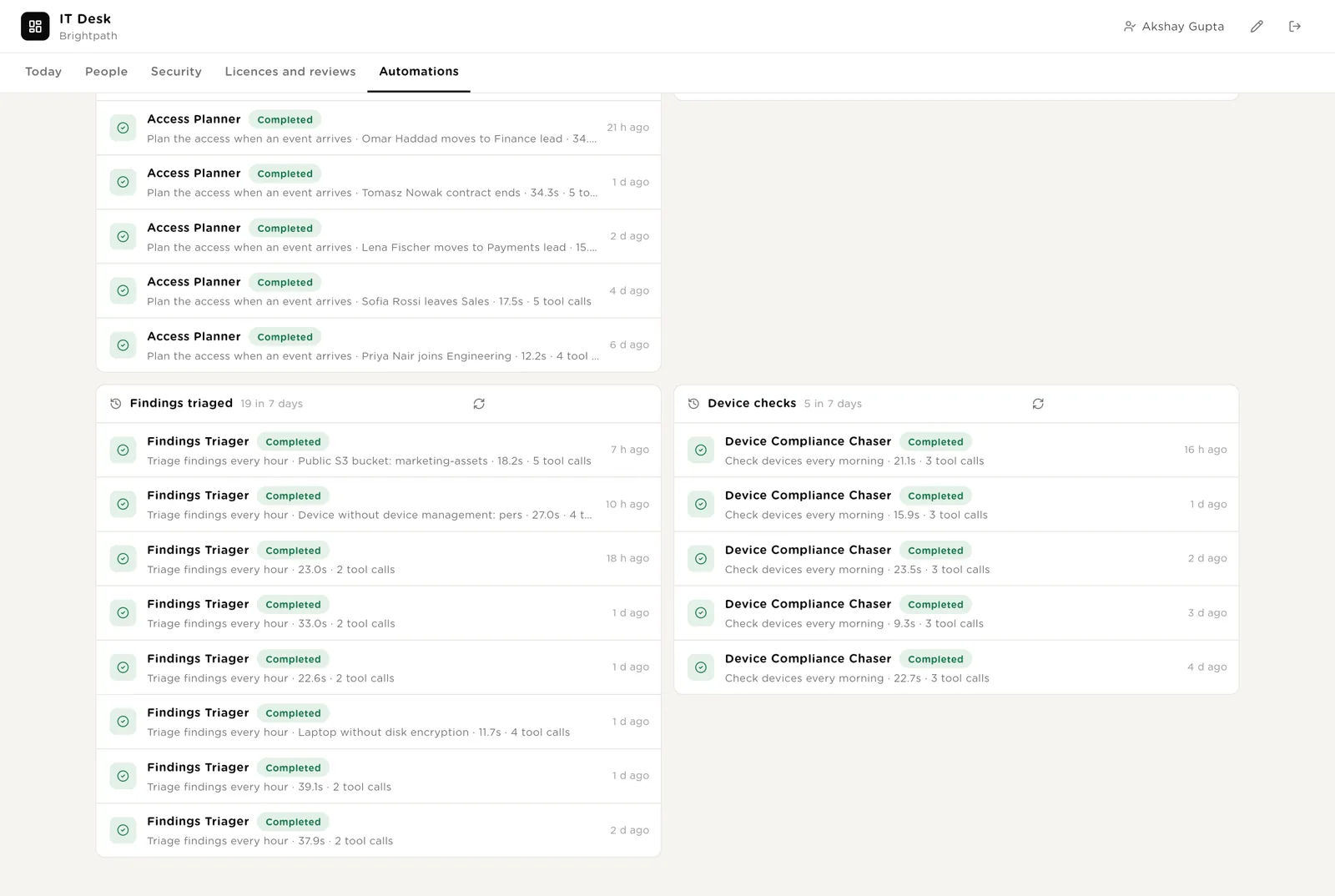
Every automation with its switch. The pack's guard rails. The record of plans written, leavers executed, findings triaged and device checks.
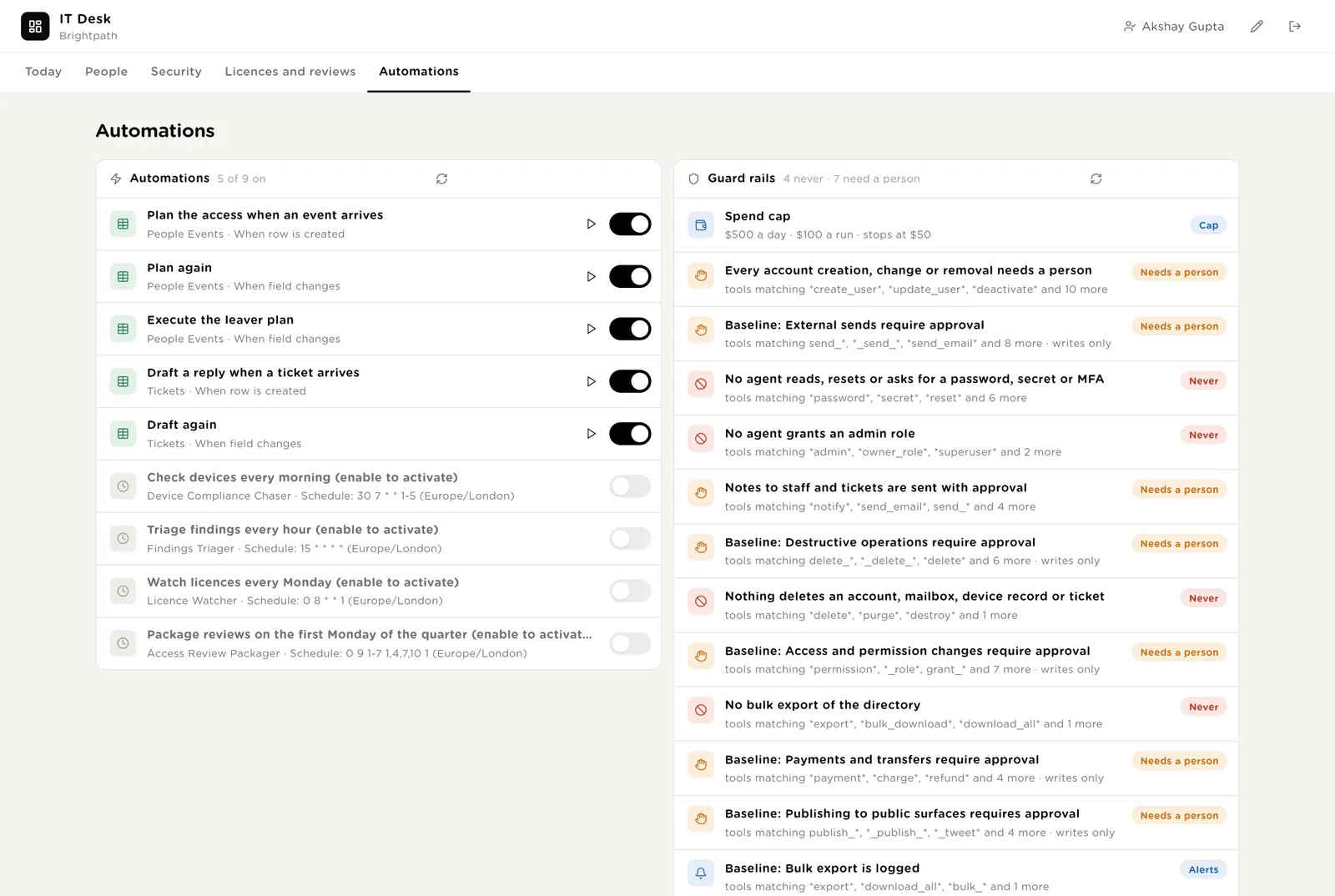
Every plan, execution, triage and device check the desk ran, with duration and what it touched.
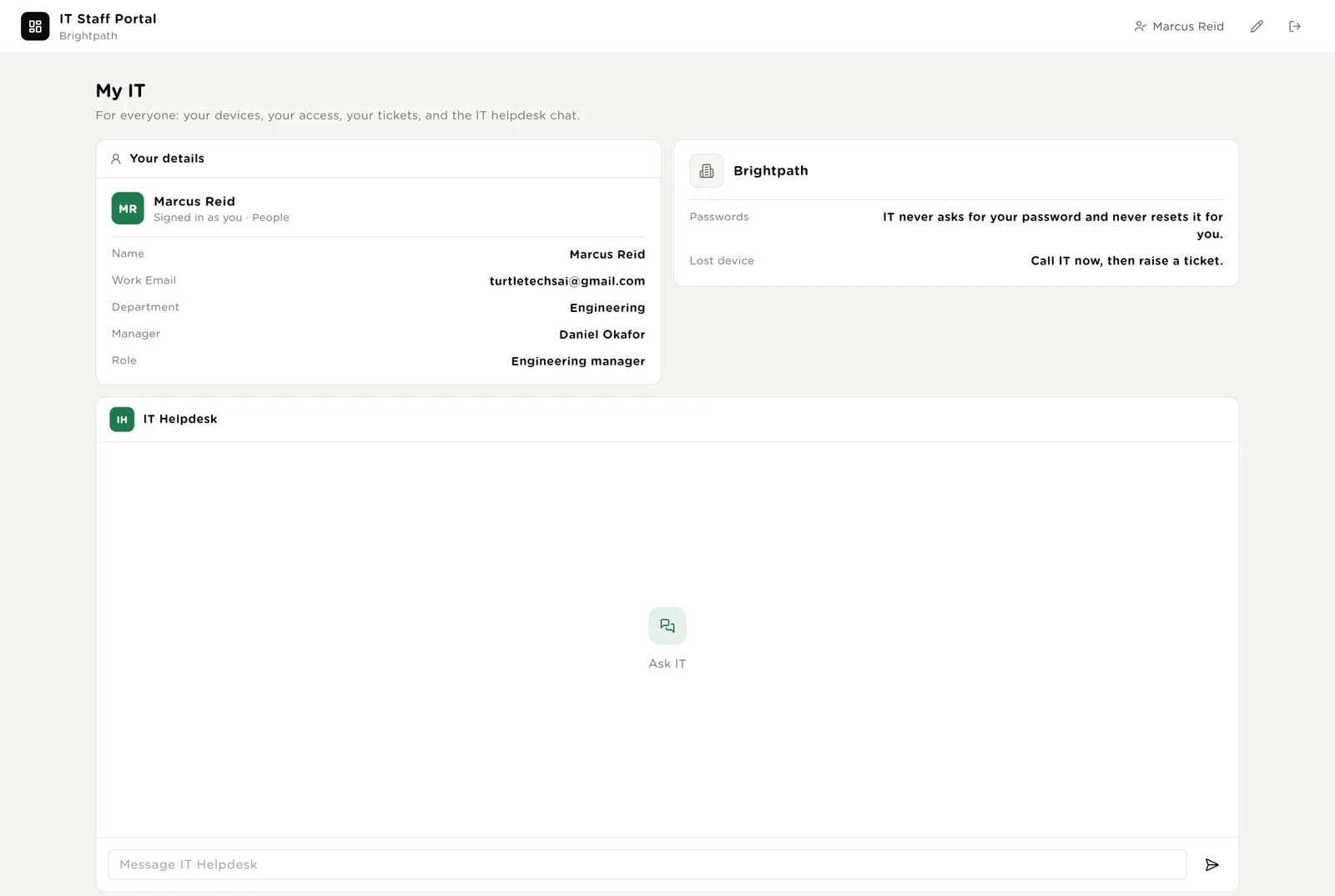
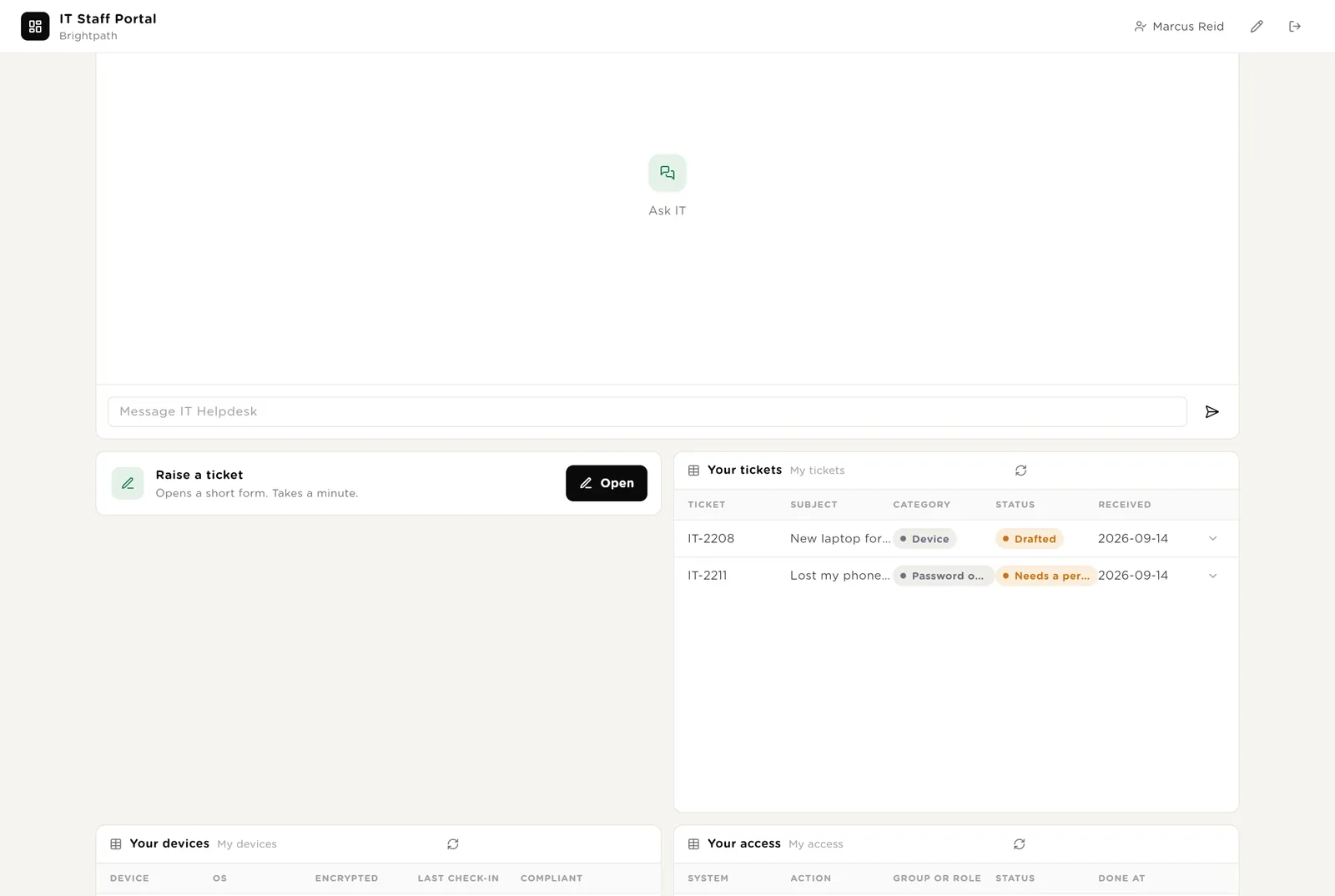
A page every employee can open with their own sign-in. Their details, the two rules IT never breaks, the IT helpdesk chat, a ticket form, and their own tickets, devices and access. The portal knows who is looking at it, so nobody sees anyone else's access.
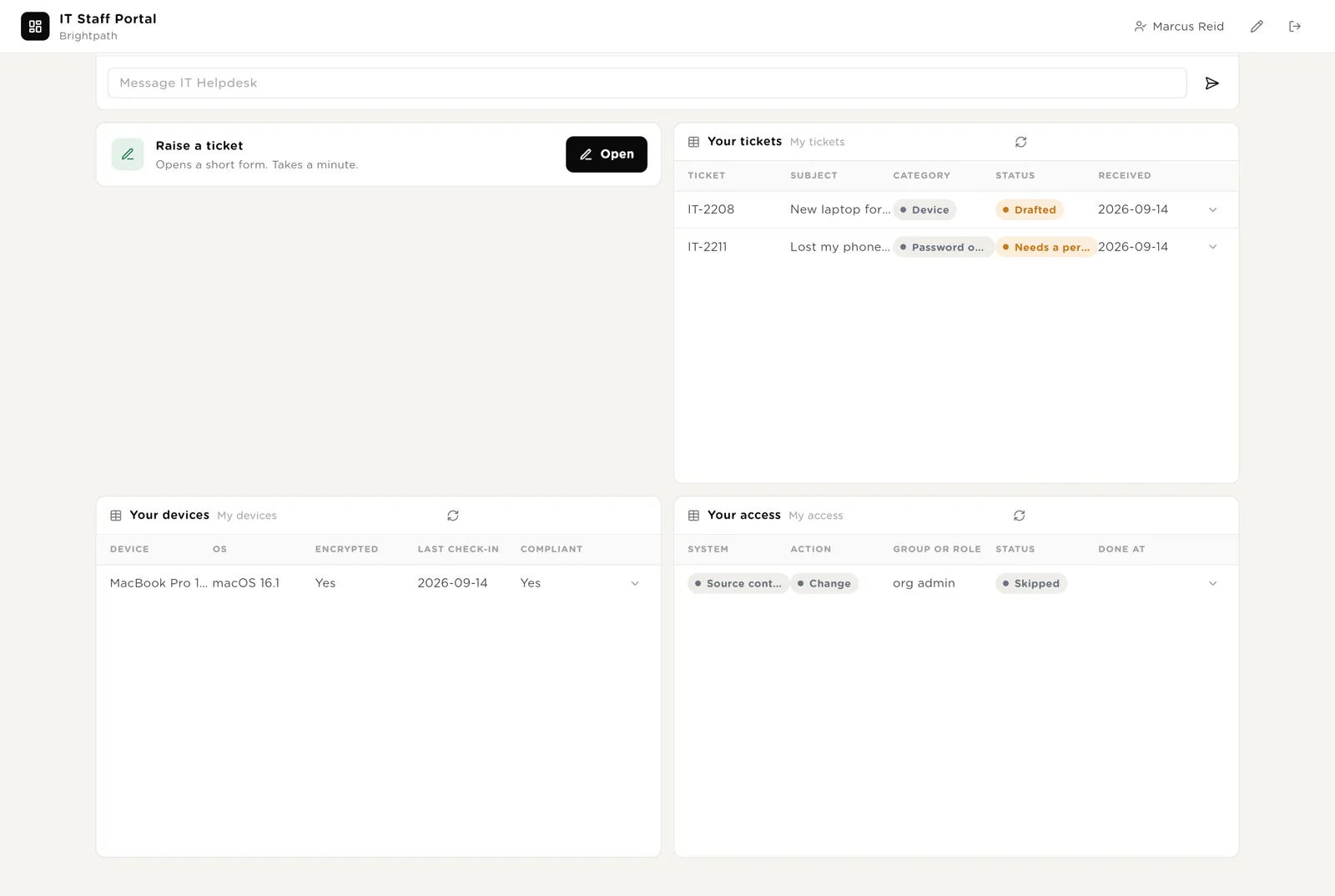
Below the chat: raise a ticket, and see your own tickets, your devices with their compliance state, and every access row that names you.
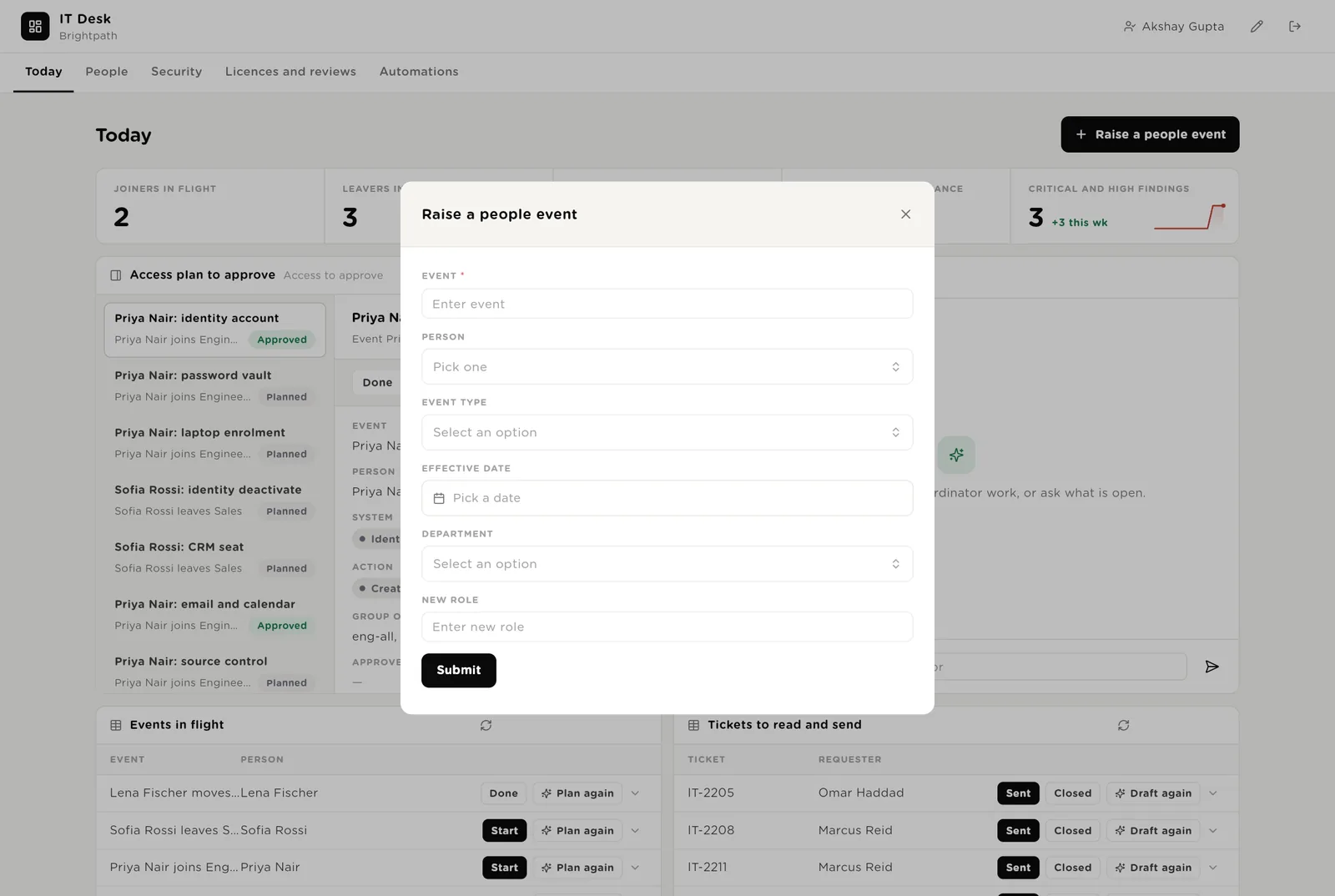
Raise a people event when HR has not, or when a manager asks; the planner builds the plan within a minute. Raise a ticket from the portal; the drafter reads it and IT replies the same day.
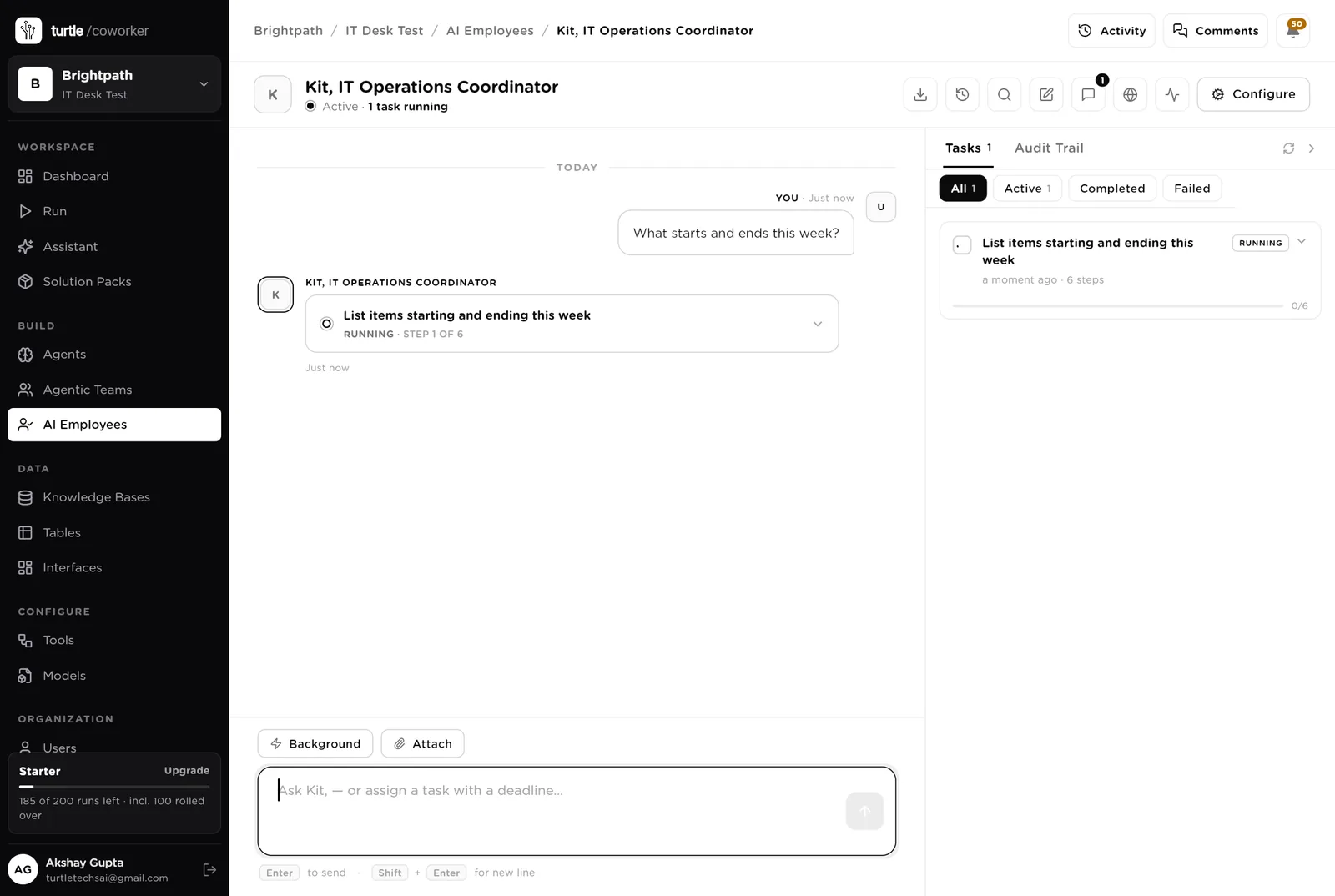
Kit is a software colleague you can chat with. Kit runs the morning list, knows which agent to use for what, reads the tables, and never touches an account without an approval, never asks for a password.
Every morning: joiners starting within five working days with plans not done, leavers within two days, devices chasing for a week, critical or high findings with no ticket, tickets marked Needs a person. One short list, oldest first, with the owner. Tools: the HR system, the identity provider, device management, the security tool, the service desk, Turtle Notify.
You typed a question. Kit turned it into a six-step task that reads the tables (events, plan rows, devices, findings) and is running it, step by step, in front of you. Reading needs no approval; anything that would change an account would stop and ask.
An agent does one job. It starts when a row is logged, on a schedule, when you press a button, or when Kit asks it. It reads your tools and your playbook, writes its result into the record, and stops. No agent ever changes an account without an approval.
When a people event arrives it reads the person from the HR system, applies your role matrix, and writes one Access Plan row per system: what to create, change or remove, which group or role. For a mover it adds the new role now and removes the old after 14 days. For a leaver it writes the removal order at 17:00 on the last day. For a joiner it drafts the welcome note for the manager, with credentials via the vault, never by email. It never creates anything.
When a leaver event is started it takes each Approved plan row in the playbook's order and performs it in the connected system: deactivate the identity account and revoke sessions, remove vault access, retire the device after backup, free the seat. Every call is held again by policy so you see the exact arguments. The system's response is written as evidence. It never deletes, and never touches a row that is not Approved.
Every morning it reads every managed device from the device tool, updates encryption, OS and last check-in, and for anything out of compliance drafts a note to the person with the exact steps and their manager copied. After seven days it raises a ticket. Sending waits for a person. It never locks or wipes a device.
The security and housekeeping work that gets skipped when the week is busy.
Every hour it reads new findings from the security tool, keeps medium and above, closes duplicates against open tickets, picks the owner from the asset, and drafts the ticket: what was found and the control, what to do, the evidence needed. Creating the ticket waits for a person. A Critical finding alerts the IT lead at once.
Every Monday it reads each product's assigned users and last sign-in from the identity provider, counts seats unused for 60 days (including leavers still assigned), and drafts the reclaim or renew note for the licence owner with the money involved. Never removes a seat.
Each quarter, per system, it lists every user with last login and manager, recommends removal for leavers and 90-day-idle accounts, and emails the package to the reviewer. The reviewer records decisions; removals go through the executor behind approval.
When a ticket arrives it sets the category and drafts the reply from your how-to articles. Access requests are checked against the role matrix; password and MFA resets, lost devices and security matters are marked Needs a person. Never resets, never grants, never sends.
The IT Helpdesk sits on the staff portal. It answers how-to questions from your IT articles (VPN, MFA, encryption, software requests) and says where the viewer's own ticket or access request stands. It never resets anything, never grants access, and never says what another person has.
A router sends the question to a how-to specialist (reads the articles) or a status specialist (reads the viewer's own tickets and events, nobody else's).
Tables are where everything is stored. They look like spreadsheets and your team can open and edit them. Your HR system, identity provider, device tool, security tool and service desk stay the record; the desk holds the plans, the approvals and the evidence.
| Table | What is in it | Stages |
|---|---|---|
| People | Everyone IT looks after, mirrored from the HR system. The portal identifies viewers here. | Starting → Active → Leaving → Left |
| People Events | Every joiner, mover and leaver with the plan and the evidence. | New → Planned → In progress → Done · Cancelled |
| Access Plan | One row per system per event: action, group, who approved, when done, the system's response. | Planned → Approved → Done · Failed · Skipped |
| Devices | Every managed device with its compliance state and the note drafted. | OK · Chasing → Fixed · Retired |
| Findings | Security findings, medium and above, with owner and ticket. | New → Ticketed → In progress → Fixed · Accepted risk · Duplicate |
| Licences | Every paid product with seats, usage, renewal and cost. | OK · Reclaim seats · Renewal due → Actioned |
| Access Reviews | One row per system per quarter with the package and the decisions. | Prepared → Sent → Decided → Applied |
| Tickets | IT tickets with the drafted reply. | New → Drafted / Needs a person → Sent → Closed |
The software knows nothing about your systems or your rules except what the tables and your playbook tell it.
Two documents: the role matrix and the IT rules (joiners, movers, leavers, devices, findings, licences, access reviews), and your IT how-to articles. Every agent and the helpdesk read them. Replace the starter text with your own.
The pack uses whichever AI model your company has already connected. Other vendors of the same kind swap in at install time without changing the desk; a team on JumpCloud, Bitwarden, Jamf and Freshservice gets the same desk.
Checks on arrival are on from day one. The schedules are off until you switch them on from the desk.
| Automation | Agent | When | Ships |
|---|---|---|---|
| Plan the access | Access Planner | The moment an event arrives | On |
| Execute the leaver plan | Leaver Executor | When an event is started | On |
| Draft a reply | IT Ticket Drafter | The moment a ticket arrives | On |
| Check devices | Device Compliance Chaser | Weekdays 07:30 | Off until you switch it on |
| Triage findings | Findings Triager | Every hour | Off until you switch it on |
| Watch licences | Licence Watcher | Monday 08:00 | Off until you switch it on |
| Package access reviews | Access Review Packager | First Monday of the quarter | Off until you switch it on |
Buttons on the desk run agents too. "Plan again" rebuilds the plan after a role changes; "Draft again" reruns the ticket drafter.
Three things always need a person. The software stops and waits at each one.
Approve, Done, Skip, Start, Sent, Ticketed, Fixed, Accept risk, Actioned, Decided. Only a person presses them. The software can plan an account; it cannot create it until the row is approved.
Even after the row is approved, the exact call (create this user with these groups, deactivate this user, send this note, create this ticket) is held. You read the arguments and click Approve or Deny. Passwords, secrets, MFA, admin roles and deletes are refused outright, from every agent.
When you give Kit a task that changes anything, Kit shows what it will do first. Approve and run, change it, or cancel.
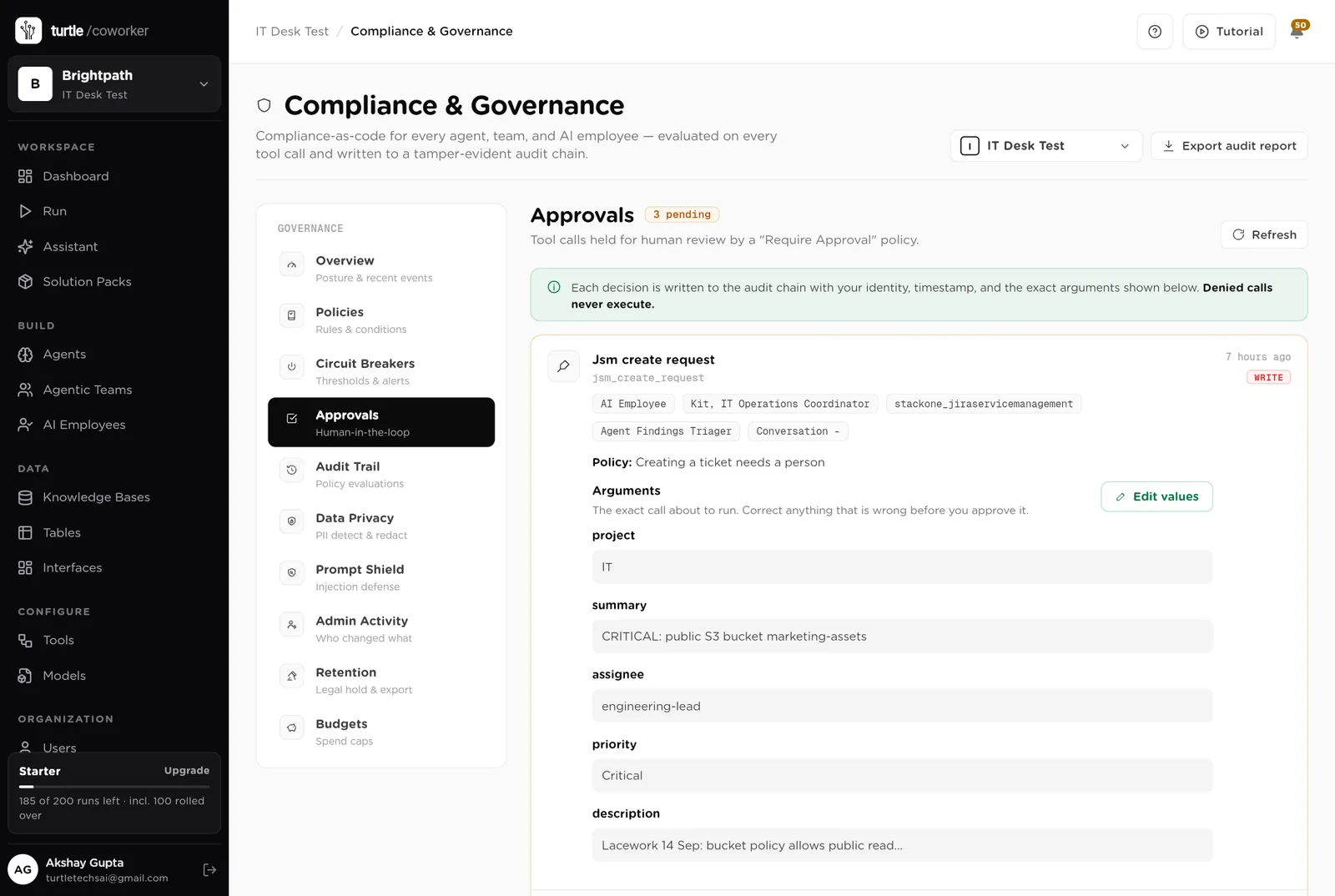
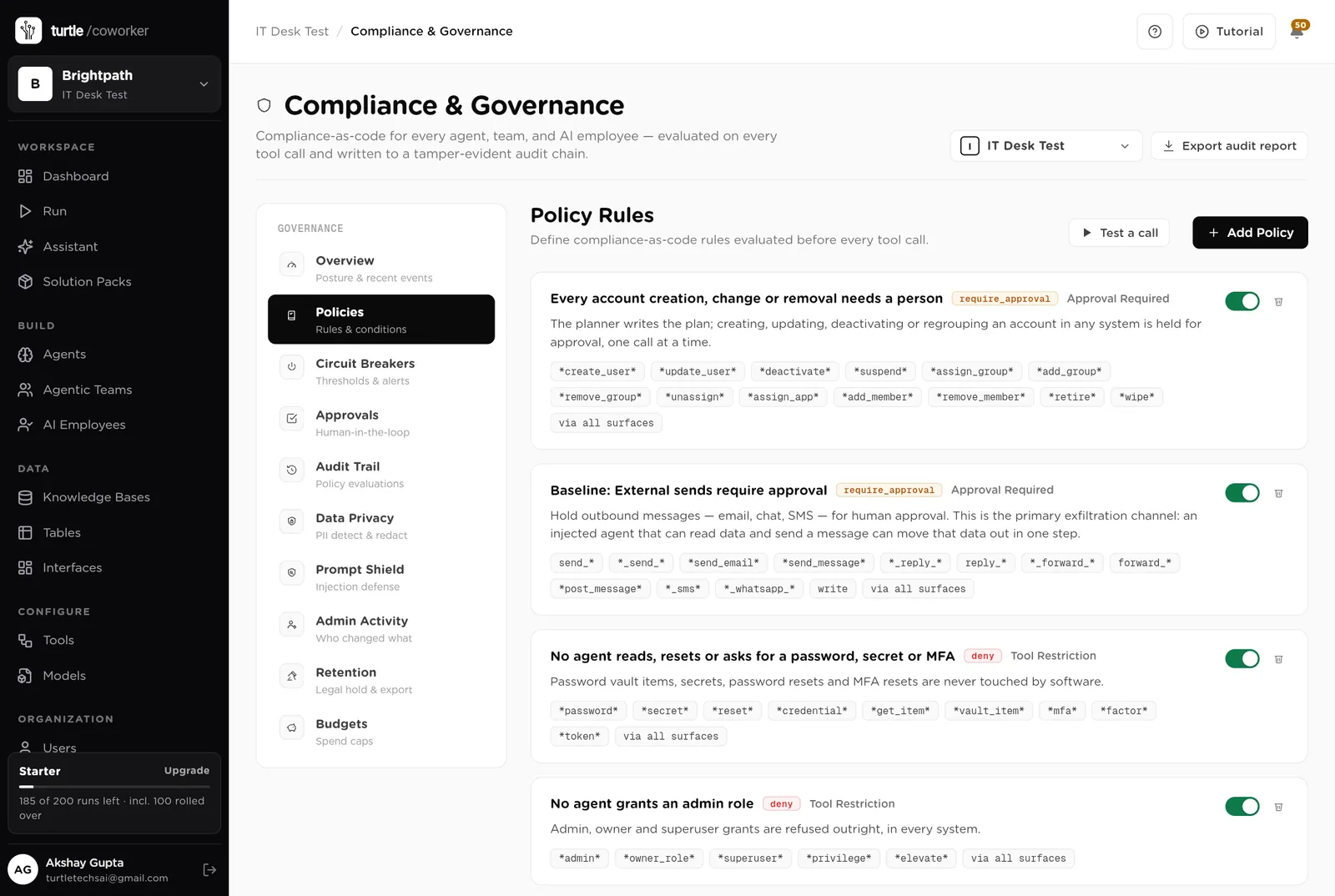
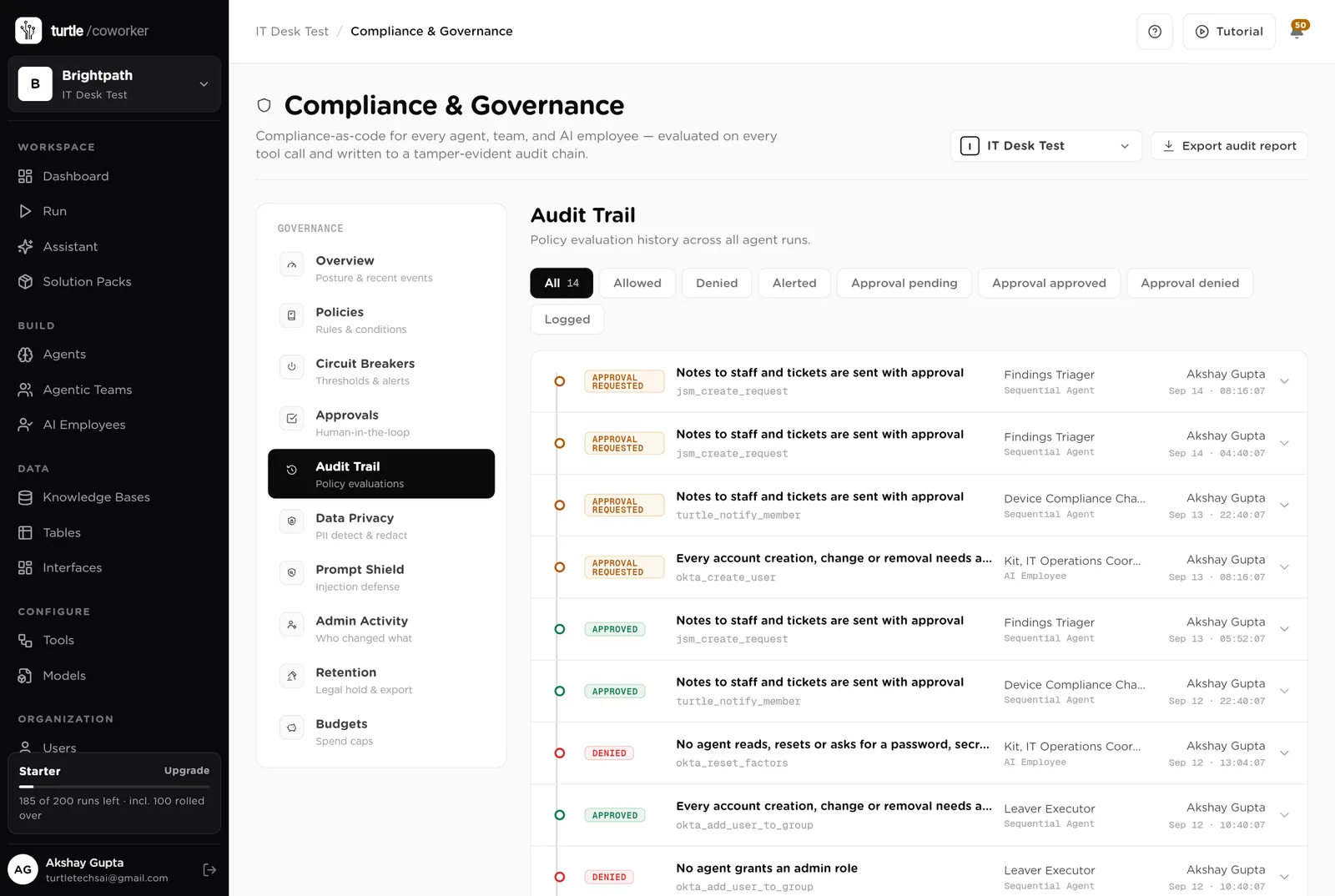
A rule is checked before every single thing the software tries to do. The pack installs six rules of its own on top of the standard ones every workspace starts with.
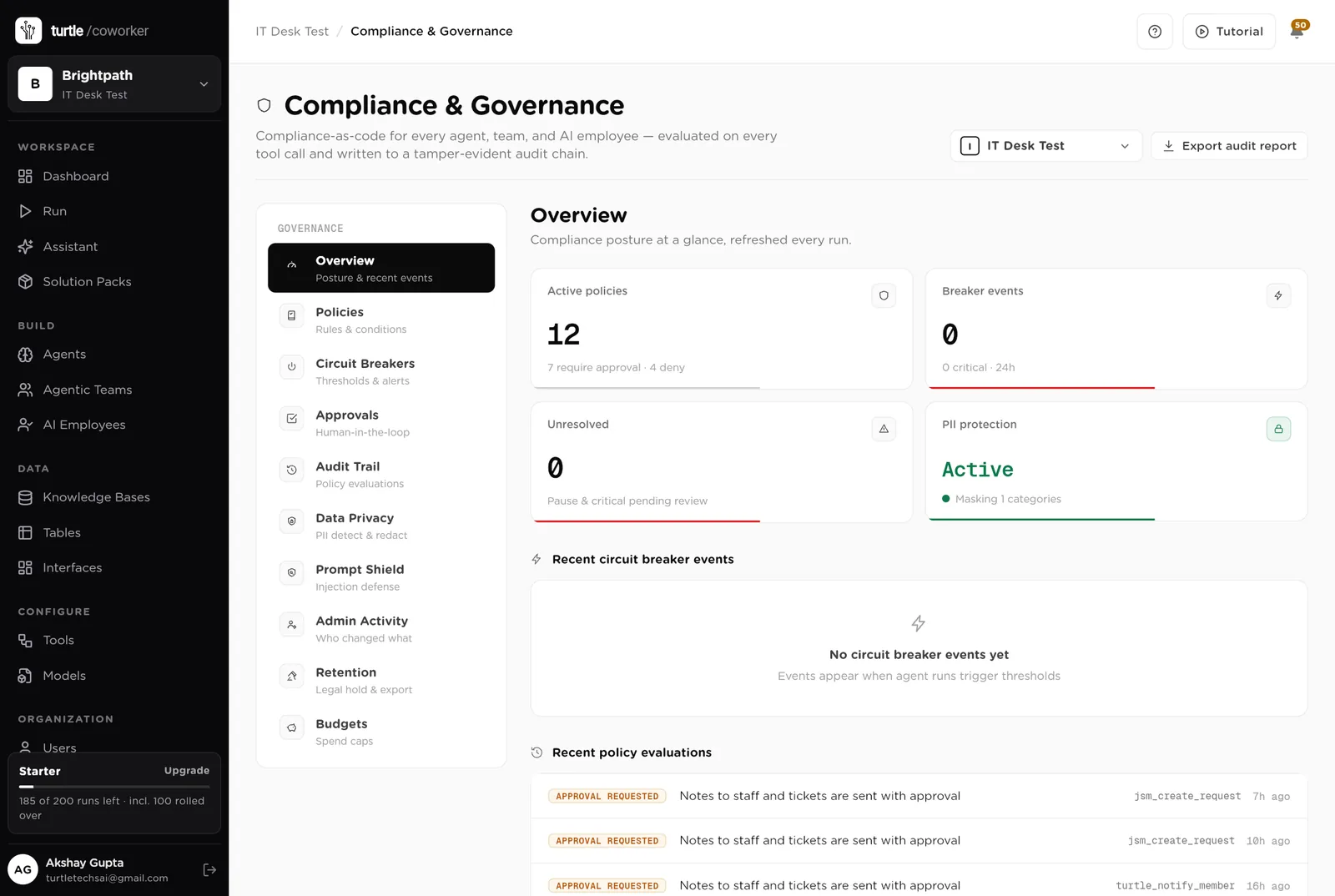
For every run you can see which agent ran, why it ran, every step it took, and every rule that checked it. Passwords and card numbers are blanked out before anything is stored.
A monthly budget with a warning level and a hard stop for the software's own usage.
Names and emails are masked in what the software reads and writes. Every key is encrypted. Nothing exports the directory.
Who planned it, who approved the row, who approved the call, what the system answered, when. The audit trail and the Access Plan table say the same thing.
The desk is shared with IT. The staff portal shows each person only their own tickets, devices and access. Only owners and admins change the layout.
These estimates assume three IT people looking after 300 staff, with about 6 joiners, 2 movers and 4 leavers a month, 60 tickets a week, 300 managed devices, 10 new findings a week, 30 paid products and quarterly reviews of 8 systems. "Before" is the time by hand; "after" is the reading, approving and clicking that is left. Your numbers will differ. These are estimates, not measurements; after a month the audit trail gives you real figures.
| Job | Assumption | Hours before | Hours after | What changes |
|---|---|---|---|---|
| Planning and provisioning a joiner | 3 h each, 6 a month | 4.2 | 1.2 | Plan from the matrix in a minute; you approve each row. |
| Offboarding a leaver with evidence | 4 h each, 4 a month | 3.7 | 1.0 | Executed in order, evidence written; you approve each call. |
| Chasing devices out of compliance | 3 h a week | 3.0 | 0.5 | Notes drafted every morning with the steps; you approve. |
| Turning findings into tickets | 30 min each, 10 a week | 5.0 | 1.2 | Deduped, owned and drafted; you approve. |
| Drafting ticket replies | 6 min each, 60 a week | 6.0 | 2.0 | Drafted from the articles; needs-a-person marked. |
| Licence housekeeping | 3 h a month | 0.7 | 0.2 | Every Monday, with the saving worked out. |
| Quarterly access reviews | 2 days a quarter | 1.2 | 0.3 | Packaged per system with recommendations. |
| Total per week | 23.8 | 6.4 | About 17 hours a week back across the team, and every account change has evidence the auditor accepts. |
The leaver whose CRM login lingered for months is deactivated at 17:00 on the last day, with the response recorded.
The plan is written the day HR raises the event; the accounts wait only for your approval.
Who approved what, when, and what the system said, for every change.
Estimates, not measurements. After a month the audit trail gives you real figures.
Installing takes one click. The real work is the role matrix.
Install the pack from the Solution Packs page. Connect your HR system, identity provider and service desk when asked; the password vault, device tool and security tool if you use them.
Replace the starter text with your matrix and your leaver rules; paste in your IT how-to articles.
Import the directory from the HR system so the portal and the plans can name everyone.
Run one joiner and one leaver through the desk end to end. Switch on the ticket drafter.
Switch on the device check, the findings triage and the licence watcher, and share the staff portal with everyone.
You pay for the platform, not per desk. The plan sets how many agents, employees and workspaces you can run; every desk is included, and runs are billed on your own model key at cost. 7 agents in this desk count against the plan's agent limit.
See plansWe use analytics cookies to see which pages help and which don’t. Nothing loads until you choose. Cookie Policy

Hello there.
AI agent. It can make mistakes, and a human reviews anything that matters.