Software that does the small, repeated jobs on a recruiting desk, so your recruiters can spend their time with candidates and clients. It screens new candidates, writes the messages and reports, chases feedback and timesheets, and warns you before a document expires. A person makes every decision. Nothing is sent, booked or agreed without someone clicking Approve.
For recruitment agencies, staffing firms, and in-house recruiting teams
The pack is built for a team that finds people for jobs and looks after them once they are placed. It fits three kinds of team.
You find candidates for client companies and charge a fee when someone is hired. You have between 2 and 30 recruiters. You use the Desk, the Client Portal, and the agents for screening, summaries, interviews, feedback, client updates and placement follow-ups.
You place temp or contract workers with clients and pay them weekly from timesheets. You use everything above plus the Temp Desk, the Worker Portal, and the agents for timesheets, document expiries, the 12-week rule and finding the next job.
The talent acquisition or resourcing team inside an MNC, serving hiring managers in business units. Your "clients" are your own departments; your "temps" are your contractors. The Client Portal becomes the hiring manager portal; fees and margins are simply left blank.
| Talent Acquisition / Recruiting | Screening applicants, arranging interviews, chasing hiring managers for feedback, weekly reports to the head of HR. |
| Contingent Workforce / Contractor Management | Contractor assignments, timesheets, right-to-work and certificate expiries, the 12-week rule, extending or ending contracts on time. |
| HR Shared Services | The help desks answer candidate and contractor questions so the HR inbox does not. |
| Hiring managers in any business unit | The portal: raise a job, see who was put forward, request an interview, decline a candidate. |
Everything the software produces is a draft or a warning for a person. It never rejects a candidate, never approves a timesheet, never clears someone to start work, never agrees a fee, and never sends a message without a person approving it first.
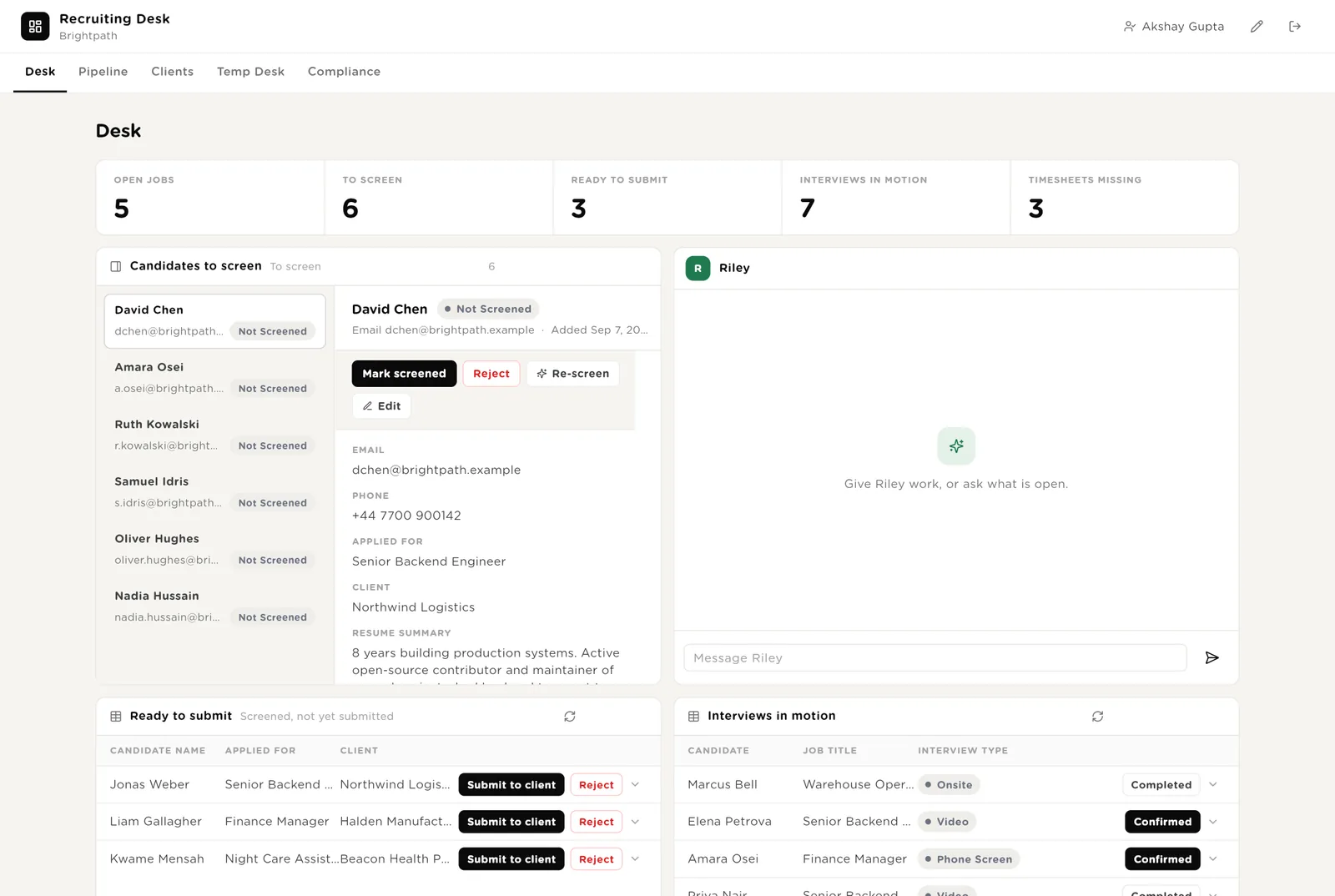
This is the first screen your recruiters open. The five numbers at the top are live. The list on the left shows candidates waiting to be screened. Click one and you see the screening result the software already wrote. Riley sits on the right, ready for instructions.
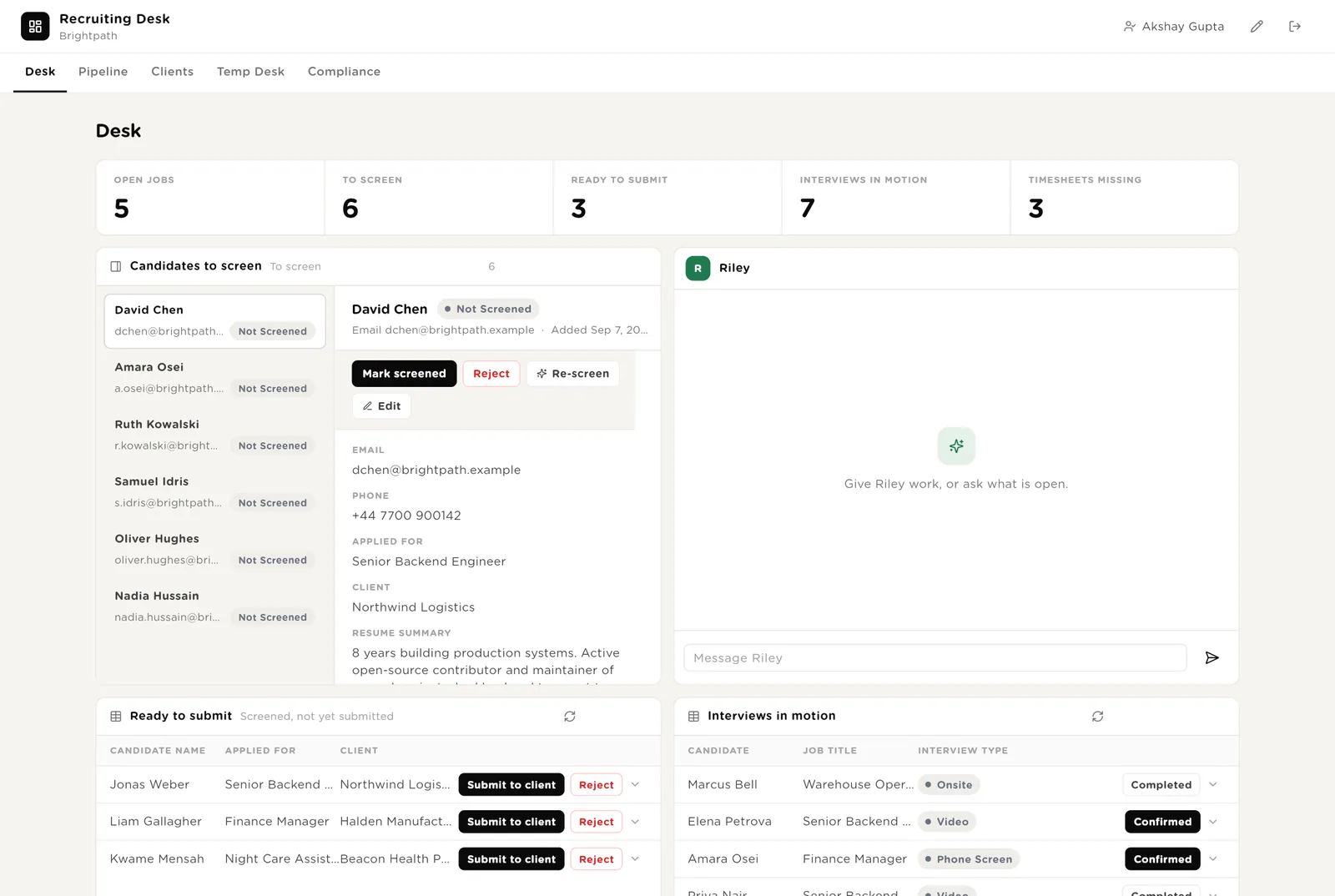
Work through what came in overnight. For each candidate: read the CV summary and the screening result, then click Mark screened or Reject. Re-screen runs the check again. Edit opens the full record.
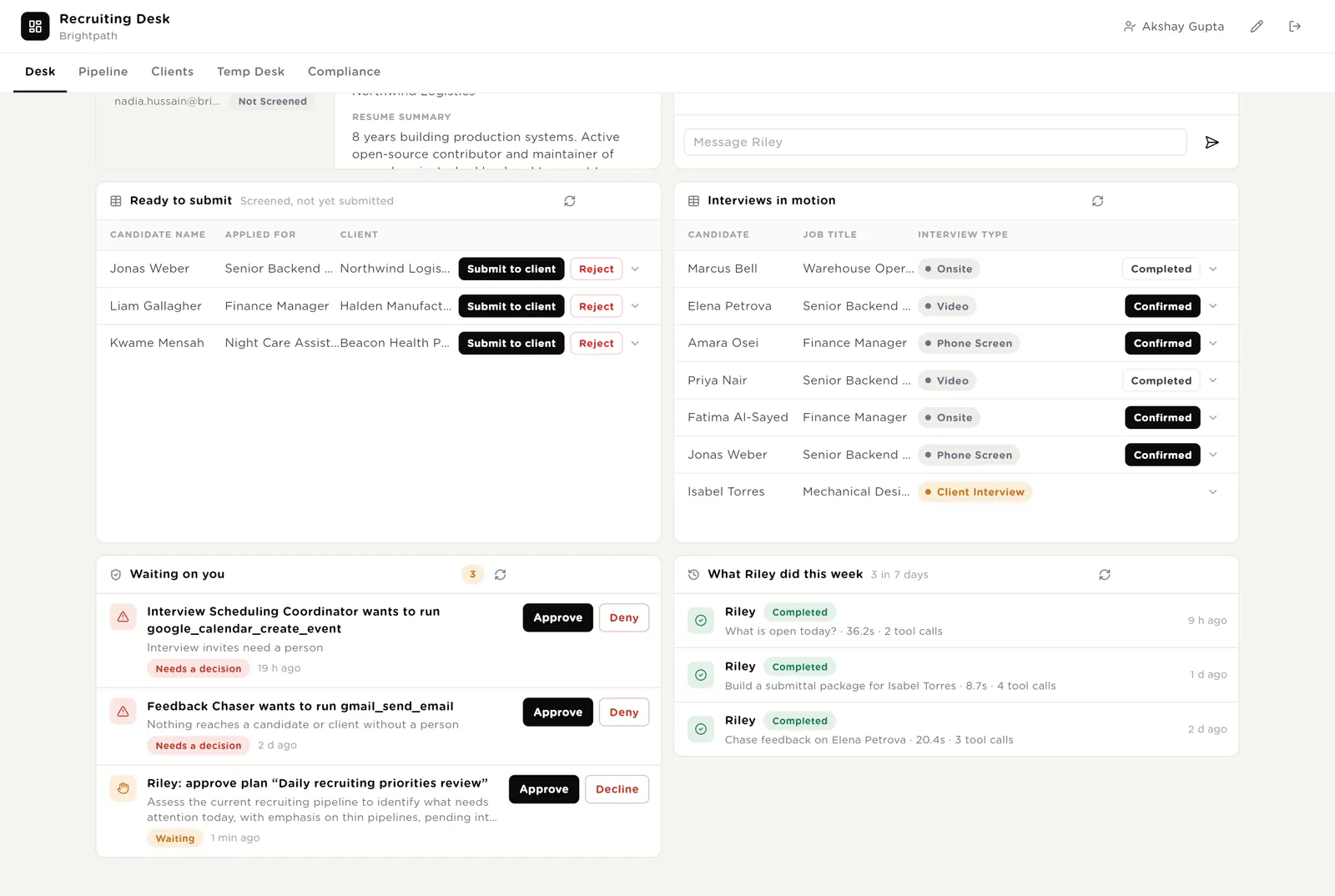
Candidates who passed screening but have not been sent to the client yet. Click Send to client and they appear in the client's portal straight away.
Every interview not yet finished. Click Confirmed when the time is agreed, Done when it has happened.
Scroll down and you see two more boxes. "Waiting on you" lists everything the software wants to do that needs a person: an email to a hiring manager, a calendar invite. "What Riley did this week" shows every task Riley ran, how long it took, and what it touched.
The email or invite is sent exactly as shown. Your name, the time and the message are recorded.
Nothing is sent. The draft stays in the record so you can use it by hand.
A recruiter never has to wonder what the software sent. Nothing leaves without a person's name on it.
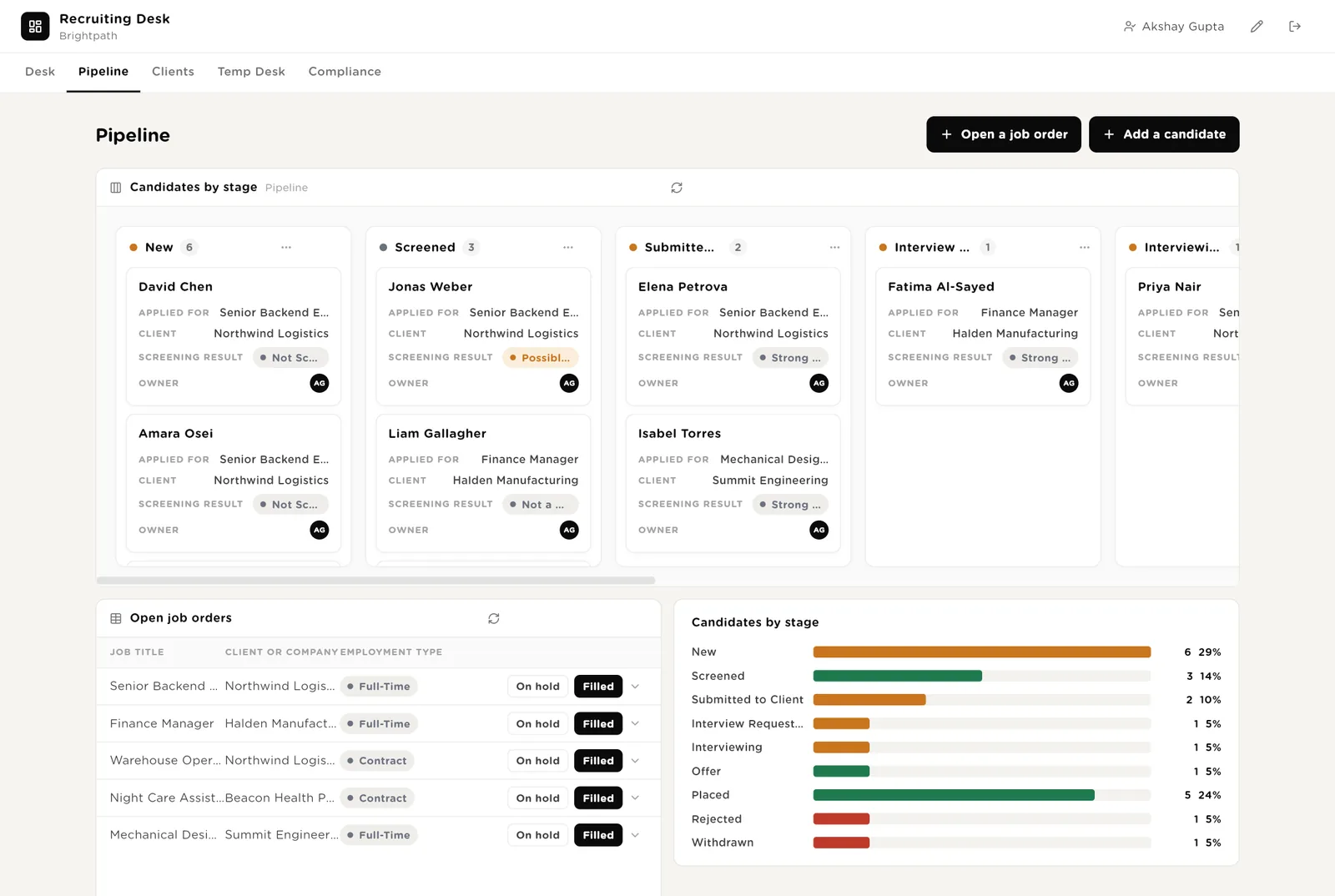
The board shows every candidate as a card, in columns by stage. Drag a card to the next column to move them on. The two buttons at the top open short forms: add a new job or a new candidate.
A short form. When you save it, the Job Brief Checker reads it and lists what is missing.
Name, contact details, the job, a CV summary. When you save it, the Candidate Screener runs and the result appears on the card within a minute.
Shows at a glance where you have too many candidates and where you have none.
Everything about your clients. Which have signed your terms and which have not. Your fee and margin with each. Every permanent placement with its invoice and guarantee period. Owen is here for client updates, job brief checks and quiet clients.
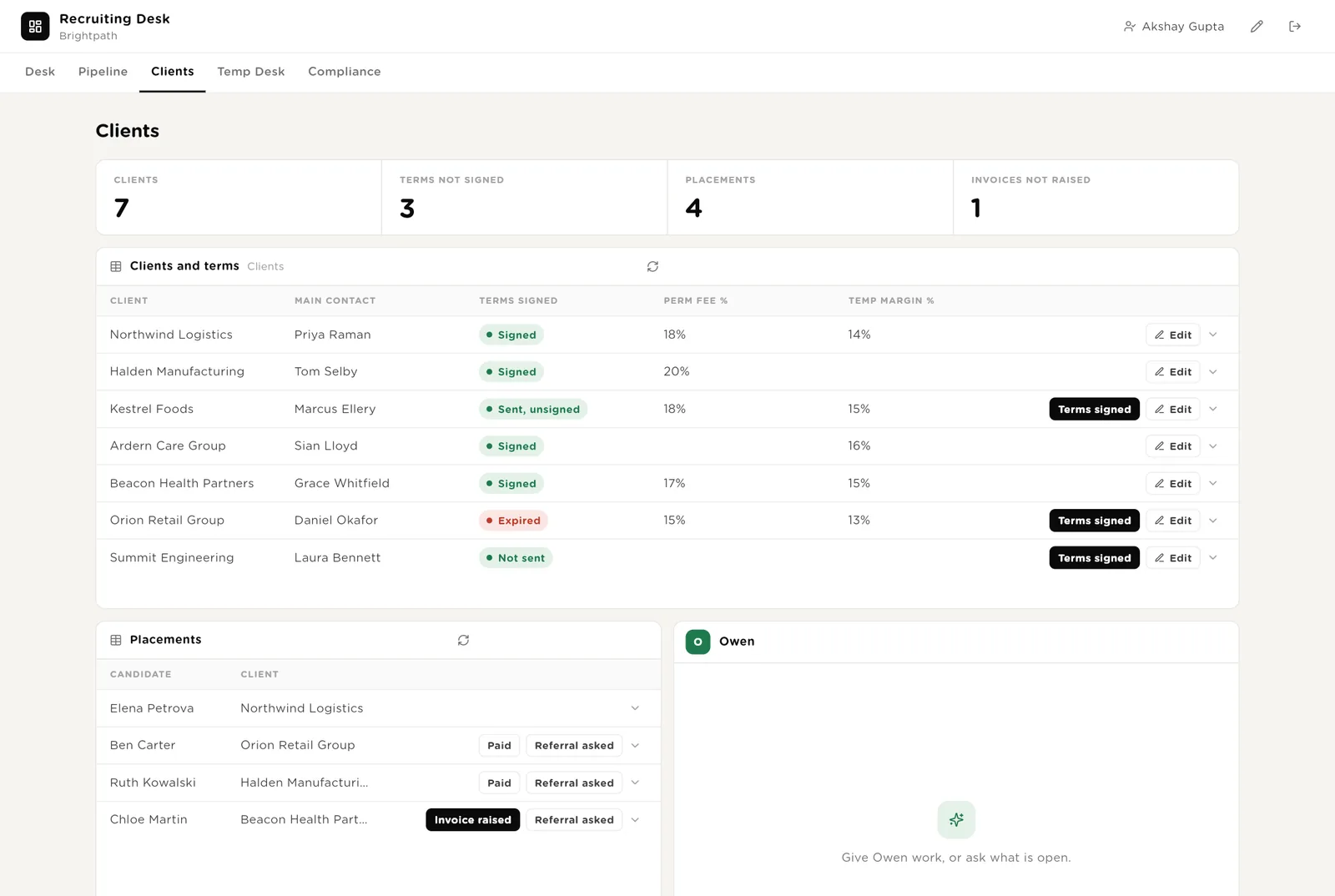
Clients who have not signed your terms show up here before anyone works on their job.
Invoice raised, Paid and Referral asked are one click each. The Placement Follow-up agent reads these every Tuesday.
"Which clients have gone quiet?" or "Write Friday's update for Northwind." Owen writes the draft; you send it.
For agencies that place temp and contract workers. Assignments as a board: booked, live, ending soon, ended. Timesheets in two lists: the ones waiting for the client to approve, and the ones the worker has not sent yet, with how many times each has been chased.
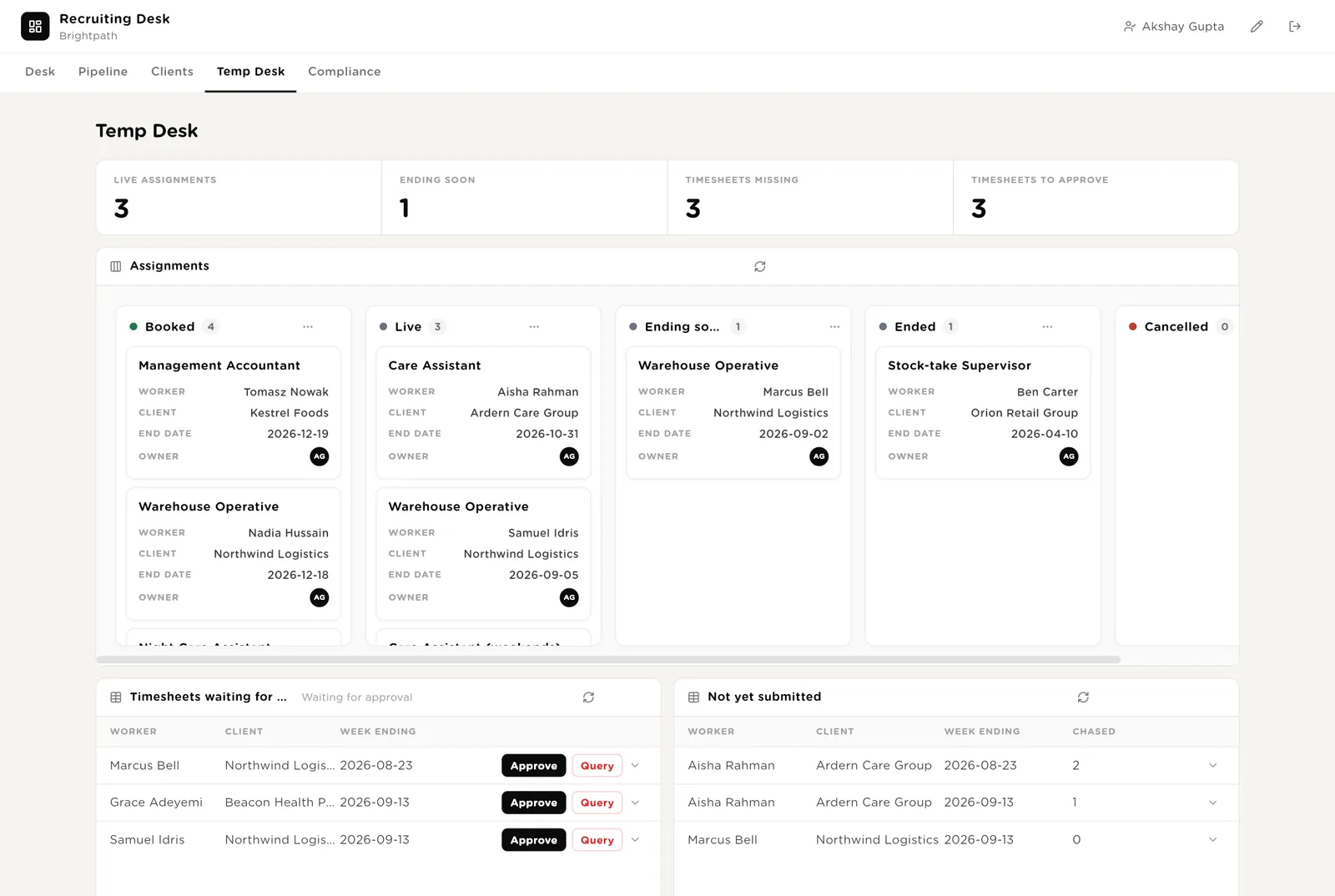
You approve a timesheet, or send it back with a question. The software never approves a timesheet.
The Next Job Finder reads this column every Wednesday. A worker here with no next job is money about to walk out of the door.
Your margins per worker per week, Sam, the on/off switches for the temp desk automations, and what Sam did this week.
Every automation on the temp desk has a switch here. Timesheet chasing, the 12-week check, next-job finding, Sam's own schedule. "Run now" starts one immediately, for example before a bank holiday.
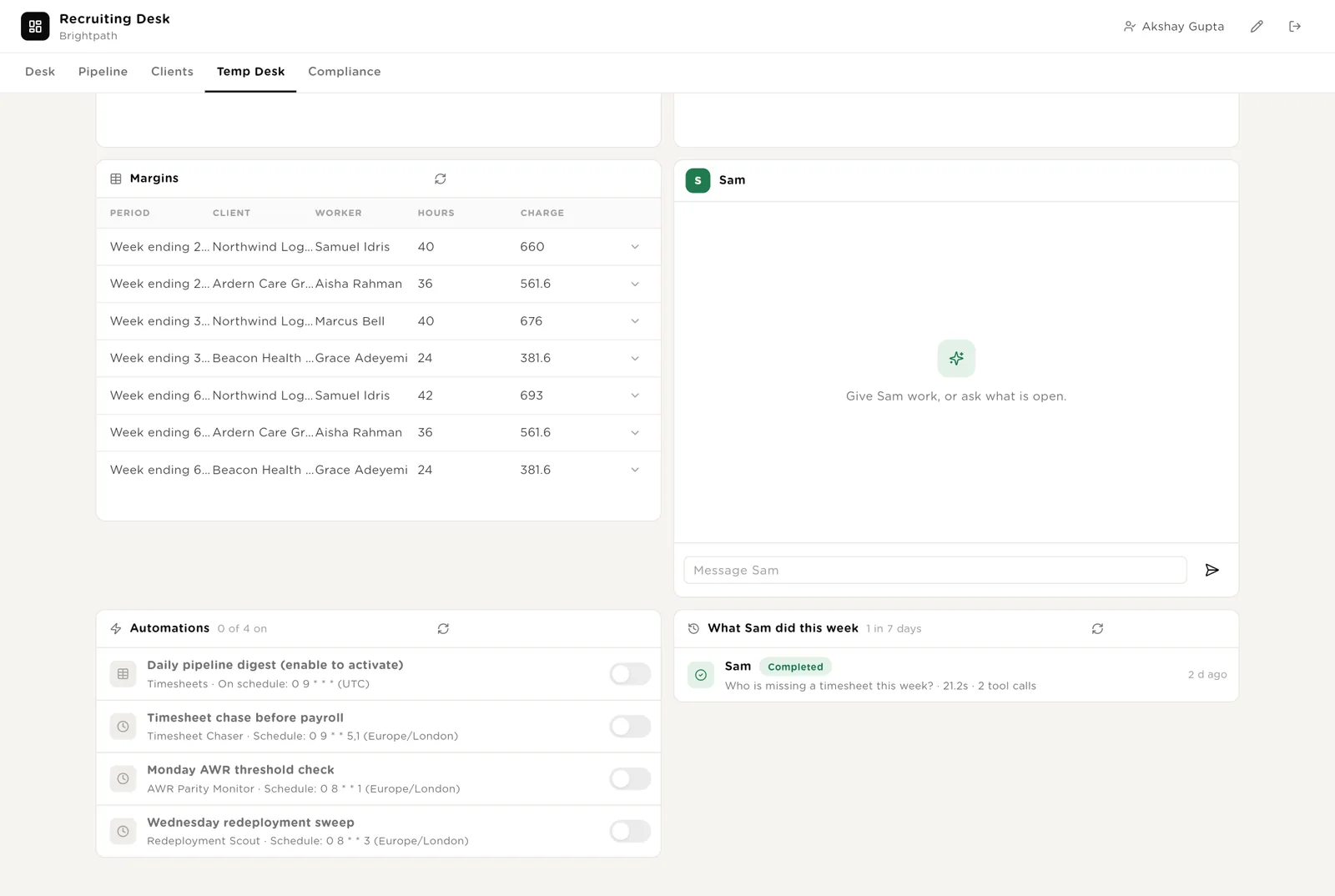
Every automation ships switched off except screening. You switch them on one at a time as you get comfortable.
Start the timesheet chase early before a bank holiday, or find next jobs the day a client cancels.
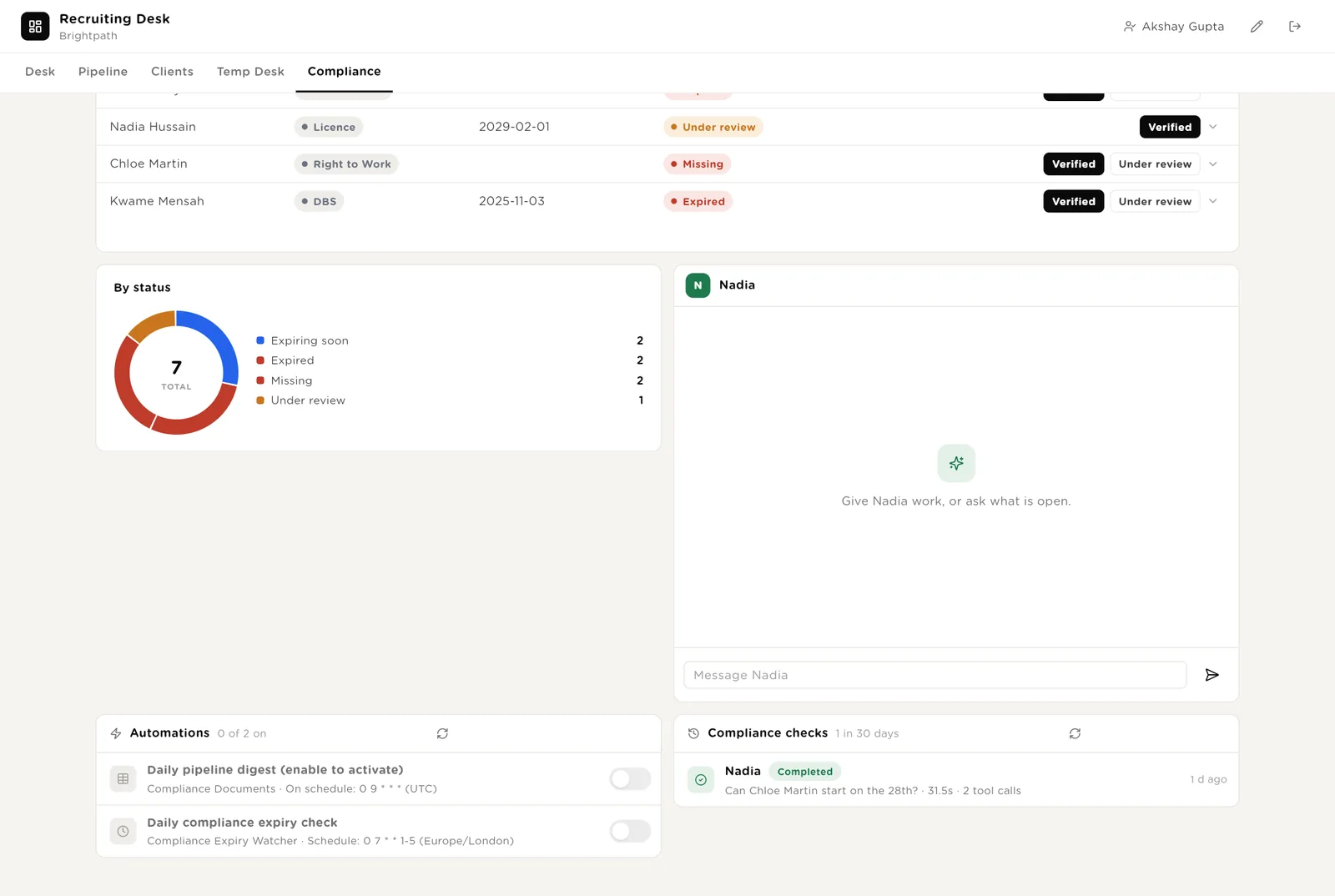
Every document that is not valid, in one list: expired, expiring soon, missing, under review. The four numbers say how bad it is. Nadia answers "can this person start?". The daily check and its history are below.
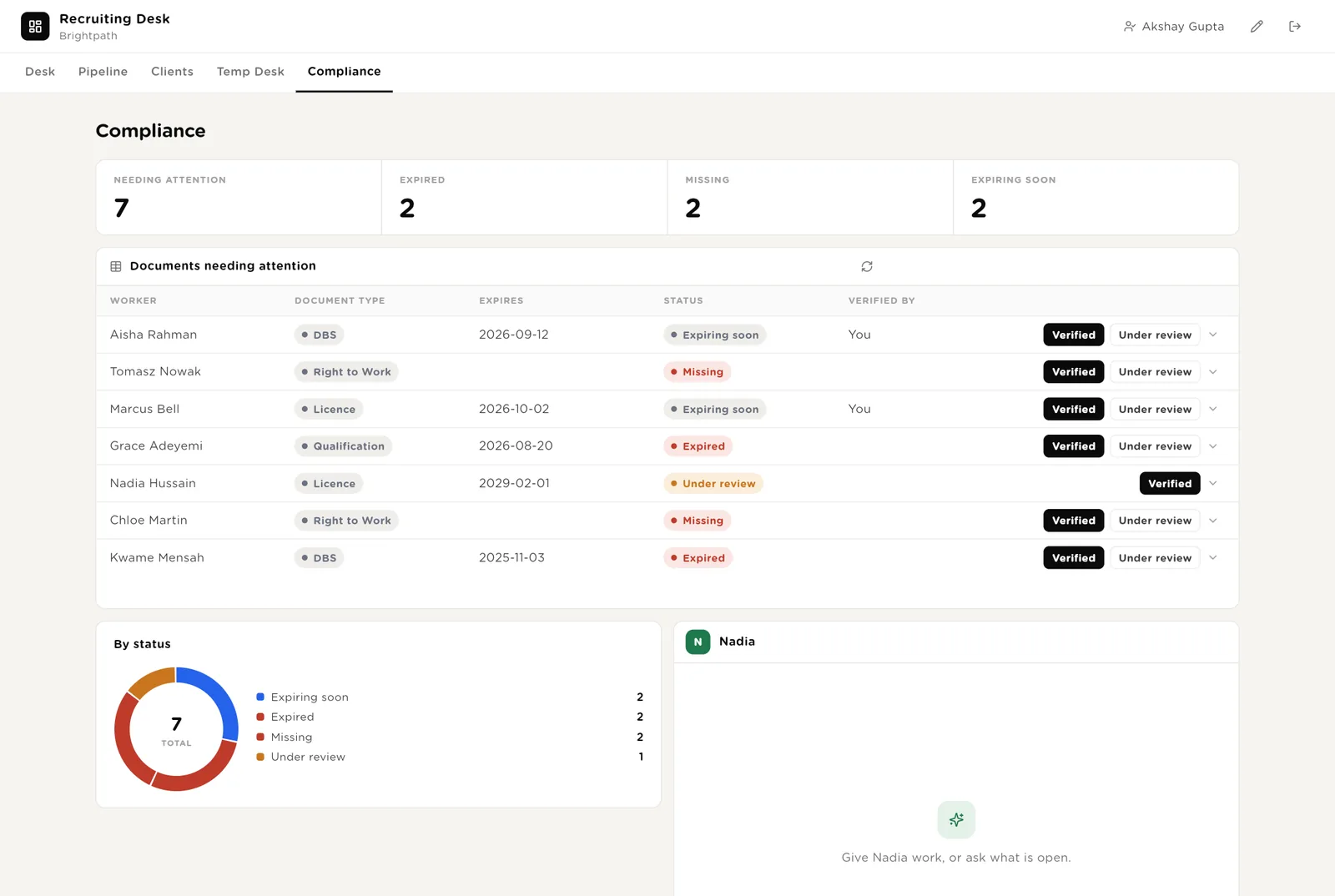
You have seen the document. It becomes Valid and the daily check stops raising it.
You have asked for the document and are waiting. The daily alert stops repeating, without pretending the document exists.
The software never marks a document as Valid. Only a person does that.
Nadia reads assignments and documents together. Ask "can Chloe start on the 28th?" and Nadia names the missing document instead of guessing. The daily expiry check has its switch here, and its history for the last 30 days.
A client contact logs in with a normal account and is matched to their company by email. They see their contract terms, their jobs, the candidates you sent them, their temps and their placements. They can raise a new job, request an interview, decline a candidate, and ask the Client Service Desk a question. They see nothing about other clients.
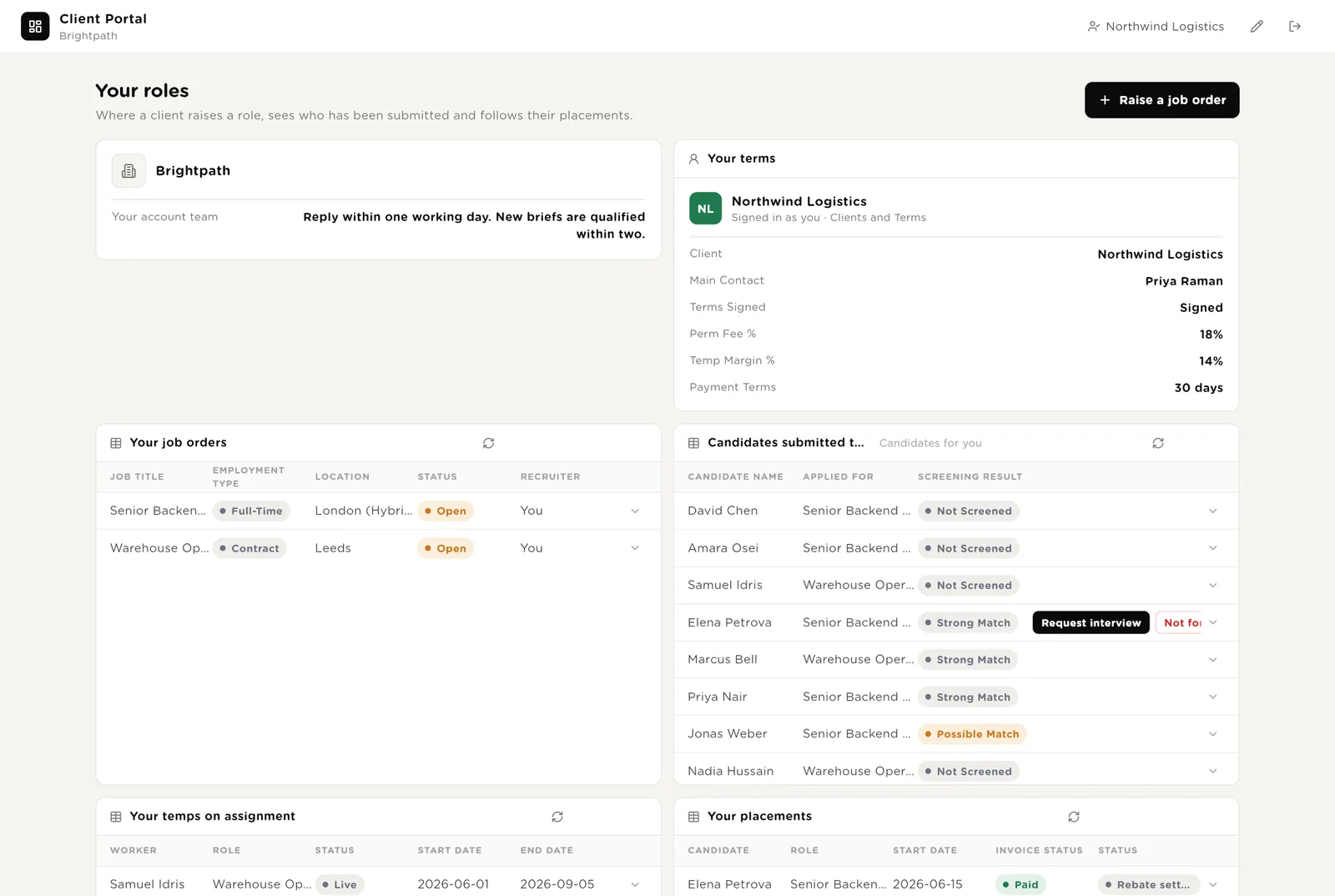
One free account per client contact. No separate login, no extra charge.
The candidate moves to "Interview requested". It shows on your desk immediately and the Interview Scheduler picks it up.
Candidates you did not send them, screening notes, other clients, your margins.
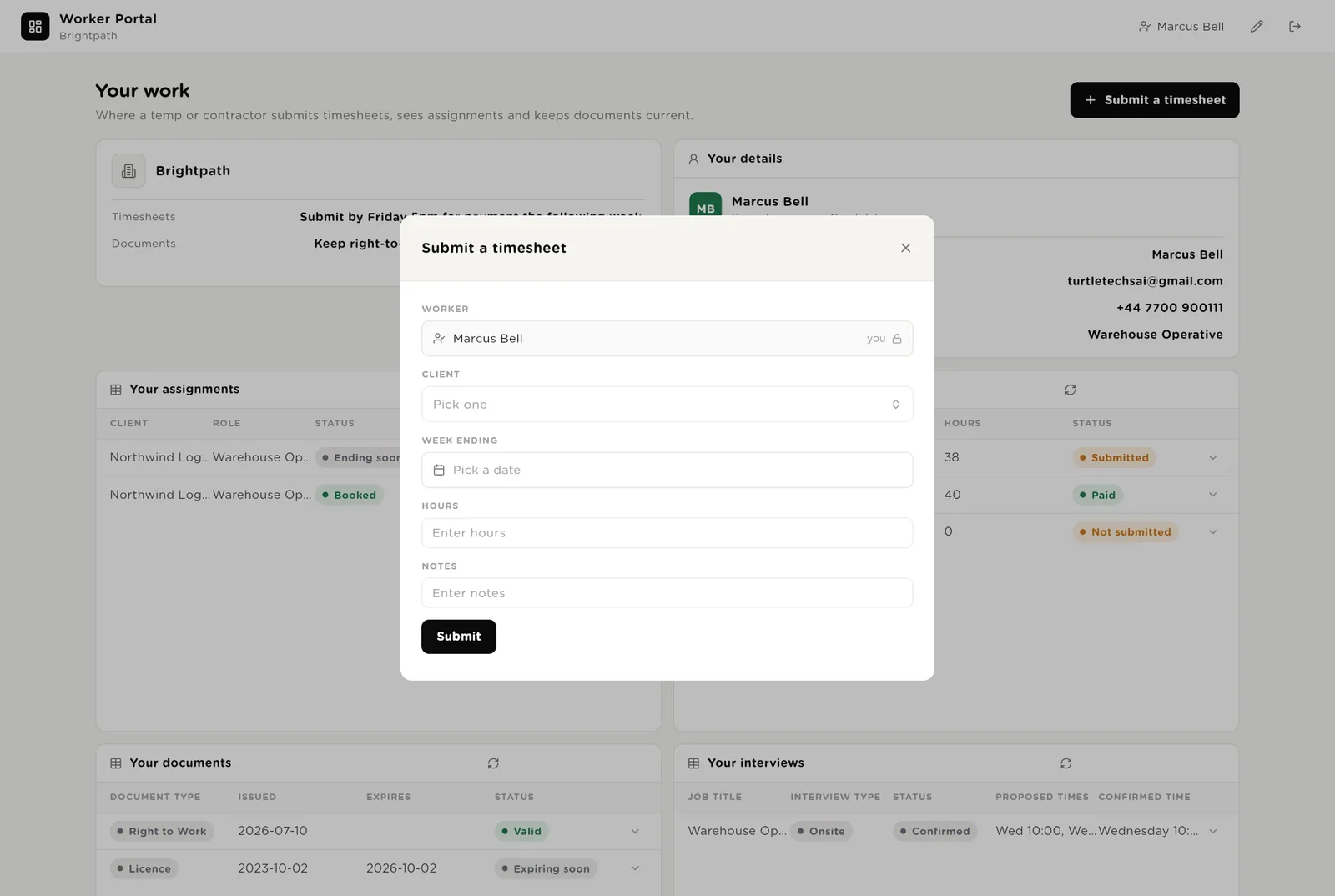
A temp worker logs in and is matched to their own record. They see their assignments with pay rate, their timesheets and whether they are approved, their documents with expiry dates, and their interviews. They submit a timesheet with three fields. The Temp Worker Help Desk answers pay and shift questions from their own records only.
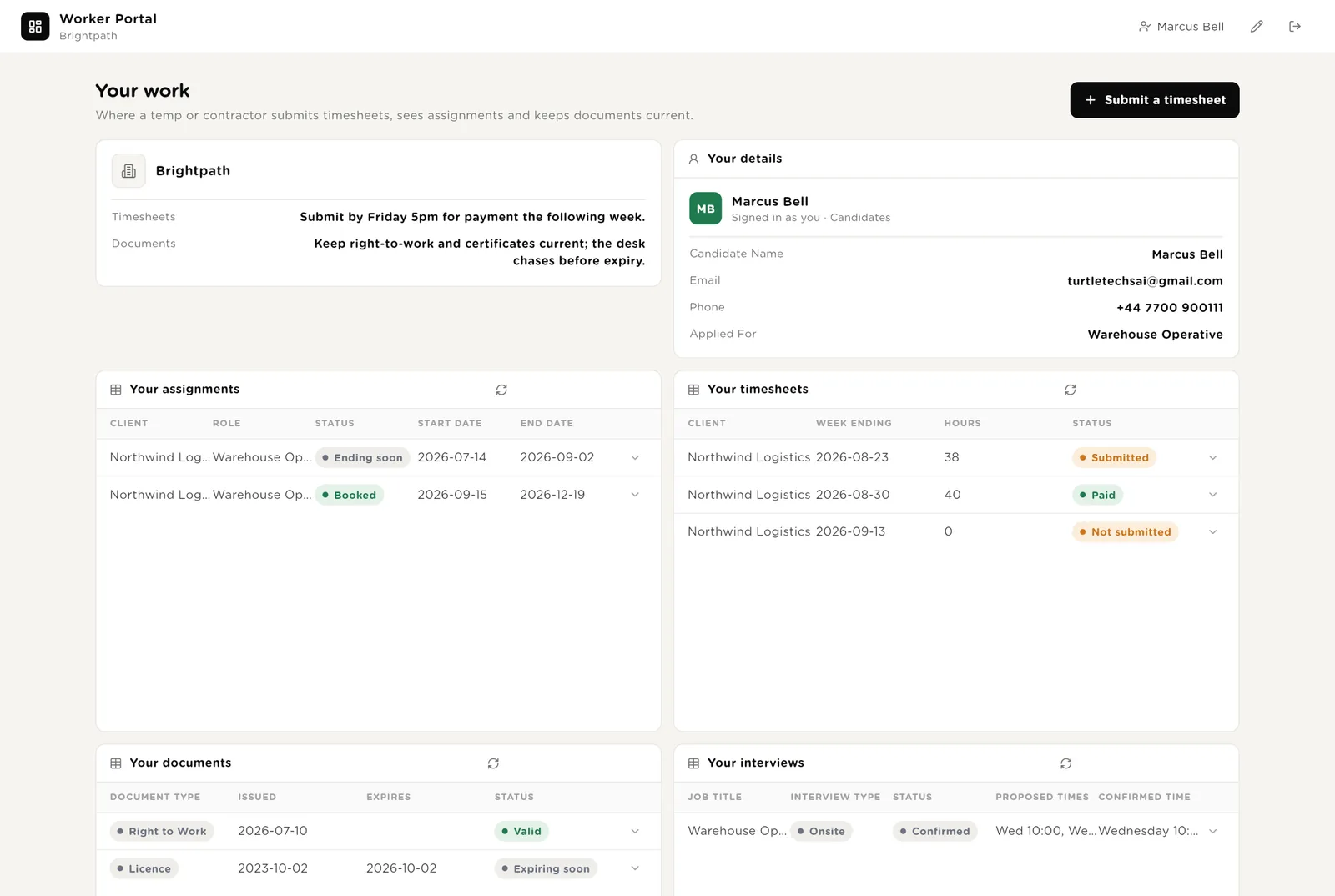
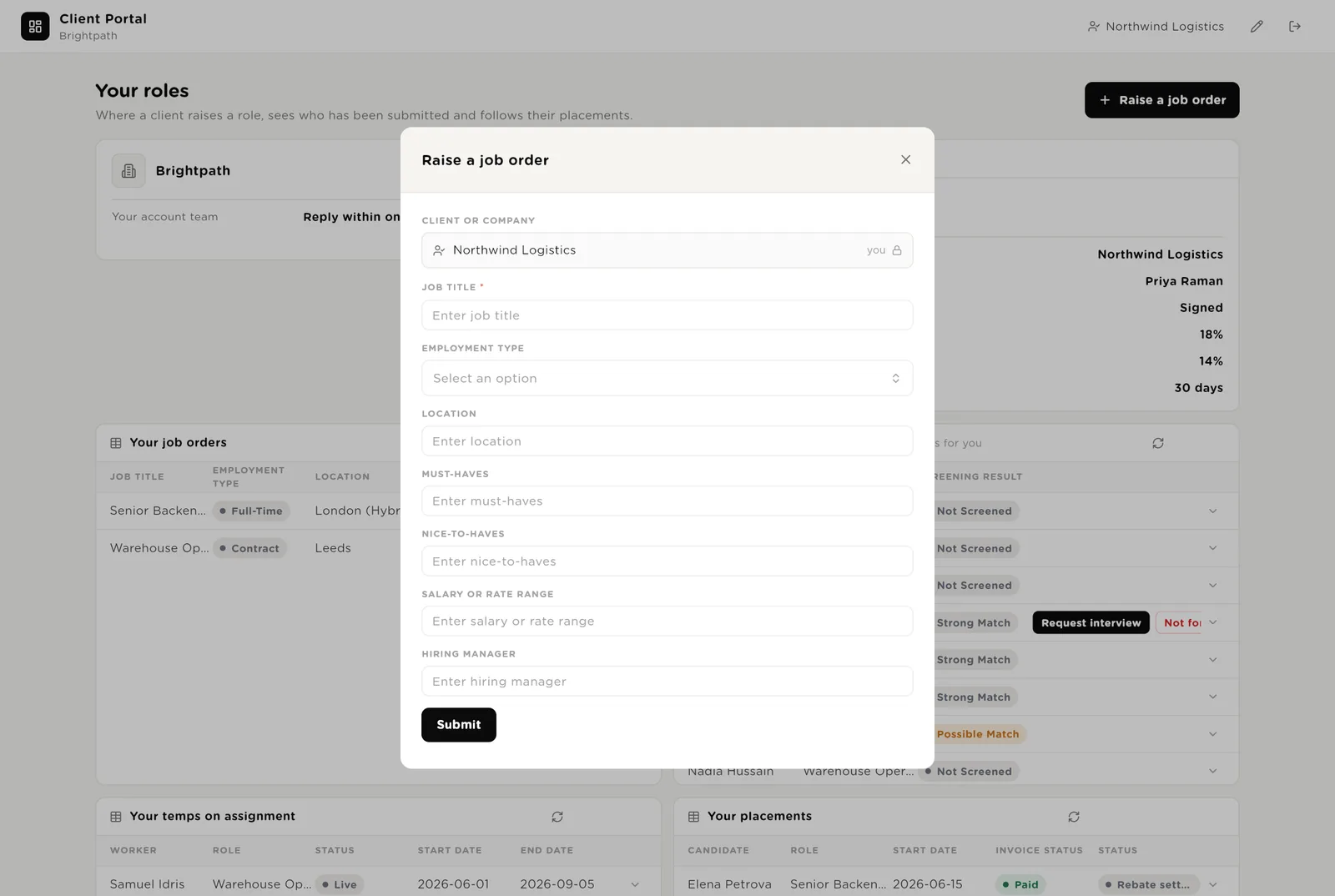
Week, client, hours. The worker's name is filled in automatically. It appears in your approval list at once.
"When will I be paid for last week?" is answered from the timesheet status and the payment terms. The desk never talks about another worker.
Forms open in a small window over the page. The client or worker is filled in from whoever is logged in, so a client cannot raise a job for another company and a worker cannot submit hours for a colleague.
A coordinator is like a junior colleague. You give it a task in plain words. It shows you a plan. You approve the plan and it does the work, using the agents and the tables. Each coordinator looks after one part of the desk and stays in its lane.
Looks after candidates. Screening, interviews, candidate messages, client summaries, the weekly report. Riley uses the six recruiting agents and works in the Jobs, Candidates and Interviews tables.
Looks after clients. Friday updates, checking a new job brief, finding clients who went quiet. Owen uses three agents and works in the Clients, Jobs and Placements tables.
Looks after temp workers. Timesheets before payroll, assignments kept up to date, finding the next job before the current one ends. Sam uses three agents and works in the Assignments, Timesheets and Margins tables.
Looks after paperwork. Right to work, DBS checks, licences, insurance, and their expiry dates. Nadia never says someone is cleared to work. Nadia tells you what is missing and who needs to fix it.
| Coordinator | Looks after | Uses these agents |
|---|---|---|
| Riley | Candidates: screening, interviews, messages, summaries, the Monday report. | Candidate Screener, Interview Scheduler, Message Writer, Summary Writer, Weekly Report, Feedback Chaser |
| Owen | Clients: Friday updates, checking new job briefs, clients who went quiet. | Client Update Writer, Job Brief Checker, Quiet Client Finder |
| Sam | Temp workers: timesheets, assignments, the next job. | Timesheet Chaser, Next Job Finder, 12-Week Rule Watcher |
| Nadia | Paperwork: right to work, DBS, licences, insurance. | Document Expiry Watcher |
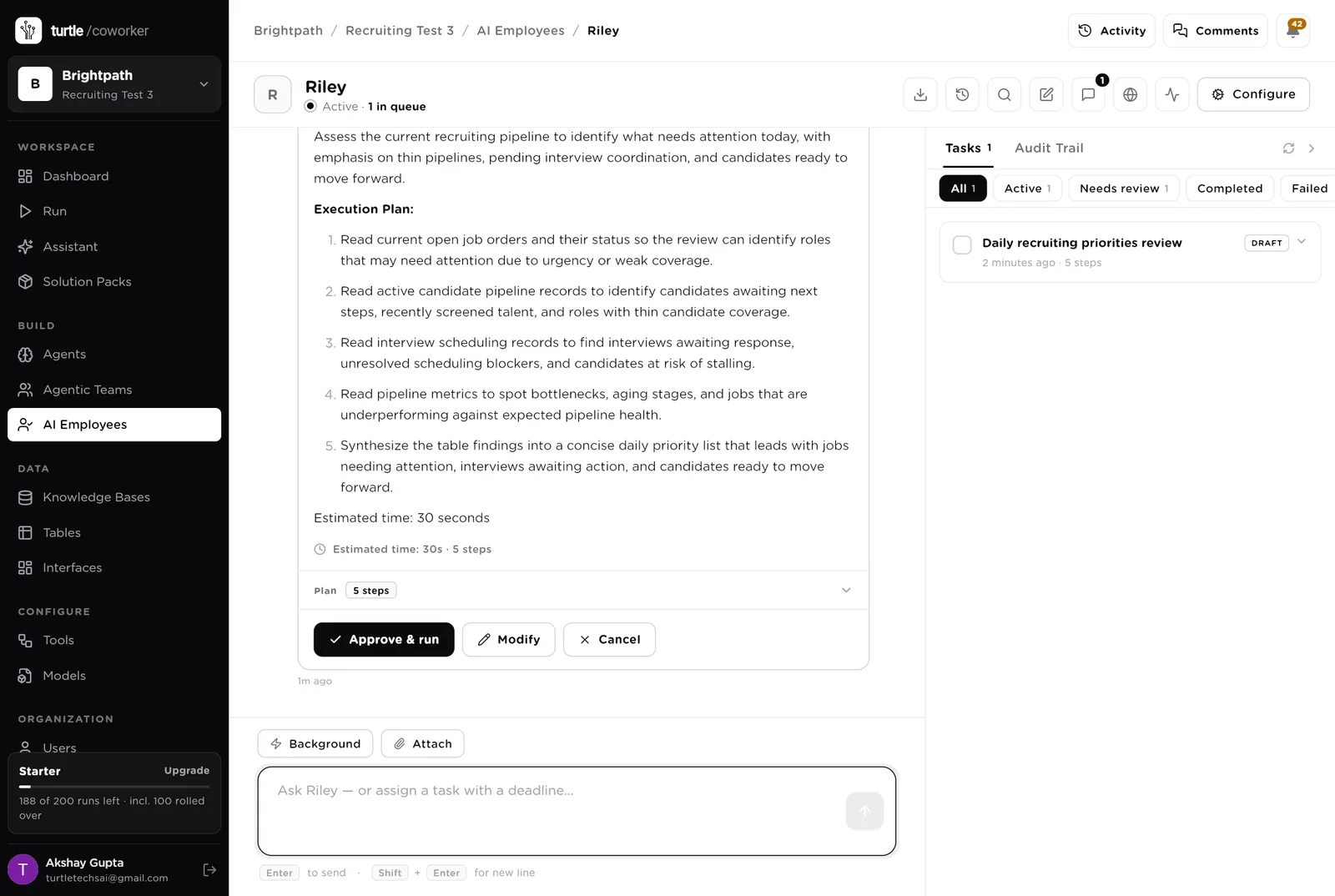
You typed "What needs my attention today?". Riley wrote a five-step plan and is waiting. Nothing runs until you click "Approve and run". You can also change the plan or cancel it.
An agent does one job. It starts on a schedule, when something new arrives, when you press a button, or when a coordinator asks it. It reads your tables and your playbook, writes its result into the record, and stops. No agent ever sends anything.
Checks a new candidate against the job. Writes "Strong match", "Possible match" or "Not a match", and explains why in plain words. Runs by itself the moment a candidate is added. It never rejects anyone. A recruiter does that.
Writes the message that asks a candidate or a manager when they are free. Suggests two or three time slots. It never confirms a time and never sends a calendar invite on its own. A person approves that.
Writes the update a candidate should get: "we received your application", "you have been put forward", or "sorry, the job is on hold". It is always honest and never promises a job, a salary or an interview. It never sends. You do.
Writes the one-page summary you send to a client about a candidate: who they are, how they match each requirement, and where they fall short. Honest about gaps. Saves it to the candidate and marks them "Sent to client".
Every Monday it counts the open jobs, the candidates at each stage, the interviews waiting for an answer and the recent placements. It writes a short report that starts with the jobs that have no candidates.
Every weekday morning it finds interviews that happened but got no feedback. It writes one short, polite reminder to the hiring manager with an easy yes-or-no question.
Checking a job brief before you spend a week on it, the Friday update every client wants, and the call to the client who went quiet.
Reads a new job and lists what is missing before anyone starts searching: no salary, vague requirements, no named manager, no signed contract with the client. Writes the questions to ask.
Every Friday afternoon it writes one short update for each client about each open job: what happened this week, how many candidates are at each stage, and the one thing you need from them.
Every Tuesday it finds clients you have not worked with for 90 days and writes a good reason to call them, based on the last job you filled for them. Not "just checking in".
Before payroll it finds the timesheets that are missing (the worker's job) and the ones waiting for the client to approve (the client's job). It writes the reminder for each and gets a little firmer the third time.
The jobs every temp desk knows it should do and rarely finds time for: document expiries, the 12-week rule, finding the next job before the current one ends, and following up placements during the guarantee period.
Every weekday morning it checks right-to-work documents, DBS checks, licences and insurance. It lists what has expired, what expires within 30 days and what is missing, starting with people who are working right now.
In the UK a temp worker gets the same pay as a permanent employee after 12 weeks in the same job. Every Monday this agent lists who is about to reach 12 weeks so you can agree the new rate with the client in time. It never sets the rate.
Every Wednesday it finds temp workers whose job ends within three weeks and looks for their next job among your open jobs and other clients. It writes the match, or says honestly that there is none.
Every Tuesday it looks at each permanent placement. Who needs a check-in call? Whose guarantee period is over, so the fee is safe and you can ask for a referral? Which invoice is unpaid? It writes the check-in and the referral request.
A help desk is a chat. It reads the question, picks the right specialist, and answers from your records and your playbook. Help desks give advice; they do not change records (except a candidate updating their own phone number). Two of them live inside the portals, so clients and temps can ask instead of emailing you.
For your recruiters. Ask it a question about a screening decision, how to present a candidate, or an interview clash. It gives advice from your playbook. It never rejects, offers or confirms anything.
For candidates. It can tell a candidate where their application stands, update their phone number or availability, or explain how the process works. It only sees that candidate's own record and never promises anything.
For your recruiters, and for clients through their portal. Questions about fees, contracts, a weak job brief, or an unhappy client. It never agrees a fee or signs anything.
For the person who handles paperwork. Questions about right to work, contractor tax status (IR35) and the 12-week rule. Advice only, not a substitute for a lawyer.
For temp workers, through their portal. Pay, timesheets, shifts, end dates. It only sees that worker's own records and never talks about anyone else.
Tables are where everything is stored. They look like spreadsheets and your team can open and edit them at any time. The records are linked to each other (a candidate belongs to a client, an assignment belongs to a worker), which is how the portals know what to show.
| Table | What is in it | Stages |
|---|---|---|
| Job Orders | The jobs you are filling. Client, requirements, salary, hiring manager. | Open · On hold · Filled · Cancelled |
| Candidates | Every candidate, their CV summary, the screening result, and which stage they are at. Temp workers are here too. | New → Screened → Sent to client → Interview requested → Interviewing → Offer → Placed |
| Interviews | One row per interview: suggested times, type, confirmed time. | Asking for availability · Times suggested · Confirmed · Done · Cancelled |
| Weekly Numbers | The counts the Monday report writes down each week. | One row per week |
| Clients and Terms | Every client, the main contact, whether the contract is signed, your fee, your margin, payment terms. | Signed · Sent, not signed · Not sent · Expired |
| Assignments | Temp jobs: who is working where, at what rate, until when. | Booked · Live · Ending soon · Ended · Cancelled |
| Timesheets | One row per worker per week. Hours and whether the client approved them. | Not submitted · Submitted · Approved · Queried · Paid |
| Compliance Documents | Right to work, DBS, licences, insurance, with expiry dates. | Valid · Expiring soon · Expired · Missing · Under review |
| Placements | Permanent placements: the fee, the invoice, and the guarantee period. | Started · In guarantee period · Cleared · Left, refund due · Refund settled |
| Next Jobs | Temp workers whose job is ending, and the next job found for them. | Not started · Matched · Offered to client · Rebooked · Lost |
| Margins | What each temp assignment earns you per week. | One row per worker per week |
The software knows nothing about your agency except what the tables and your playbook tell it.
A document with a starter page that tells you what to write: how you judge candidates, how you write summaries for clients, how you speak to candidates, how you arrange interviews, and your rules on fair hiring. Every agent reads it before it works.
The desk uses whichever AI model your company has already connected. You do not choose or manage a model for each agent.
Only screening runs from day one. Everything else is switched off until you turn it on from the desk. You can also press "Run now" on any of them.
| Automation | Agent | When | Ships |
|---|---|---|---|
| Screen new candidates | Candidate Screener | The moment a candidate is added | On |
| Morning screening sweep | Candidate Screener | Weekdays 07:00 | Off until you switch it on |
| Move interviews forward | Interview Scheduler | Weekdays 08:00 and 14:00 | Off until you switch it on |
| Chase interview feedback | Feedback Chaser | Weekdays 09:00 | Off until you switch it on |
| Monday report | Weekly Pipeline Report | Monday 07:30 | Off until you switch it on |
| Friday client updates | Client Update Writer | Friday 15:00 | Off until you switch it on |
| Find quiet clients | Quiet Client Finder | Tuesday 08:00 | Off until you switch it on |
| Chase timesheets | Timesheet Chaser | Friday and Monday 09:00 | Off until you switch it on |
| Check document expiries | Document Expiry Watcher | Weekdays 07:00 | Off until you switch it on |
| Check the 12-week rule | 12-Week Rule Watcher | Monday 08:00 | Off until you switch it on |
| Find next jobs for temps | Next Job Finder | Wednesday 08:00 | Off until you switch it on |
| Placement follow-ups | Placement Follow-up | Tuesday 09:00 | Off until you switch it on |
Buttons on the desk also run agents. "Re-screen" runs the screener again. When a run starts from a button, it runs in the name of the person who pressed it, and if an email is approved it goes from that person's own Gmail.
Three things always need a person. The software stops and waits at each one.
Mark screened, Send to client, Confirmed, Approve (a timesheet), Verified (a document), Terms signed, Invoice raised. These are the decisions. Only a person can press them. The software can move a candidate to "Screened"; it cannot move anyone to "Rejected", approve a timesheet or mark a document valid.
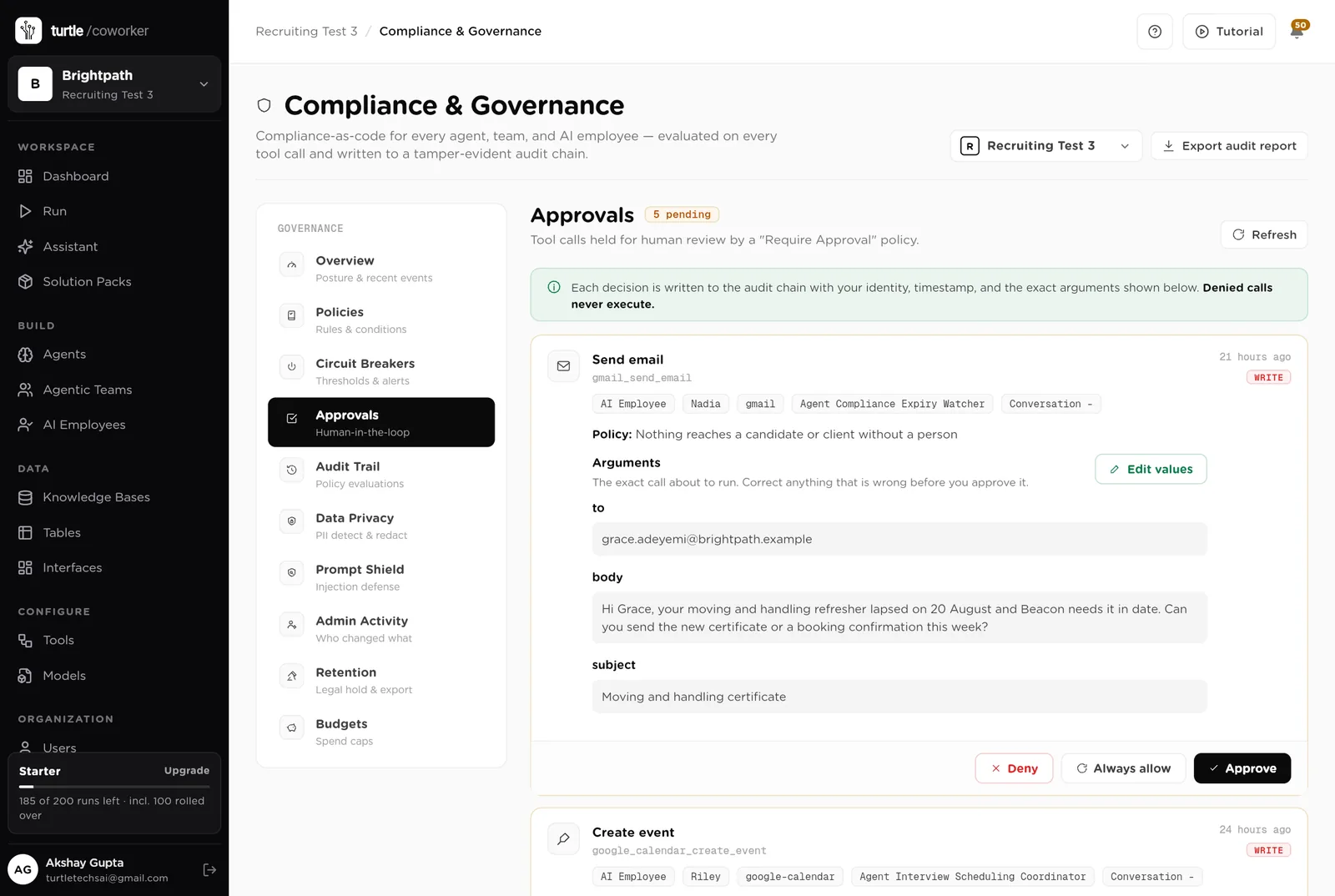
When an agent wants to send an email or a calendar invite, it stops. The message appears in Approvals exactly as it would be sent. You read it, fix anything wrong, and click Approve or Deny. Each approval is for one message. The next one asks again.
When you give a coordinator a task, it writes a plan and shows it to you first. Approve and run, change it, or cancel. It does not start work on its own.
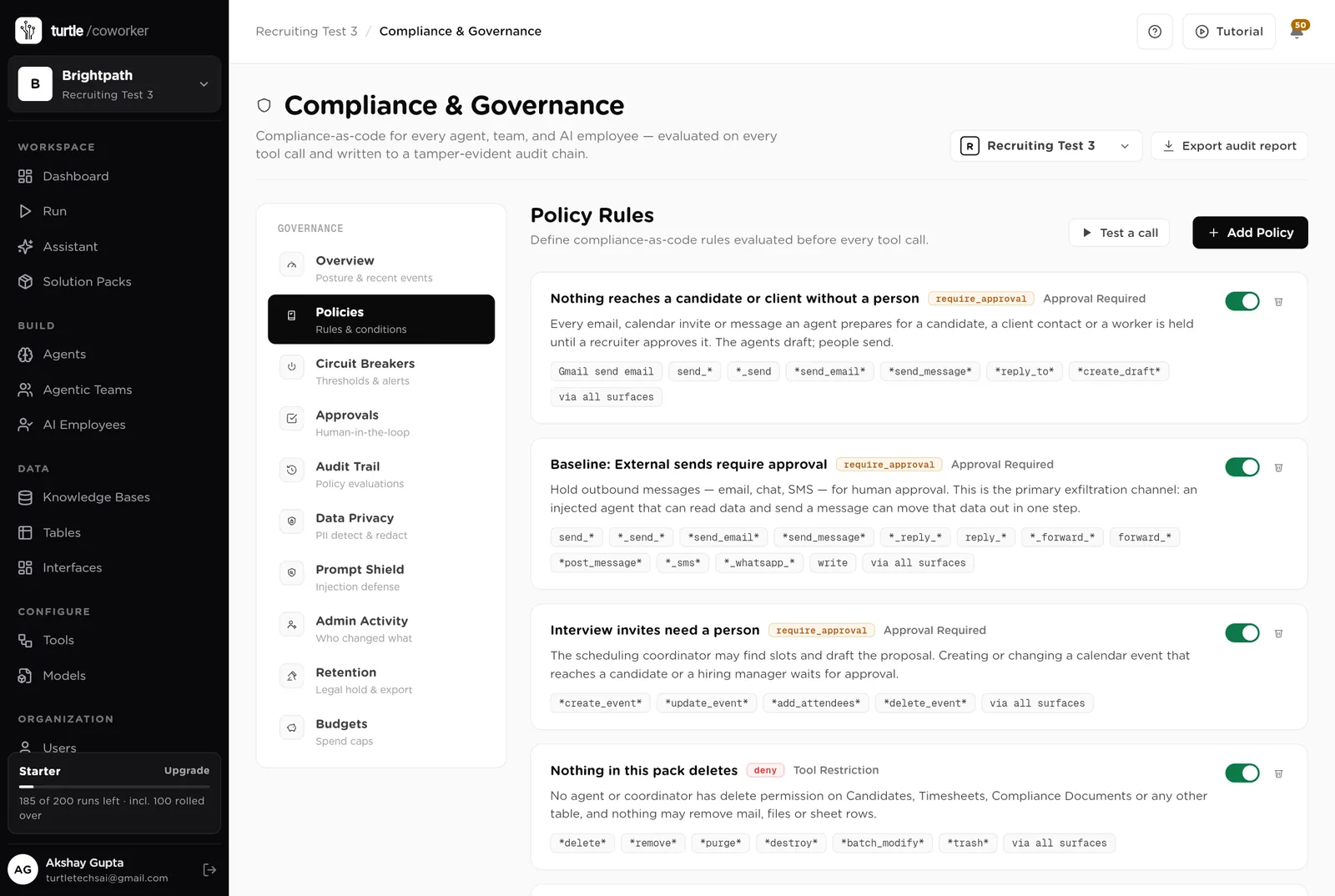
A rule is checked before every single thing the software tries to do. The pack installs six rules of its own on top of the six every workspace starts with. You can see them, switch them off, or add your own.
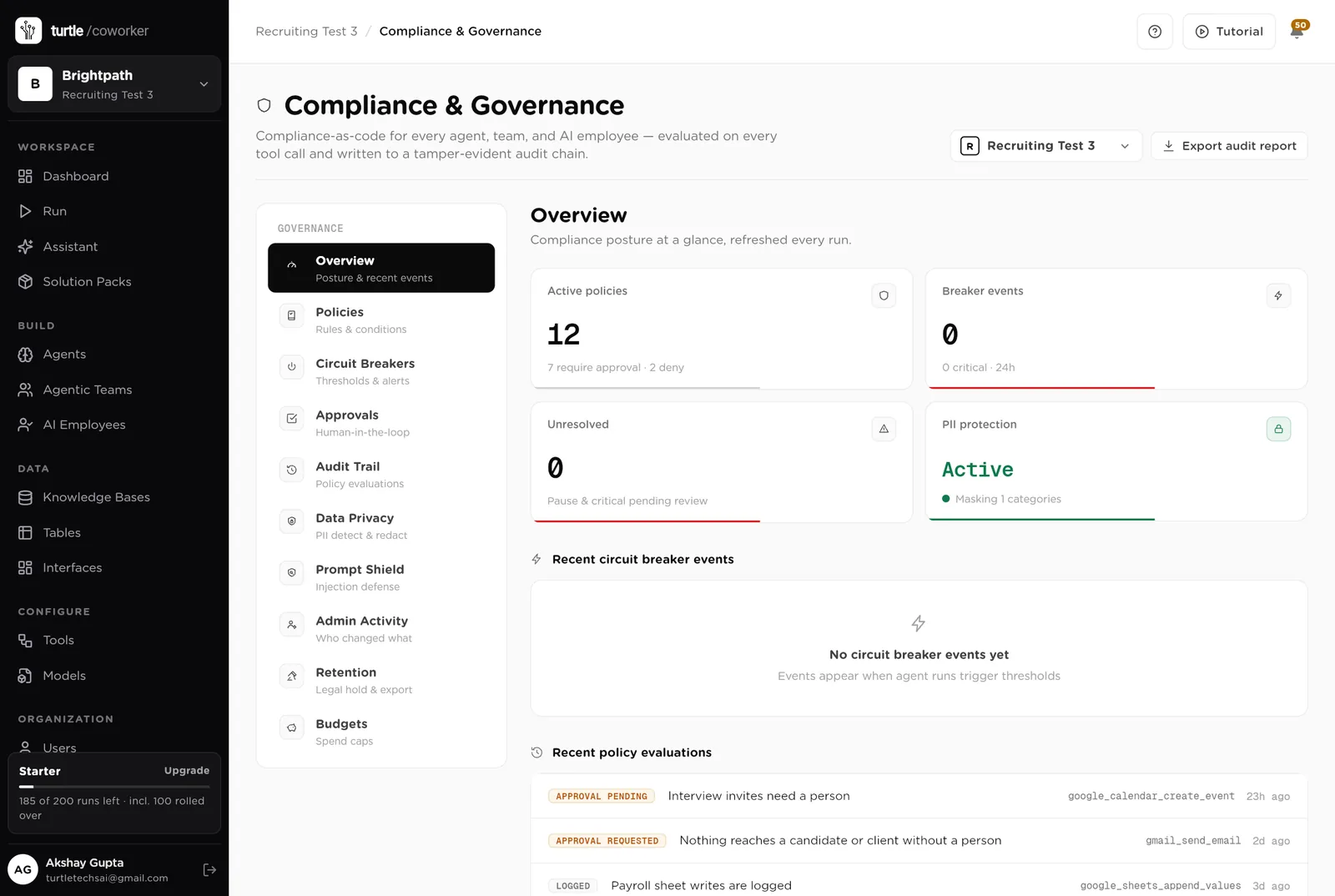
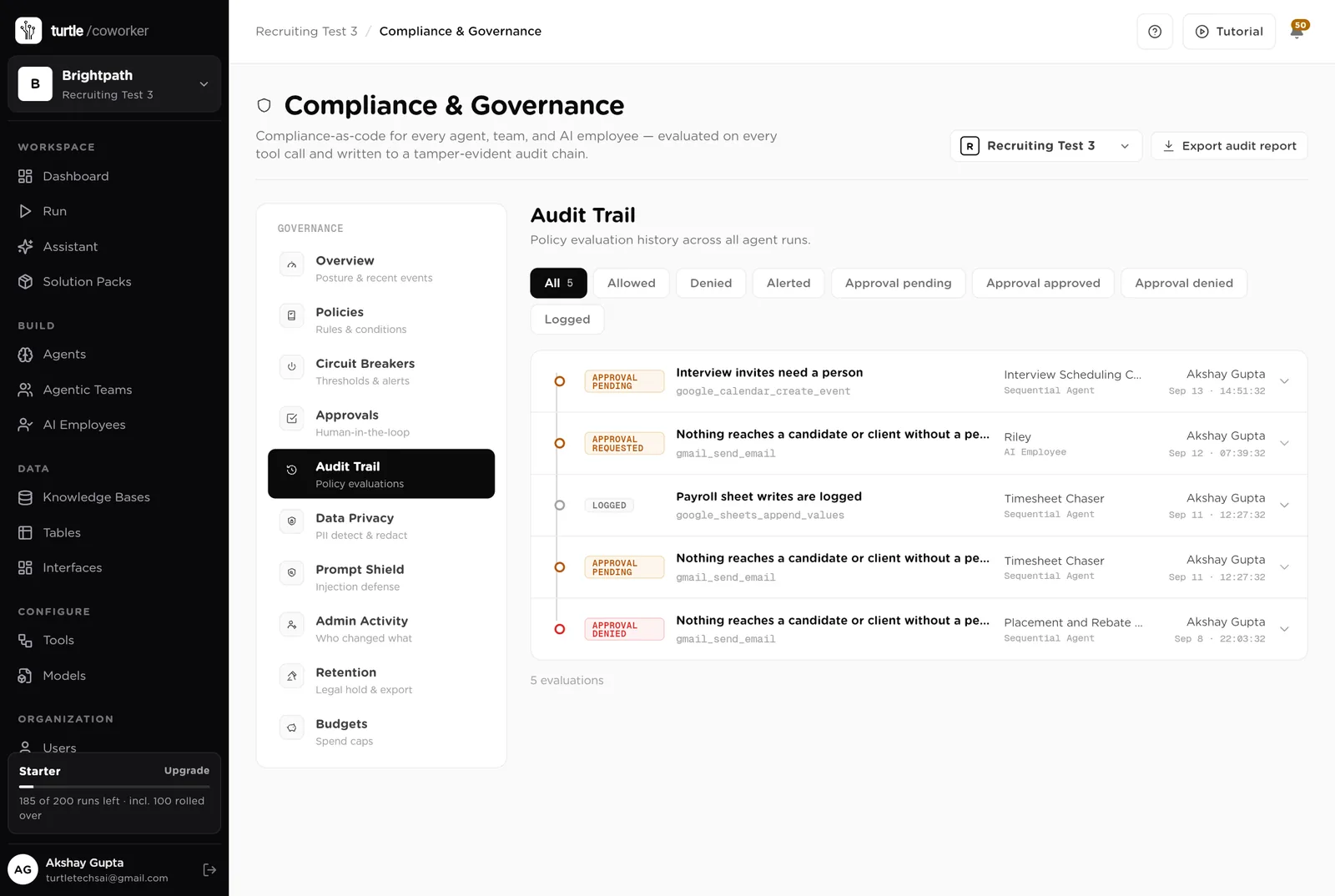
For every run you can see which agent ran, why it ran, every step it took, and every rule that checked it. Passwords and card numbers are blanked out before anything is stored.
A monthly budget with a warning level and a hard stop. If an agent starts failing or costing more than usual, it is paused automatically until someone looks.
Personal details are detected and masked. Instructions hidden inside CVs or emails are neutralised. Every password and key is encrypted. Candidate data leaves your tables only through a message a person approved.
The screener is told to ignore age, gender, ethnicity and every other protected characteristic, and to explain its reasoning point by point. It never rejects. "Not a match" is advice; the Reject button belongs to a person.
Your team sees the desk. Each client and worker sees only their own portal and their own records. Only owners and admins can change the layout. Data retention, legal hold and audit export are in the Compliance screen.
These estimates assume a small agency: three recruiters, about 40 applicants a week, 6 active clients, 30 temps working, weekly payroll. "Before" is the time these jobs take by hand. "After" is the reading and deciding that is left. Your numbers will differ. These are estimates, not measurements; after a month the audit trail gives you real figures.
| Job | Assumption | Hours before | Hours after | What changes |
|---|---|---|---|---|
| Screening applicants | 15 min each, 40 a week | 10.0 | 2.5 | The result is written before you open the CV. You read and decide. |
| Writing candidate summaries for clients | 45 min each, 6 a week | 4.5 | 1.5 | Drafted for you. You edit and send. |
| Arranging interviews | 30 min each, 8 a week | 4.0 | 1.5 | The messages are drafted. You confirm the time. |
| Chasing managers for feedback | 1.5 h a week | 1.5 | 0.3 | Reminders written every morning. |
| Weekly client updates | 20 min per client, 6 clients | 2.0 | 0.5 | Drafted every Friday. |
| Checking a new job brief | 1 h each, 2 a week | 2.0 | 0.7 | The gaps and the questions are listed for you. |
| Chasing timesheets | 3 h a week for 30 temps | 3.0 | 0.7 | Reminders drafted. You approve them all at once. |
| Checking document expiries | 2 h a week | 2.0 | 0.3 | Checked every morning. |
| 12-week rule, next jobs, placement follow-ups | 3 h a week, often skipped | 3.0 | 0.8 | Done every week without anyone remembering. |
| The weekly report | 1.5 h a week | 1.5 | 0.2 | Written every Monday. |
| Total per week | 33.5 | 9.0 | About 24 hours a week back. Roughly half of one person's week. |
Screening happens the moment a candidate applies, so a strong one is in front of the client the same day. The first agency to send usually gets the interview.
Next jobs found before the current one ends. Timesheets in before payroll closes. A placement check-in in week three, not a refund in week eight.
A worker sent home for an expired DBS costs a day's margin and the client's trust. The daily check lists those first.
Estimates, not measurements. After a month the audit trail gives you real figures.
Installing takes one click. The real work is writing your playbook and switching things on one at a time.
Install the pack from the Products page. Connect Gmail and Google Calendar when asked. Sheets only if you keep a payroll spreadsheet.
Replace the starter page with your own: how you judge candidates, how you write to them, your summary format, your rules. This is what makes the results sound like you.
Add your open jobs, current candidates, clients, assignments and documents to the tables. Paste from a spreadsheet or type them in. Screening is already on.
Invite your recruiters. Invite client contacts and temp workers as free members and share the portals with them. Their email links them to their record.
Work from the Desk page. Switch on timesheet chasing and the document check first. Then feedback chasing and Friday updates. Approve messages from the desk.
Read the Monday report, switch on the rest, and let the help desks answer the questions that used to be emails.
You pay for the platform, not per desk. The plan sets how many agents, employees and workspaces you can run; every desk is included, and runs are billed on your own model key at cost. 14 agents in this desk count against the plan's agent limit.
See plansFor bookkeepers, fractional controllers and finance teams running AP for one or many entities
Sales and marketingFor marketing teams of 1 to 10 people running email, forms, search and a little paid media
Sales and marketingFor founders and small marketing teams publishing in the founder's name
We use analytics cookies to see which pages help and which don’t. Nothing loads until you choose. Cookie Policy

Hello there.
AI agent. It can make mistakes, and a human reviews anything that matters.