Software for the sales manager's pipeline. Every call is summarised the moment it is logged: what was said, the objections, the next steps with dates, and the CRM note drafted for a person to approve. Every weekday morning the deals that have gone quiet, or whose close date has passed, get a nudge drafted for the owner and a short message drafted for the customer. Before a meeting, the contact is looked up and a one-page brief is written. When a deal changes stage, the email sequence follows. Every Friday the review pack is written: the numbers, the slipped deals with reasons, three decisions for Monday. No agent changes a deal amount, closes a deal, moves an owner or sends a customer a word.
For sales teams of 3 to 30 reps with a sales manager or a RevOps person who wants the pipeline honest without reading five tools
The pack is built for the person who is responsible for a sales team's pipeline being up to date, every call being in the CRM, and no deal being forgotten. It fits three kinds of team.
Three to thirty reps, one CRM, one call notes tool, one sequencer and a shared calendar. You get the desk, Ari and every agent. Your CRM stays the record.
One region or one product line in an MNC sales organisation with its own pipeline and forecast. The desk gives the manager the Friday numbers and the quiet-deal list; nothing changes a deal from software.
One workspace per client, each with its own CRM connection, playbook and Friday review. The summariser and the chaser are the same for every client; the stages and the tone differ.
| Sales | Calls written up, quiet deals chased, briefs before every meeting, the CRM kept honest. |
| Revenue Operations | Sequences and CRM stages kept in step, the Friday review pack, the rules that stop software touching a deal. |
| Marketing | The handoff: which sequences are running, which contacts are paused because a deal moved, what the objections were. |
| Customer Success | The won deals with the last conversation and what was promised, ready for onboarding. |
Everything the software produces is a note, a draft or a list for a person. It never changes a deal amount, never sets a deal to Won or Lost, never changes the owner, never emails or messages a customer, never adds anyone to a sequence, and never deletes anything. Writing a note or a task into the CRM waits for a person.
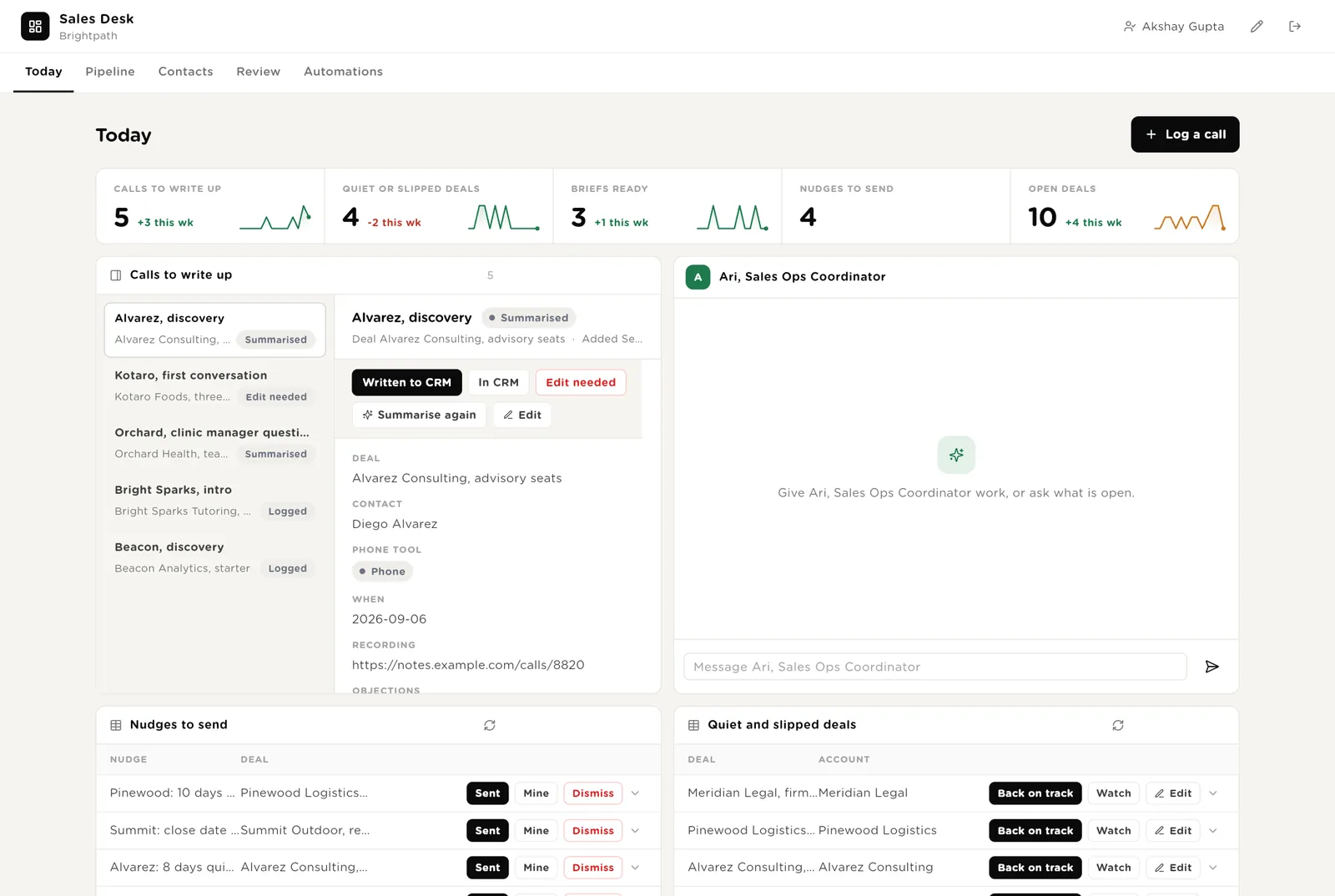
The first screen the manager opens. Five live numbers. Every call not yet written into the CRM, with its summary. Ari beside them. The nudges drafted and waiting to be sent. The deals that have gone quiet or slipped.
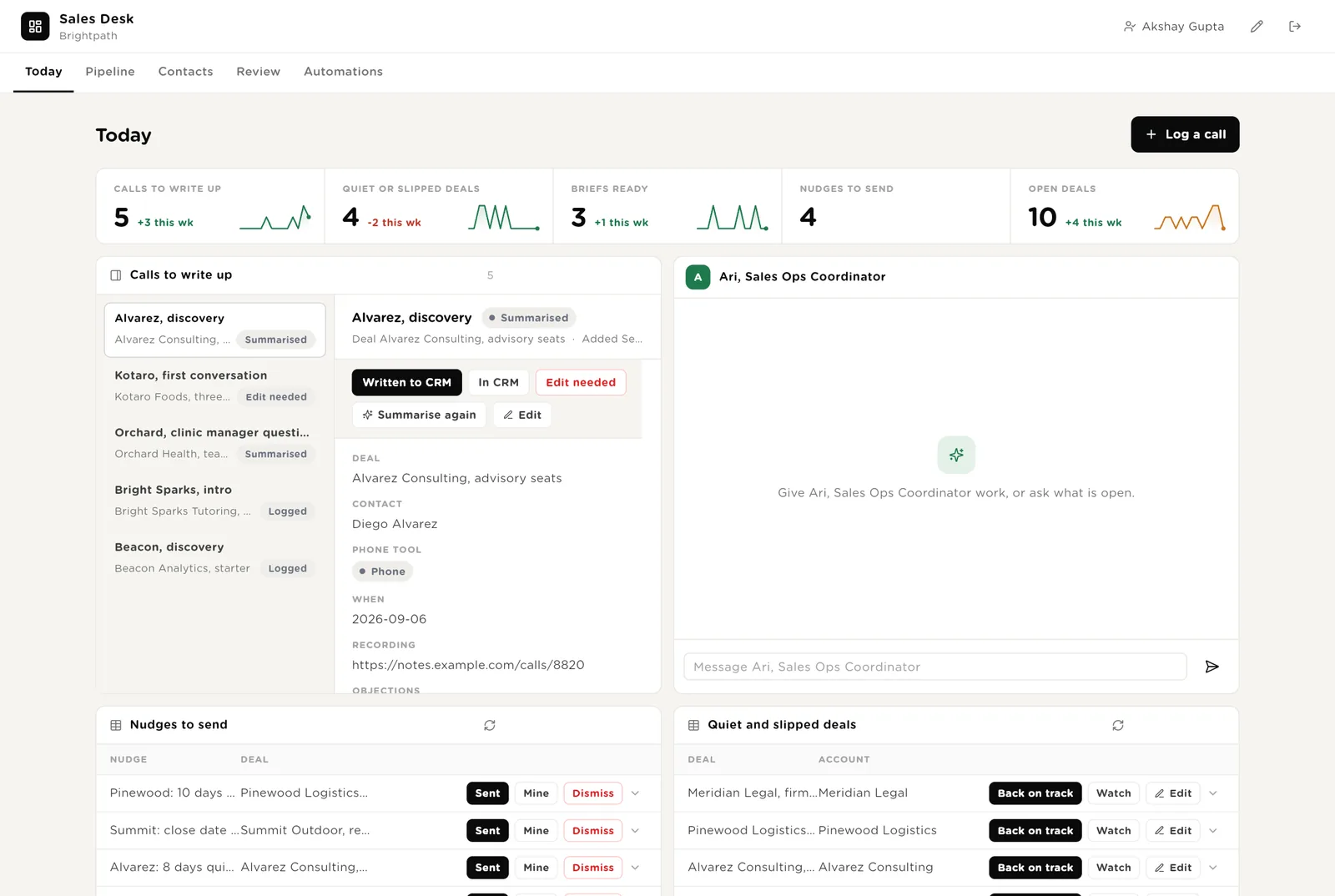
You approved the note and it is in the CRM. Click Written to CRM so the desk records it and the call leaves the list.
Runs the summariser once more on a call, after you have corrected the recording link or the deal.
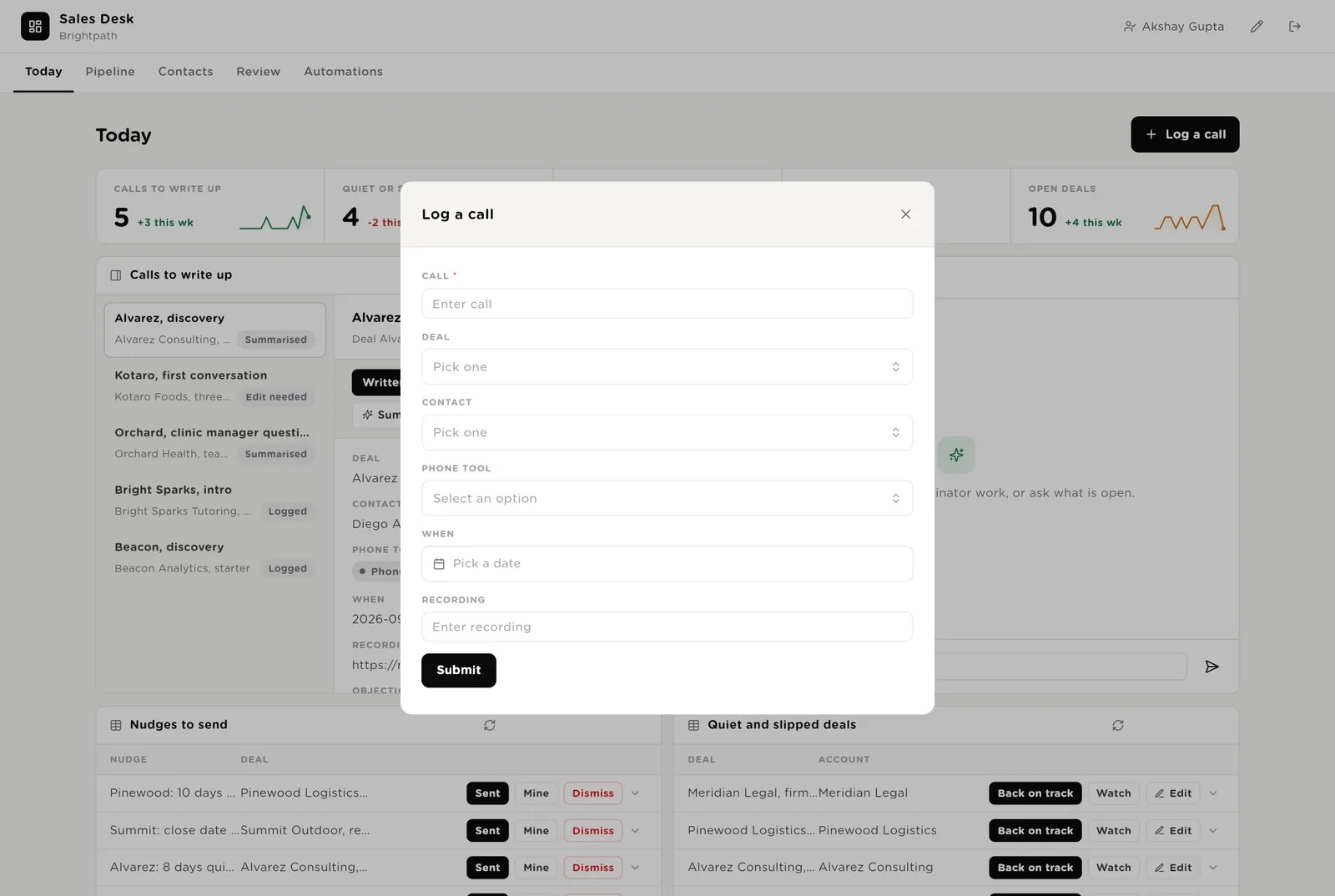
Opens a short form. Name the call, pick the deal and the contact, paste the recording link. The summary appears within a minute.
Scroll down for the nudges waiting to be sent, the deals that have gone quiet, everything the software wants to do that needs your Approve, and Ari's recent work.
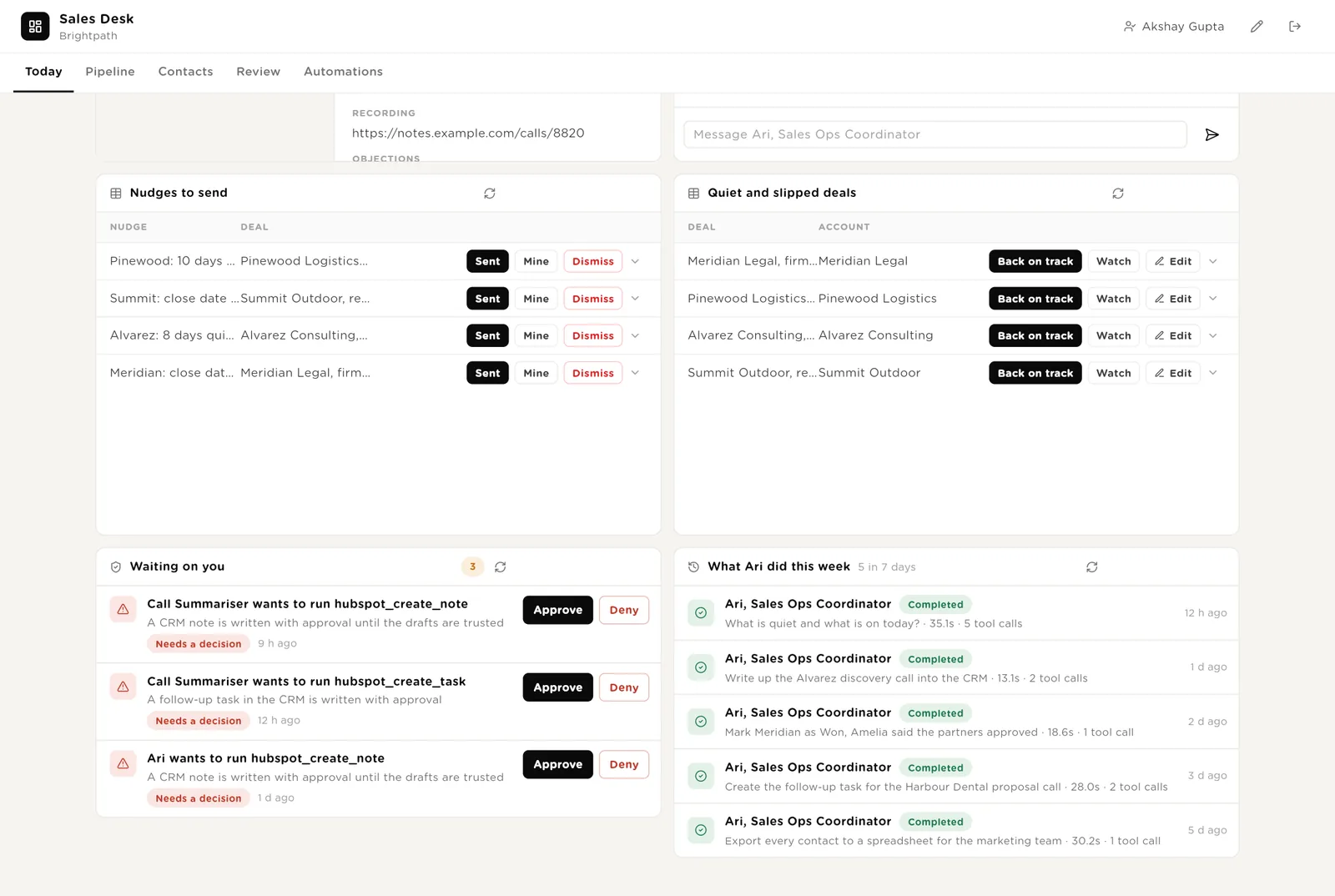
You read the nudge, sent the touch to the customer from your own inbox, and click Sent. The desk records it.
The deal has a next step and a date again. Its risk goes back to On track and it leaves the quiet list.
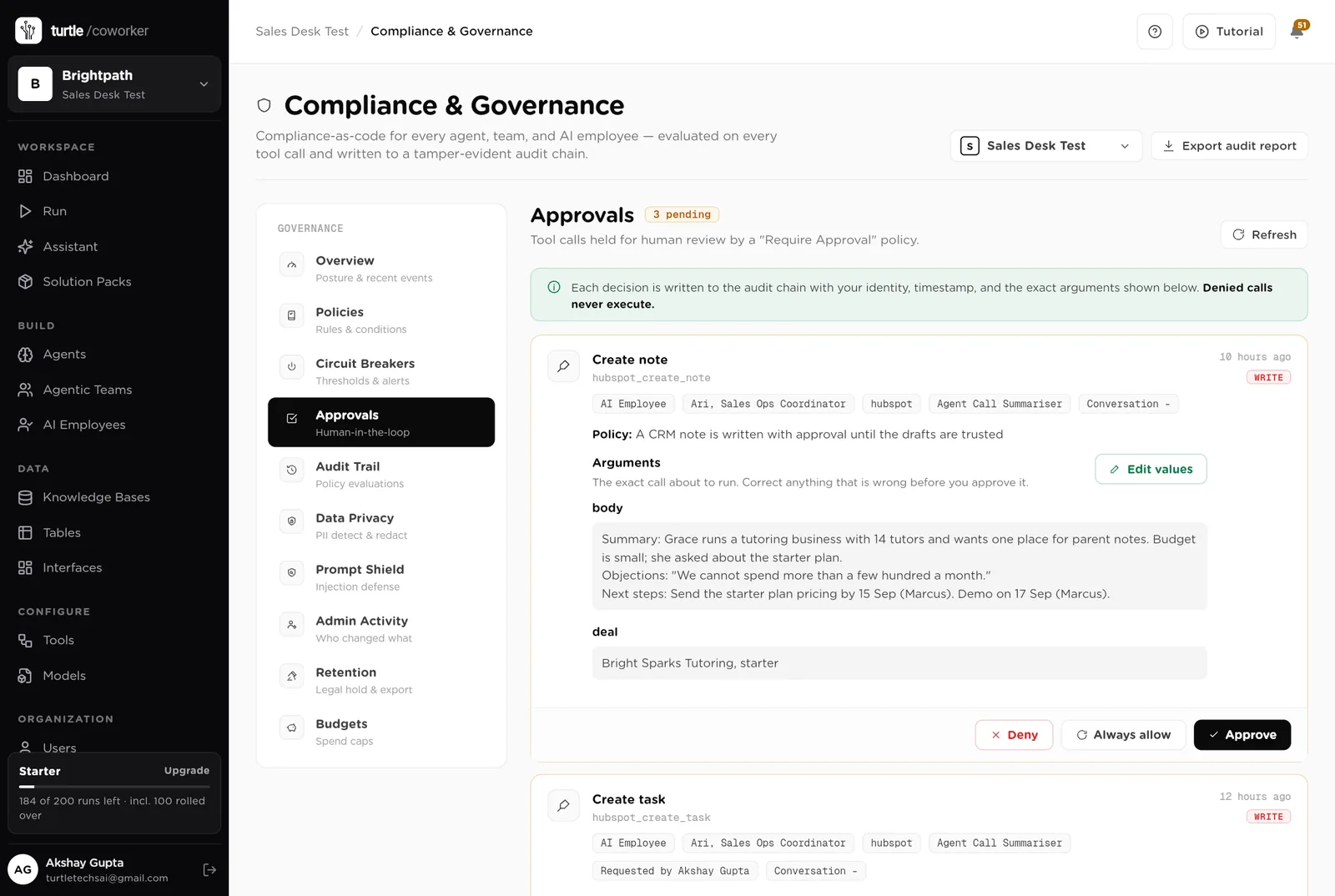
The exact call the software wants to make: the note text, the task title. Approve or Deny in place; the audit trail records who decided.
Every open deal as a card by stage; drag a card to move it. A heatmap of stage against risk, so you can see at a glance where the pipeline is quiet. The open deals, the sequences running, and the count by stage.
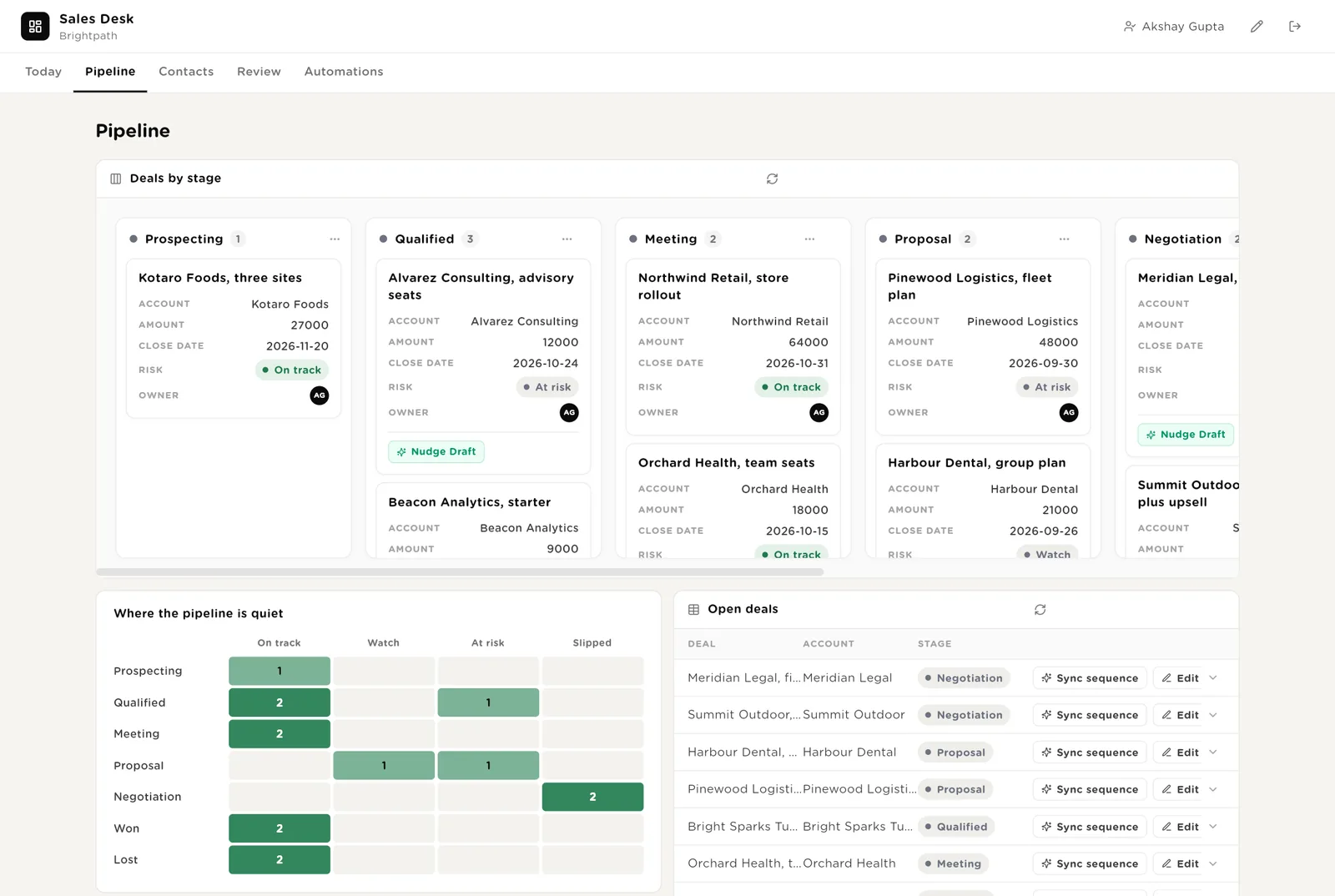
Moving a deal to Meeting pauses its sequence. Moving it to Won or Lost is your call and yours alone; the software never does it.
Runs the sequence check on one deal now, if you changed the stage in the CRM rather than on the desk.
A dark cell at Proposal and At risk means proposals are going out and not being chased. That is the Monday conversation.
Every contact with whether they have been looked up and whether a brief is ready. Ask for a brief with one click. The briefs ready for today. The contacts not yet enriched.
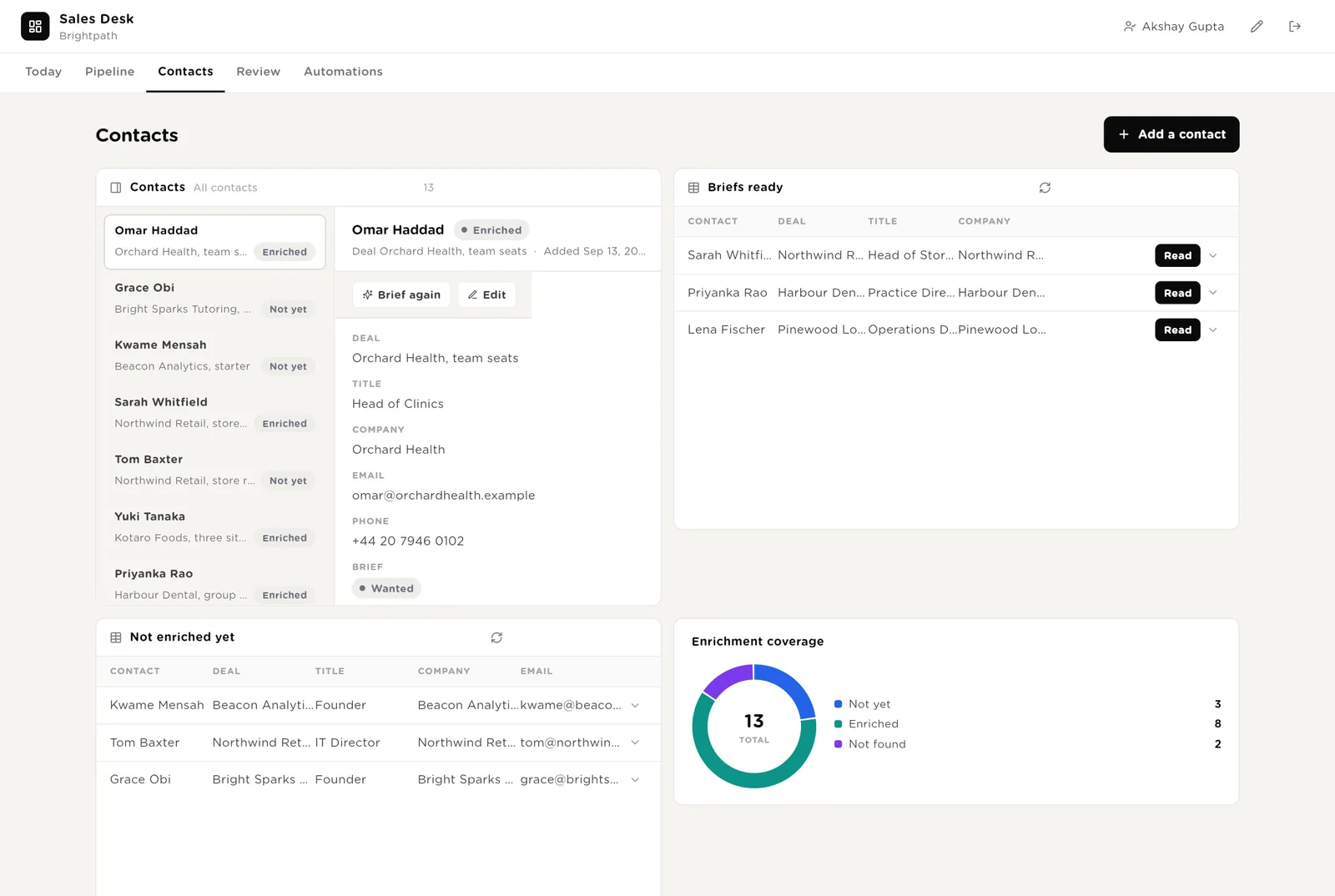
Marks the contact as wanting a brief. The enricher looks the person and the company up, reads the last conversation, and writes the page within a minute.
You read the brief before the call. Click Read so it leaves the list; the brief stays on the contact.
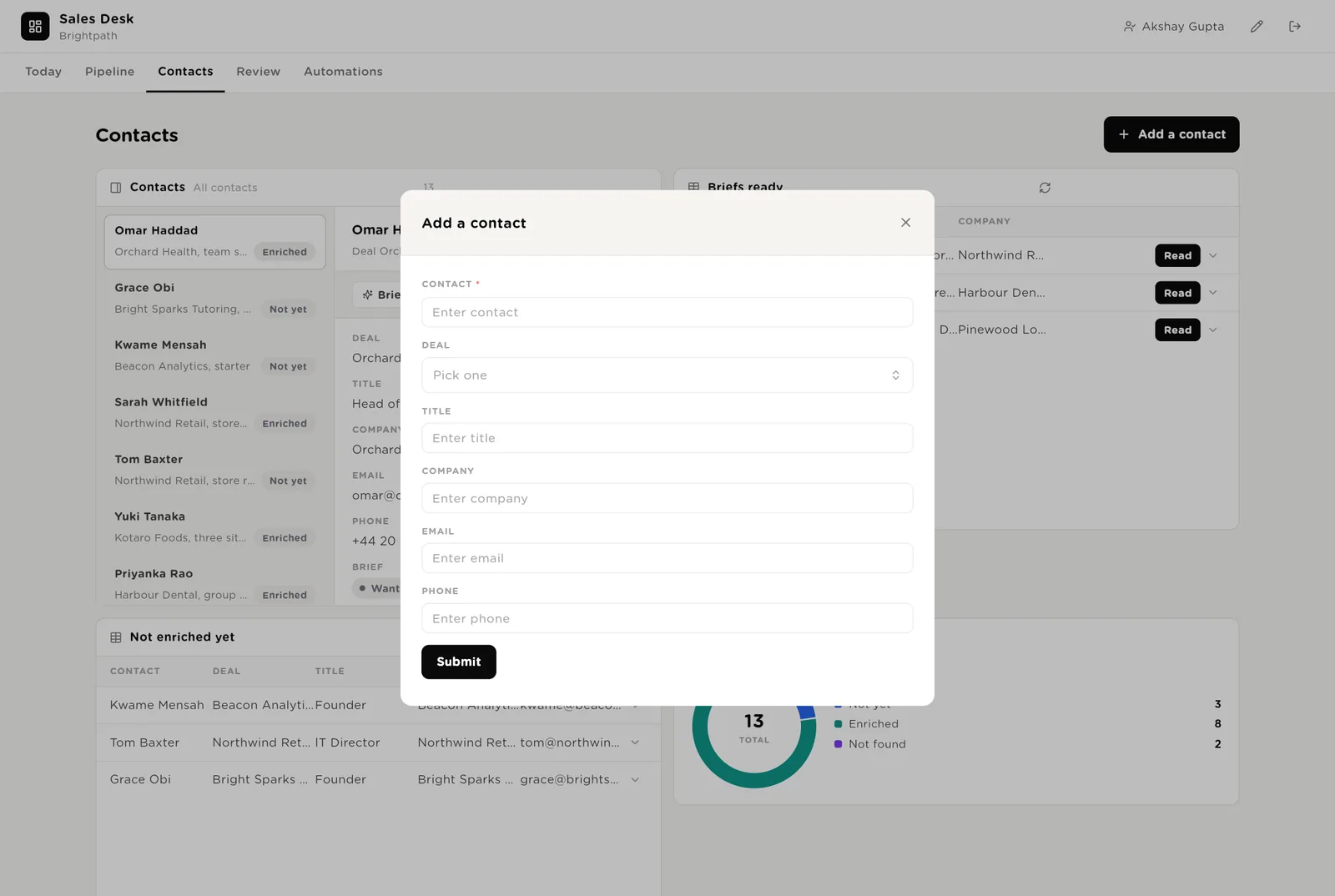
Opens a short form. Name, deal, title, company, email, phone. The enricher fills in what you left blank.
Every Friday review with the numbers and the three decisions, waiting to be read. The pipeline by risk. Sequences flagged because the deal was lost. Every nudge and every recent call.
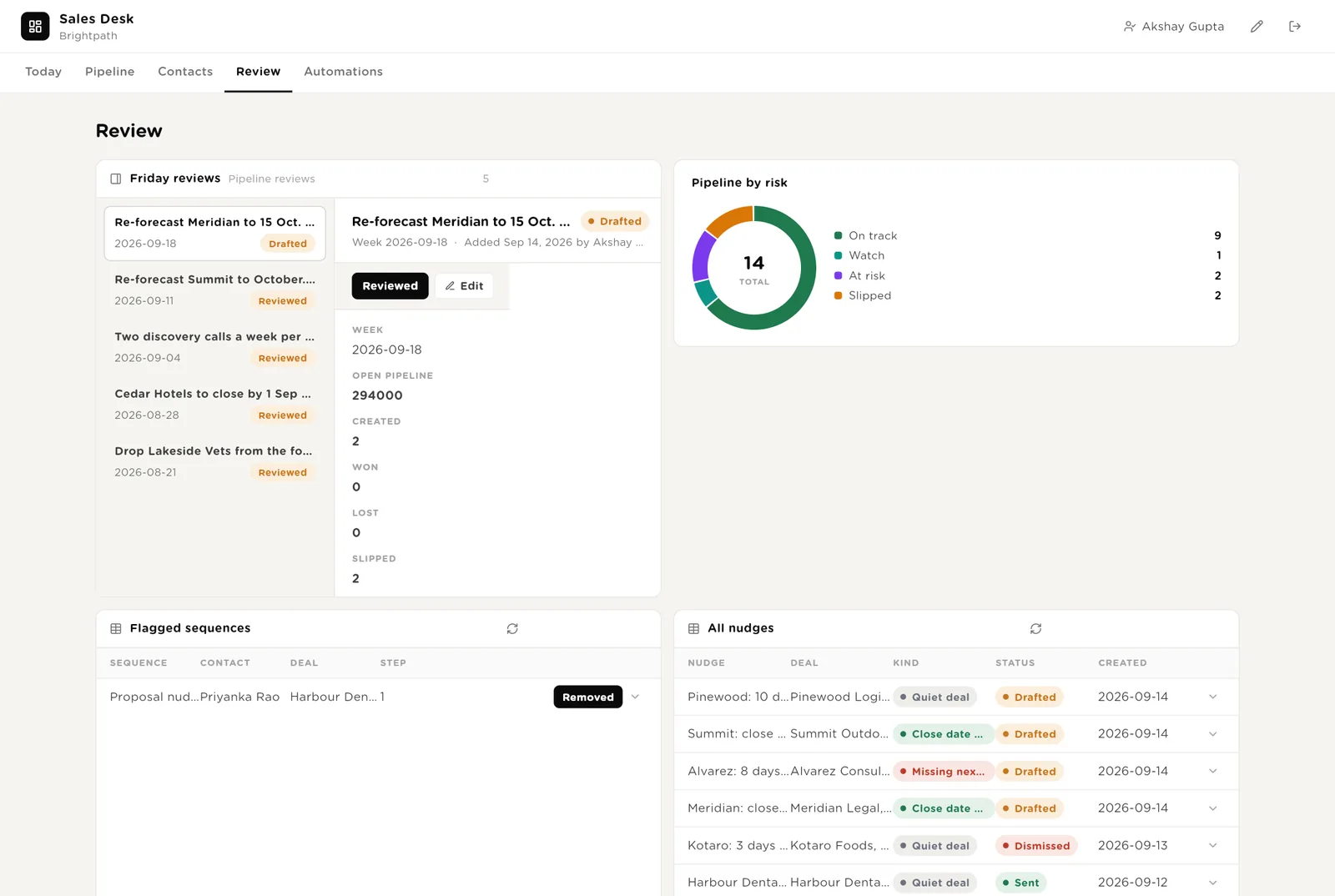
You read the review and the decisions are agreed. Click Reviewed; the row is the record of what Monday's meeting decided.
A contact was flagged because the deal was lost. You removed them from the sequence in the sequencer; click Removed.
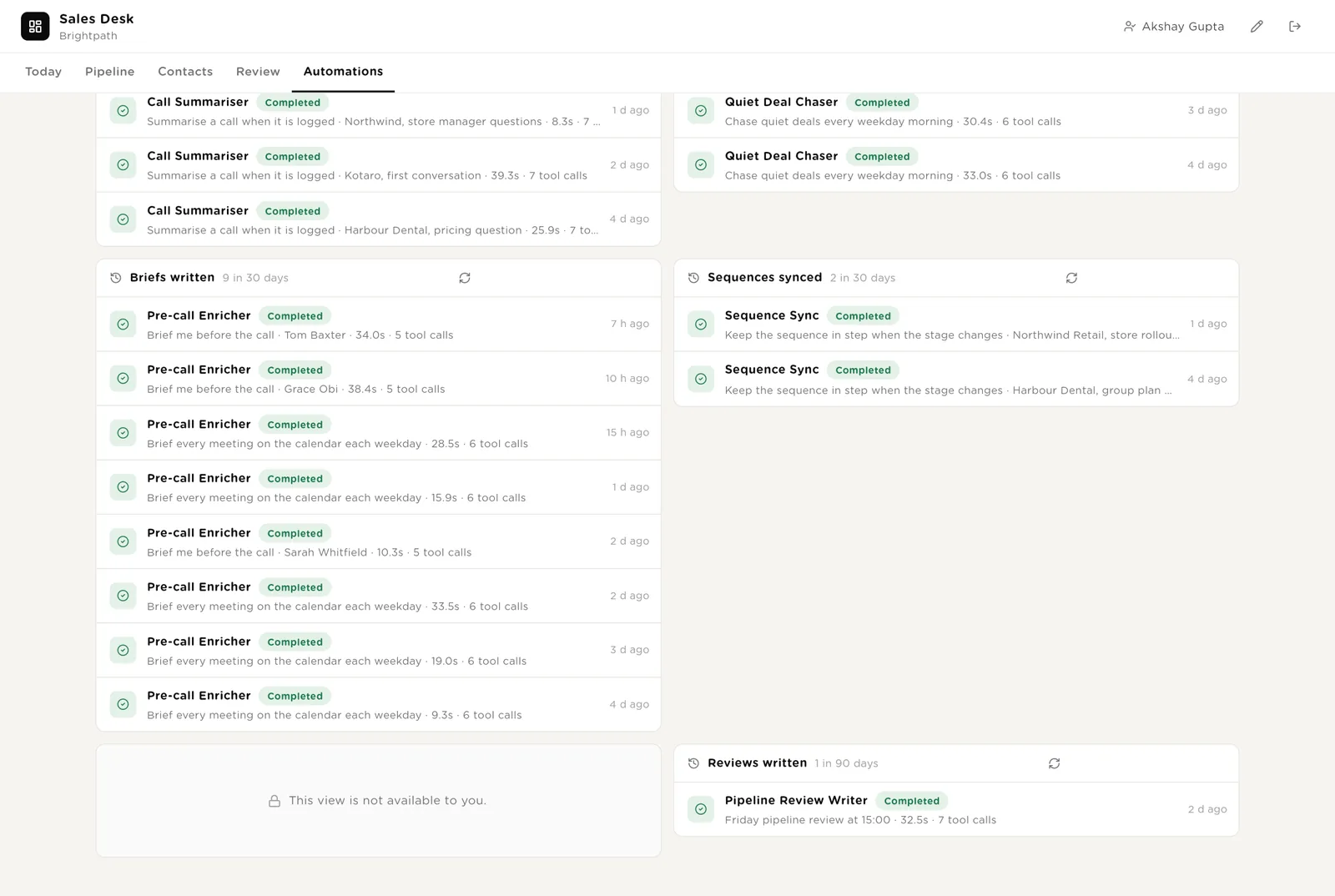
Every automation with its switch. The pack's guard rails. The record of calls summarised, quiet deals chased, briefs written and sequences synced.
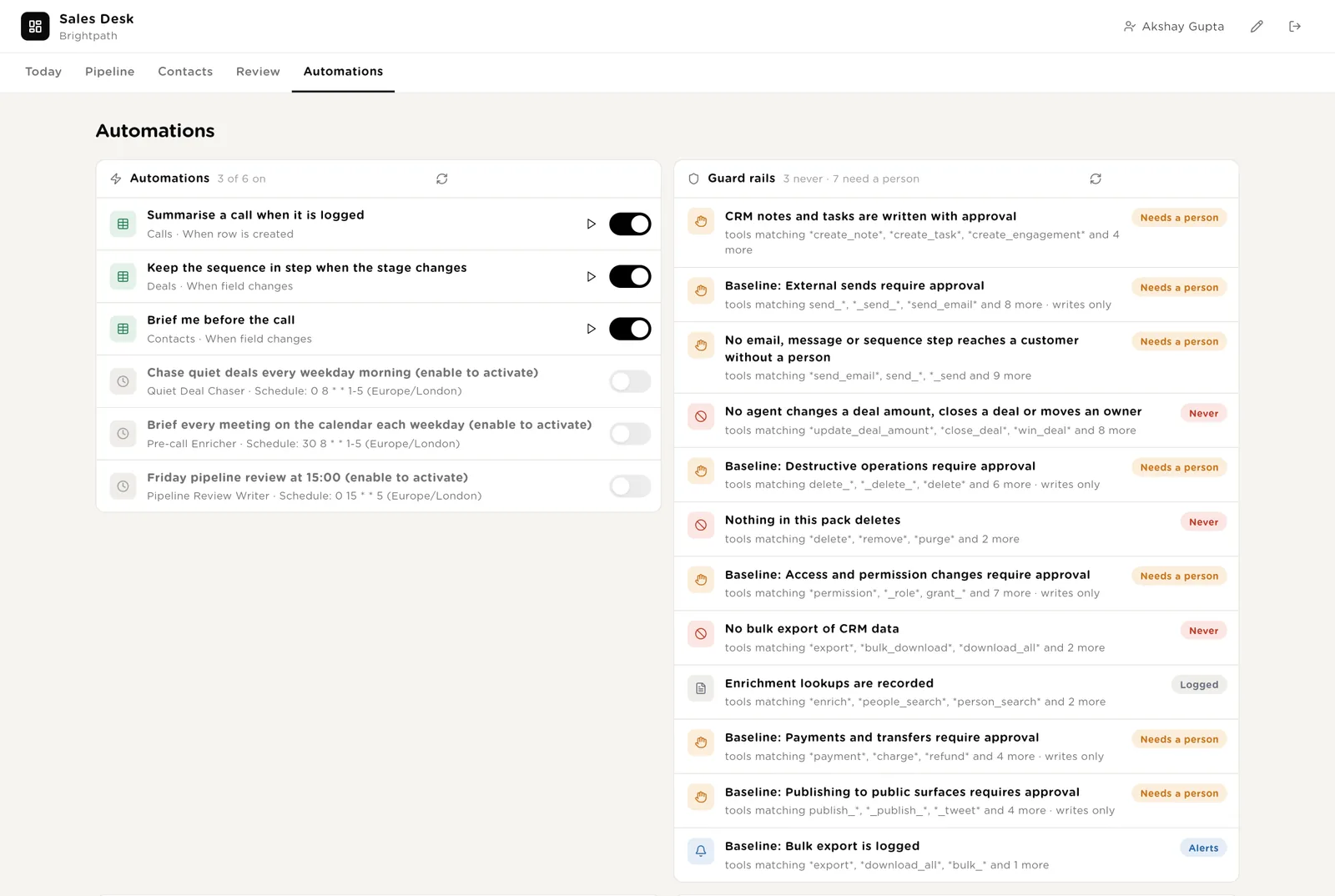
Every brief, every sequence sync and every Friday review the desk ran, and the reviews themselves.
Log a call when it ends; the summariser writes it up within a minute. Add a contact when you meet someone new; the enricher fills in the rest before your next call.
Ari is a software colleague you can chat with. Ari runs the morning list, knows which agent to use for what, reads the tables and the calendar, and never touches a deal.
Every morning: the calls not yet in the CRM, the deals at risk or slipped, the deals with no next step, the meetings today with no brief, the nudges drafted but not sent. One short list, oldest first, with the owner. Tools: the CRM, the call notes tool, the calendar, the phone tool, Turtle Notify.
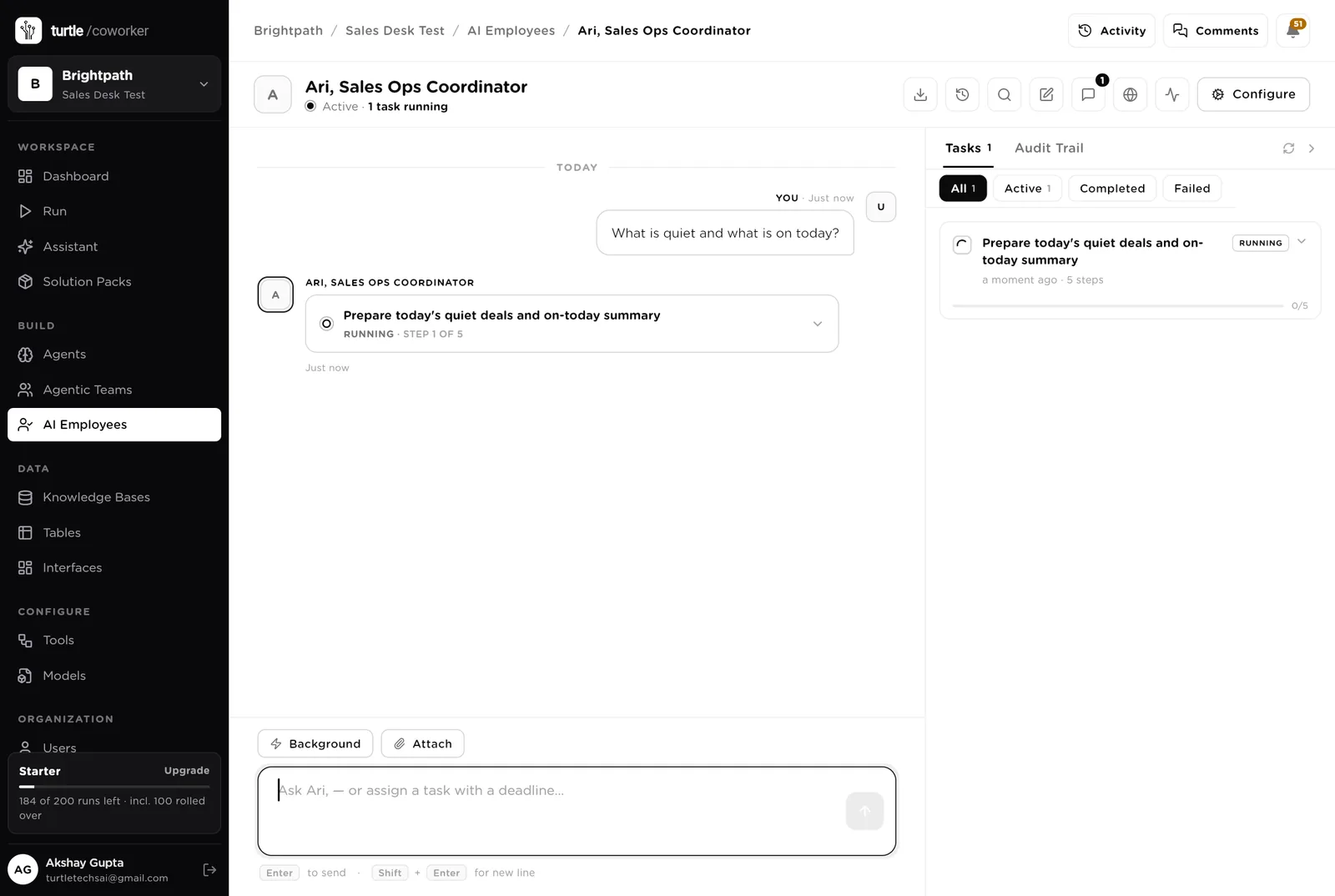
You typed a question. Ari turned it into a five-step task that reads the tables (calls to write up, quiet deals, briefs ready, nudges, open deals) and is running it in front of you, step by step. Reading needs no approval; anything that would write to the CRM or message a customer would stop and ask.
An agent does one job. It starts on a schedule, when a row is logged, when you press a button, or when Ari asks it. It reads your tools and your playbook, writes its result into the record, and stops. No agent ever changes a deal.
When a call is logged it reads the transcript from the call notes tool and the call record from the phone tool, and writes three lines of summary, the objections in the customer's words, and the next steps each with a date and an owner. It puts the next step on the deal, drafts the CRM note and the follow-up task (both wait for your Approve), and drafts the follow-up email for you to send.
Every weekday at 08:00 it reads every open deal and its recent activity from the CRM, updates how long each has been quiet and its risk, and for anything quiet for seven days, past its close date or without a next step it drafts a nudge to the owner and a two-sentence touch to the customer. The owner gets the nudge by email; the customer touch waits for the rep to send.
Every weekday at 08:30 it reads today's calendar and, for every meeting with someone outside the company, looks the person and the company up in the enrichment tool, reads the last conversation, and writes the one-page brief: the company in two lines, the role and any recent change, what was promised last time, the deal and its next step, two questions to ask. The Brief me button does the same for one contact.
The tidy-up and the write-up that get skipped when the week is busy.
When a deal changes stage it finds every contact on that deal who is in a sequence. If the deal reached Meeting, Won or Lost, it pauses the sequence in the sequencer (behind your Approve) so nobody gets a "just checking in" email the day after they booked a demo. If the deal is Lost it flags the contact for the owner to remove. Never adds anyone to a sequence, never sends a step.
Every Friday at 15:00 it counts the open pipeline by stage, the deals created, won, lost and slipped this week, finds the reason for each slipped deal in its calls and notes, writes three decisions for Monday with owners, creates the review row and emails the sales manager.
The help desk is an internal chat. It says where a deal stands, who last spoke to a contact and what was promised, which sequences are paused and why, and what the playbook says about a stage or a nudge. It reads the tables and the playbook and never changes anything.
A router sends the question to a deal status specialist (reads the deals, calls, contacts, nudges and sequences) or a playbook specialist (reads the playbook).
Tables are where everything is stored. They look like spreadsheets and your team can open and edit them. The CRM, the call notes tool, the sequencer and the calendar stay the record; the desk holds the queue, the drafts and the briefs.
| Table | What is in it | Stages |
|---|---|---|
| Deals | Every open deal with its stage, amount, close date, days quiet, risk and next step. | Prospecting → Qualified → Meeting → Proposal → Negotiation → Won · Lost |
| Contacts | The people on each deal, whether they have been enriched, and the pre-call brief. | Not yet → Enriched · Not found; brief Not needed → Wanted → Ready |
| Calls | Every call with the summary, the objections, the next steps and whether the CRM note is written. | Logged → Summarised → In CRM · Edit needed |
| Sequence Runs | Every contact in a sequence, the step they are on, and the stage the deal was in when it started. | Active → Paused · Finished · Flagged |
| Nudges | Every quiet deal, missing next step or passed close date, with the nudge and the customer touch drafted. | Drafted → Sent → Done · Dismissed |
| Pipeline Reviews | One row per week: the numbers and the three decisions. | Drafted → Reviewed |
The software knows nothing about how your team sells except what the tables and your playbook tell it.
One document: what each stage means, when a deal counts as quiet, how a call note is laid out, what a nudge sounds like, how a brief is written, when a sequence pauses, how the Friday review is laid out. Every agent and the help desk read it. Replace the starter text with your own.
The pack uses whichever AI model your company has already connected. Other vendors of the same kind swap in at install time without changing the desk; a team on Pipedrive, Gong and lemlist gets the same desk.
Checks on arrival are on from day one. The schedules are off until you switch them on from the desk.
| Automation | Agent | When | Ships |
|---|---|---|---|
| Summarise a call | Call Summariser | The moment a call is logged | On |
| Keep the sequence in step | Sequence Sync | The moment a deal changes stage | On |
| Brief me | Pre-call Enricher | When you press Brief me on a contact | On |
| Chase quiet deals | Quiet Deal Chaser | Weekdays 08:00 | Off until you switch it on |
| Brief every meeting on the calendar | Pre-call Enricher | Weekdays 08:30 | Off until you switch it on |
| Friday pipeline review | Pipeline Review Writer | Friday 15:00 | Off until you switch it on |
Buttons on the desk run agents too. "Summarise again" runs the summariser on one call; "Sync sequence" runs the sequence check on one deal.
Three things always need a person. The software stops and waits at each one.
Written to CRM, Sent, Back on track, Reviewed, Removed, and dragging a deal to a new stage. Only a person presses them. The software can say a deal is quiet; it cannot move it. It can draft the touch; it cannot send it.
If an agent or Ari tries to write a note or a task into the CRM, or pause a sequence, it stops. The exact call appears in Approvals. You read it and click Approve or Deny. Changing an amount, setting Won or Lost, changing an owner, emailing a customer and exporting data are refused outright, from every agent.
When you give Ari a task, Ari shows what it will do first. Approve and run, change it, or cancel.
A rule is checked before every single thing the software tries to do. The pack installs six rules of its own on top of the standard ones every workspace starts with.
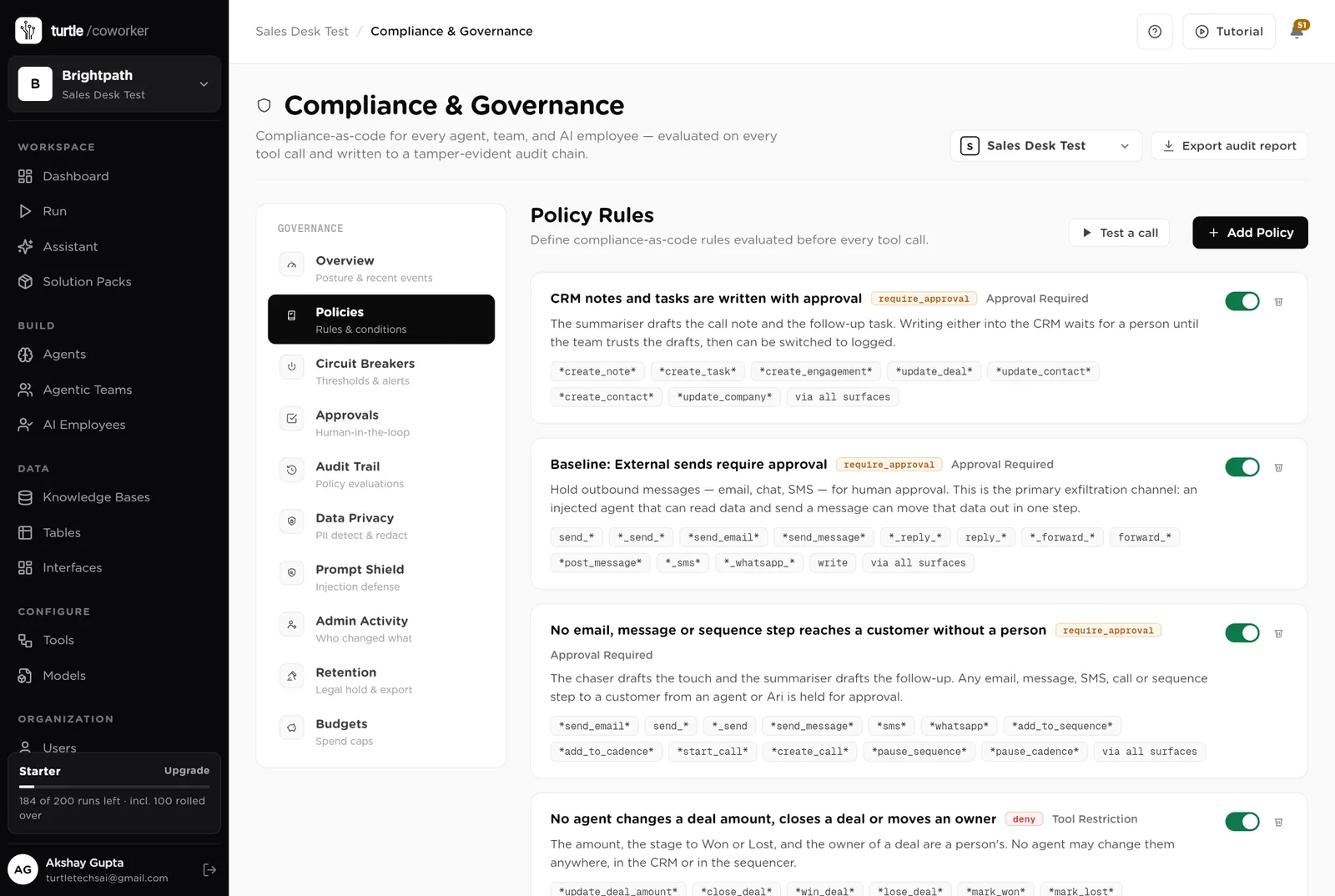
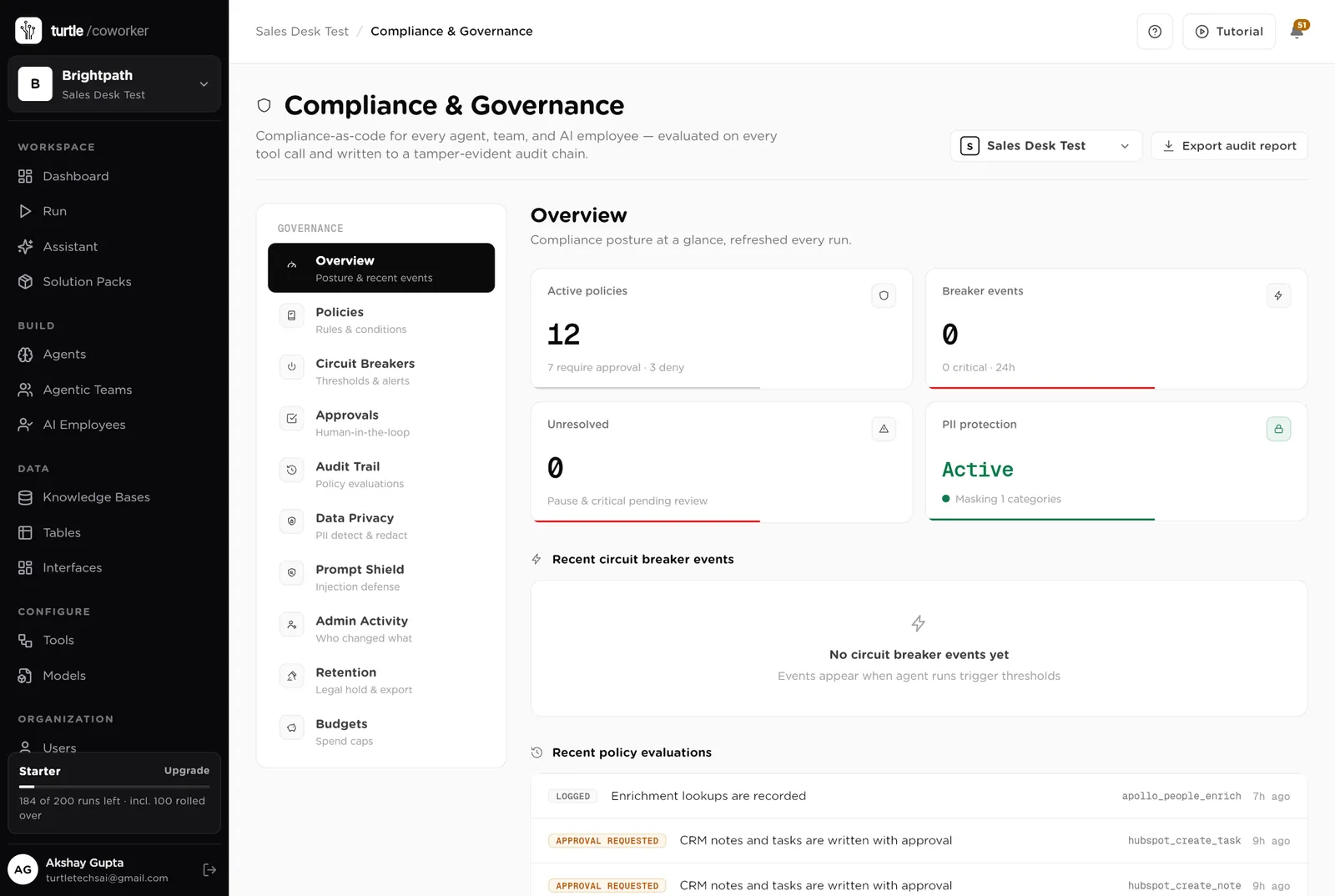
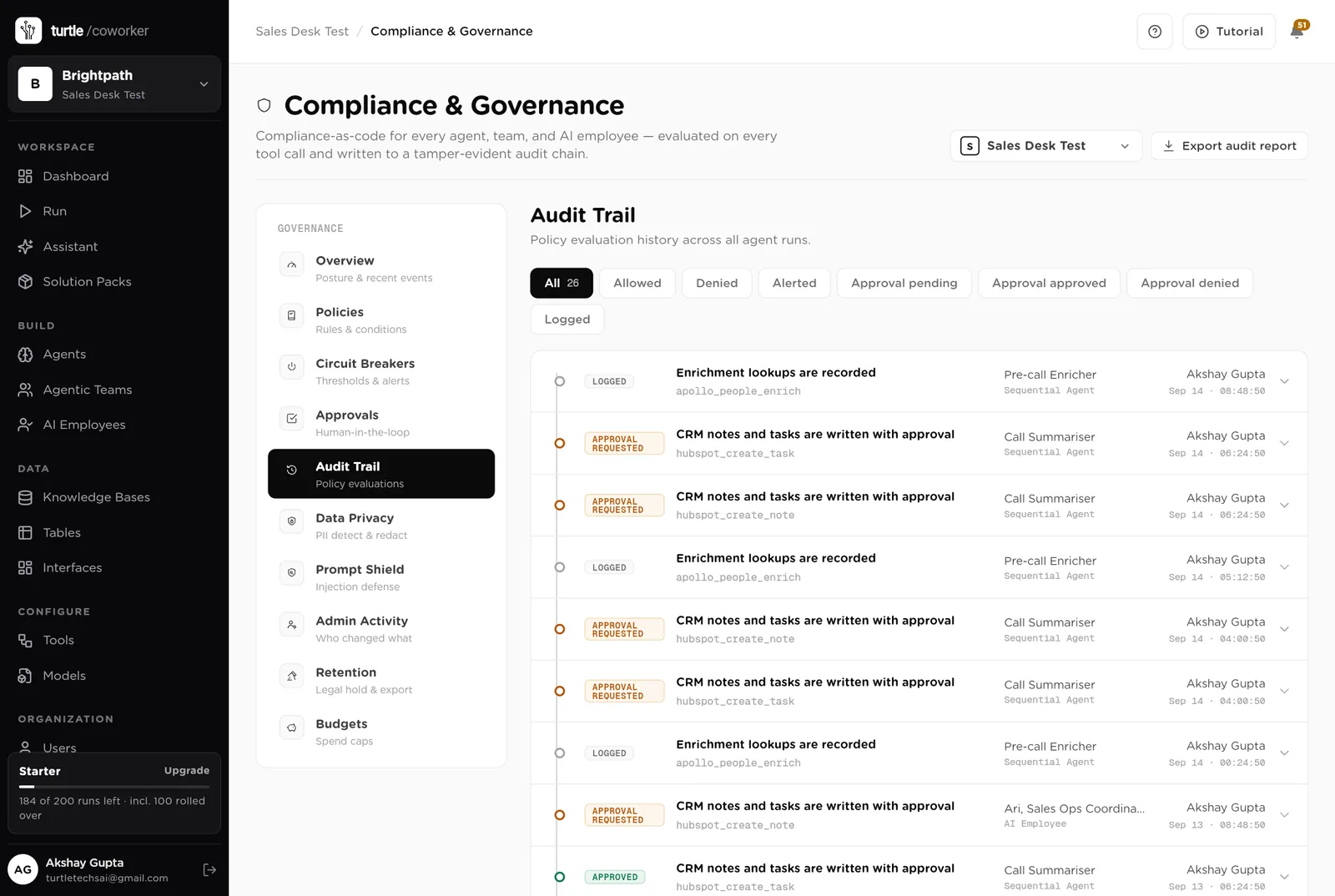
For every run you can see which agent ran, why it ran, every step it took, and every rule that checked it. Passwords and card numbers are blanked out before anything is stored.
A monthly budget with a warning level and a hard stop for the software's own usage.
Agents read transcripts and CRM notes to write summaries and briefs; nothing is exported, and nothing is sent to a customer without a person.
Who drafted it, what the transcript said, who approved it, when. The audit trail and the Calls table say the same thing.
The desk is shared with the team. Only owners and admins change the layout.
These estimates assume ten reps, about 60 calls a week, 40 open deals, 15 outside meetings a week and a Friday review. "Before" is the time by hand; "after" is the reading and deciding that is left. Your numbers will differ. These are estimates, not measurements; after a month the audit trail gives you real figures.
| Job | Assumption | Hours before | Hours after | What changes |
|---|---|---|---|---|
| Writing calls into the CRM | 12 min each, 60 a week | 12.0 | 3.0 | Summarised with next steps; you approve the note. |
| Finding and chasing quiet deals | 30 min a day for the manager | 2.5 | 0.5 | Listed every morning with the nudge drafted; you send. |
| Preparing for a call | 15 min each, 15 a week | 3.8 | 1.0 | The brief is written before you sit down; you read it. |
| Pausing sequences when a deal moves | 1 h a week | 1.0 | 0.2 | Paused on the stage change; you approve. |
| The Friday review | 2 h a week for the manager | 2.0 | 0.5 | Written and emailed every Friday at 15:00. |
| Answering "where is that deal" | 2 h a week | 2.0 | 0.5 | The helpdesk answers from the tables. |
| Total per week | 23.3 | 5.7 | About 17 hours a week back across the team and the manager, and no deal waits until someone happens to remember it. |
The call that used to be a scribbled note is a summary with dated next steps on the deal, within a minute.
The deal that sat for three weeks now gets a nudge on day seven, every time, with the touch already drafted.
The numbers, the slipped deals with reasons and three decisions are in the manager's inbox at 15:00.
Estimates, not measurements. After a month the audit trail gives you real figures.
Installing takes one click. The real work is the playbook and the first week of calls.
Install the pack from the Solution Packs page. Connect the CRM, the call notes tool and the calendar when asked; the sequencer, the enrichment tool and the phone tool if you use them.
Replace the starter text with your stage definitions, your quiet rule, your call note format and your Friday review layout.
Add your open deals to the Deals table, or let the chaser read them from the CRM on its first run.
Log calls through the desk and approve the notes. Switch on the quiet deal chaser.
Switch on the morning briefs and the Friday review, and move the CRM writes rule to logged once the notes are trusted.
You pay for the platform, not per desk. The plan sets how many agents, employees and workspaces you can run; every desk is included, and runs are billed on your own model key at cost. 5 agents in this desk count against the plan's agent limit.
See plansFor marketing teams of 1 to 10 people running email, forms, search and a little paid media
Sales and marketingFor founders and small marketing teams publishing in the founder's name
Sales and marketingFor founders and small sales teams handling inbound leads
We use analytics cookies to see which pages help and which don’t. Nothing loads until you choose. Cookie Policy

Hello there.
AI agent. It can make mistakes, and a human reviews anything that matters.